What is Crypto Static
Crypto Static enables users to initiate deposit and withdrawal transactions for cryptocurrencies that aren’t currently supported by existing payment gateway providers. I. Deposit (Player Page) If a player chooses a currency from the currency dropdown that isn’t supported by the current payment gateway providers, they will see a specific QR code and wallet address for Crypto Static payments. Additionally, the interface will display the Amount text field and the Hash ID text field.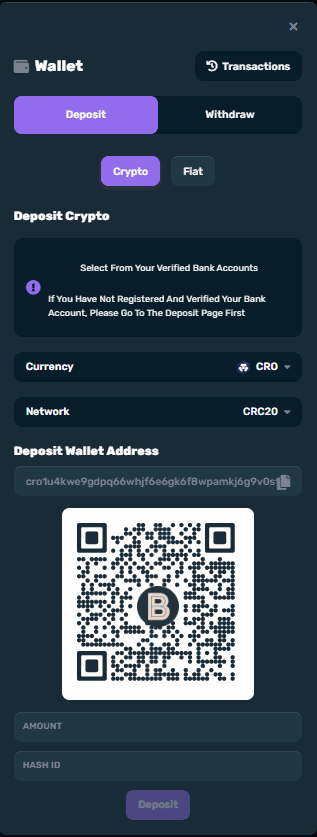 Hash ID will be provided by the player once QR code has been scanned. Once all fields are filled in, the Deposit button will now be enabled.
A pop-up notification will appear once request is successful. Otherwise, an error pop-up will.
“Deposit request successfully received. Please allow n hours for audit checking. Thank you for your patience. Kindly check Transactions [link] page for additional details.”
Backoffice Deposit Request
In the backoffice, click the eye icon of the transaction made. ‘Confirmed’ will both appear in the Deposit Request in the BO as well as the deposit transactions page in the player page.
Hash ID will be provided by the player once QR code has been scanned. Once all fields are filled in, the Deposit button will now be enabled.
A pop-up notification will appear once request is successful. Otherwise, an error pop-up will.
“Deposit request successfully received. Please allow n hours for audit checking. Thank you for your patience. Kindly check Transactions [link] page for additional details.”
Backoffice Deposit Request
In the backoffice, click the eye icon of the transaction made. ‘Confirmed’ will both appear in the Deposit Request in the BO as well as the deposit transactions page in the player page.
 Deposit Request Info
Transaction Details (Eye Icon) will contain the following details:
Deposit Request Info
Transaction Details (Eye Icon) will contain the following details:
Since this is a manual transaction, other labels such as retry, account name, and provider transaction ID will appear as N/A since they are processed and controlled by the backoffice user.
When processing, if the backoffice user does not input an amount, the Amount Requested will automatically placed in Amount Received. Amount Received only accepts numeric characters and a decimal point.
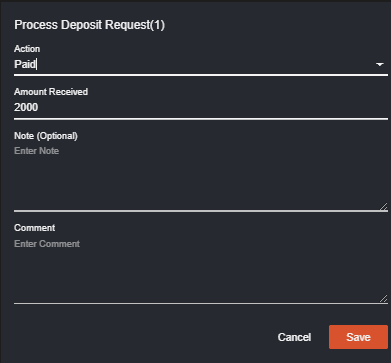 If user inputs an amount not equal to the Amount Requested, a warning prompt will appear upon saving.
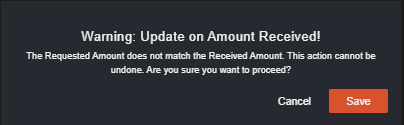 Note that if the BO user designates a transaction as Paid but fails to enter an amount in the Amount Received field, especially when the Amount Requested doesn’t match the Amount Received, the player will only receive credit for the initially requested amount. In instances of user error, a manual adjustment becomes necessary.
II. Withdrawal (Player Page)
No changes are expected on the Transactions Withdrawal page except for the statuses applicable to Crypto Static transactions.
Backoffice Withdrawal Request
Once the player requested the withdrawal, the status in the BO will be ‘New’ then when ‘Approved’, the operator can now proceed with ‘Paid/Rejected’.
In the backoffice, click the eye icon to view the details of the transaction of the player.
Note that if the BO user designates a transaction as Paid but fails to enter an amount in the Amount Received field, especially when the Amount Requested doesn’t match the Amount Received, the player will only receive credit for the initially requested amount. In instances of user error, a manual adjustment becomes necessary.
II. Withdrawal (Player Page)
No changes are expected on the Transactions Withdrawal page except for the statuses applicable to Crypto Static transactions.
Backoffice Withdrawal Request
Once the player requested the withdrawal, the status in the BO will be ‘New’ then when ‘Approved’, the operator can now proceed with ‘Paid/Rejected’.
In the backoffice, click the eye icon to view the details of the transaction of the player.
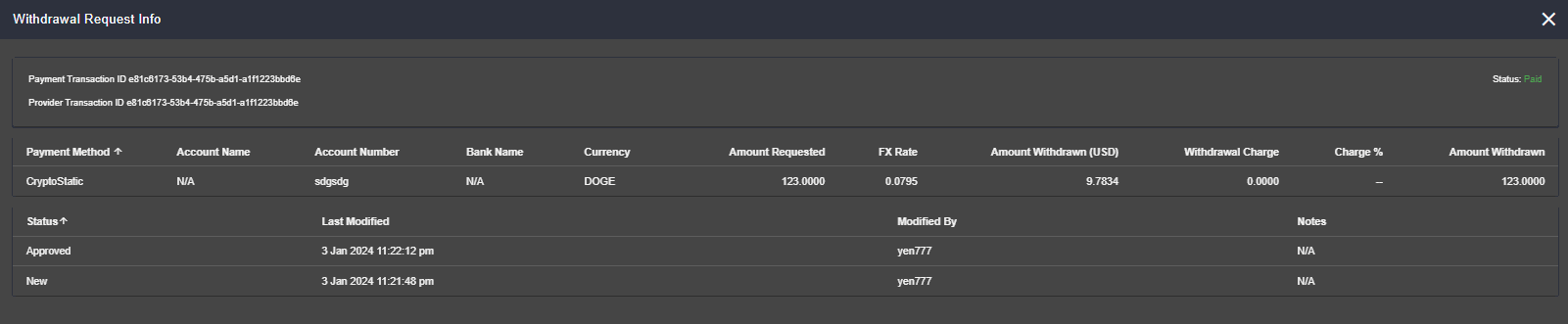
Given that this is a manual transaction, labels like bank name, account name, and provider transaction ID will be displayed as N/A, as they are managed and controlled by the backoffice user during processing.
Backoffice Player Reports
If a player uses Crypto Static for Deposit, transactions should be visible in the player reports too. Withdrawal requested using Cryptostatic will appear as ManualWithdrawal in transactions.
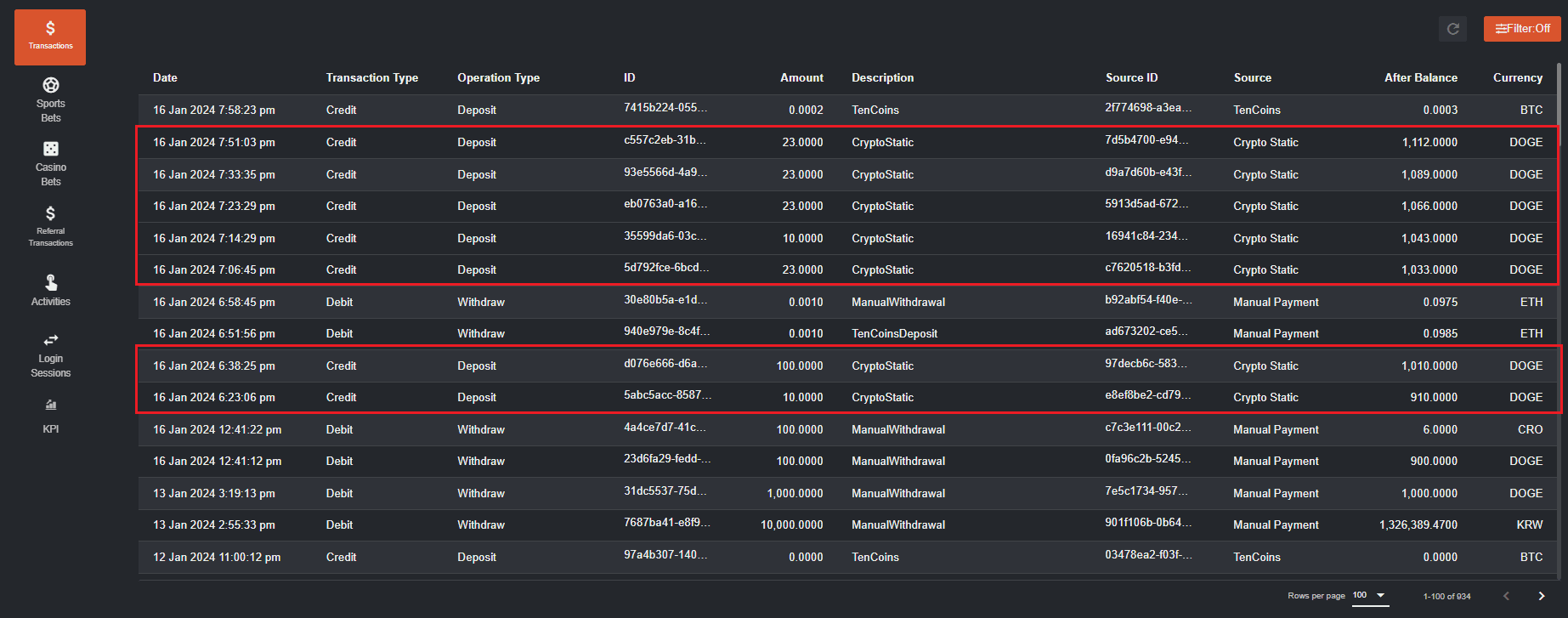 Player Management > Verification
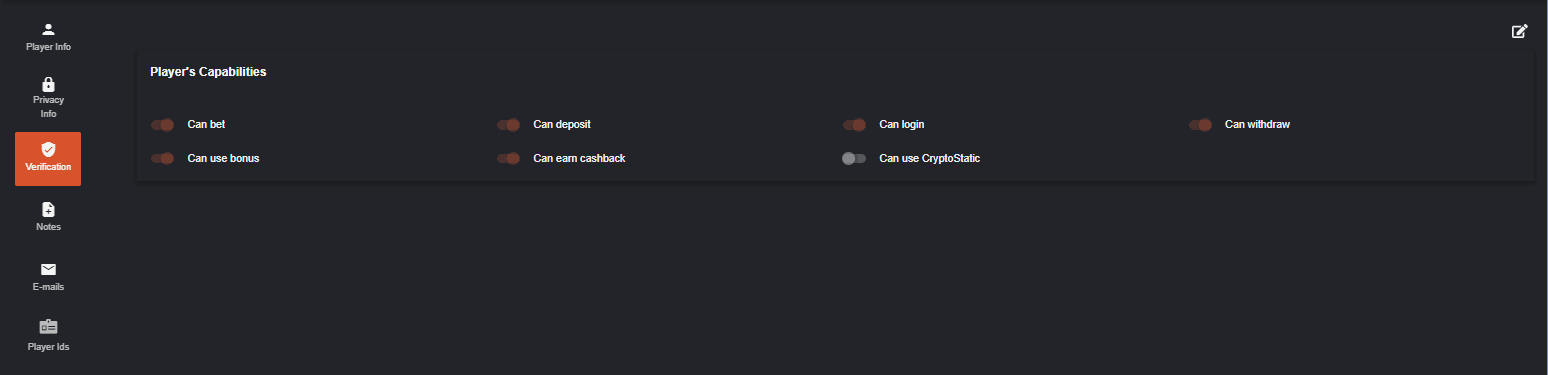
The back office user can enable or disable the player’s capability in using crypto static. Note that if this is disabled, the player cannot make a deposit using Cryptostatic.
Player Management > Verification
The back office user can enable or disable the player’s capability in using crypto static. Note that if this is disabled, the player cannot make a deposit using Cryptostatic.