Introduction to VIP Program
A VIP Program is a loyalty program that is created to retain and reward high-value or new customers. Through this, you get exclusive benefits like bonus, early access to product launches, and personalized deals. All of which contribute to enhance customer satisfaction, make loyal customers feel valued and keep coming back for more. Eligibility All active players are eligible to be part of the VIP Program. Tiered System VIP Program has a tiered system where players can level up based on their spending. Once activity requirements is met, the higher the chances to level up. The more exp (XP) earned, the higher the tier. Activity The main activity that the player will be able to generate points to level up in the program is through:- Bet Placement (wager) – by simply placing a bet (real money), regardless of the outcome, will allow the player to generate points. This is only applicable to settled bets for both Sports and Casino. Points system will be generated by the Operators in which bet amount is equals to number of points. Note that Sports and Casino has its own exchange rate.
How to Set Up VIP
Here is the guide to help the backoffice user set up VIP Program. The backoffice user must have the permission to modify the VIP Program. To navigate, go to Settings > User Management > Select the User > Edit Individual Permissions. In the User Management, if Not Permitted is chosen, the backoffice user is forbidden from viewing the module. VIP Permitted means that the backoffice user has a viewing access while VIP Can Modify indicates that the backoffice user has a full access (to view and modify).
The back office user can decide which player can earn the VIP cash rebate and/or level up bonus. These can be activated in the player’s capabilities after selecting a specific player.
In the User Management, if Not Permitted is chosen, the backoffice user is forbidden from viewing the module. VIP Permitted means that the backoffice user has a viewing access while VIP Can Modify indicates that the backoffice user has a full access (to view and modify).
The back office user can decide which player can earn the VIP cash rebate and/or level up bonus. These can be activated in the player’s capabilities after selecting a specific player.
 Can earn VIP cash rebate ON - the player will be able to earn a VIP cash rebate.
Can earn VIP cash rebate OFF - the player will not be earn a VIP rebate on the next disbursement period.
Can earn VIP level up bonus ON - the player will be able to earn a level-up bonus.
Can earn VIP level up bonus OFF- the player will not be able to earn a level-up bonus effective immediately.
To start with VIP Program, go to CHARM then select VIP.
I. VIP Settings
a. When all settings are toggled ON, the VIP details are available in the player’s menu. This means that the players will earn and receive a Level Up Bonus, Cash Rebate, and/or Rakeback after they were disbursed in the backoffice.
Can earn VIP cash rebate ON - the player will be able to earn a VIP cash rebate.
Can earn VIP cash rebate OFF - the player will not be earn a VIP rebate on the next disbursement period.
Can earn VIP level up bonus ON - the player will be able to earn a level-up bonus.
Can earn VIP level up bonus OFF- the player will not be able to earn a level-up bonus effective immediately.
To start with VIP Program, go to CHARM then select VIP.
I. VIP Settings
a. When all settings are toggled ON, the VIP details are available in the player’s menu. This means that the players will earn and receive a Level Up Bonus, Cash Rebate, and/or Rakeback after they were disbursed in the backoffice.
 b. When toggled OFF, the VIP button will not be available in the Player Menu.
 c. When L_evel Up Bonus_, Cash Rebate, and/or Rakeback are toggled OFF, VIP Tier Details are removed for Level Up Bonus, Cash Rebate, and/or Rakeback. This means that players will not be able to earn and receive a Level Up Bonus, Cash Rebate, and/or Rakeback.
II. Tier Settings
c. When L_evel Up Bonus_, Cash Rebate, and/or Rakeback are toggled OFF, VIP Tier Details are removed for Level Up Bonus, Cash Rebate, and/or Rakeback. This means that players will not be able to earn and receive a Level Up Bonus, Cash Rebate, and/or Rakeback.
II. Tier SettingsBelow are samples of Tiers and how they appear in the backoffice.
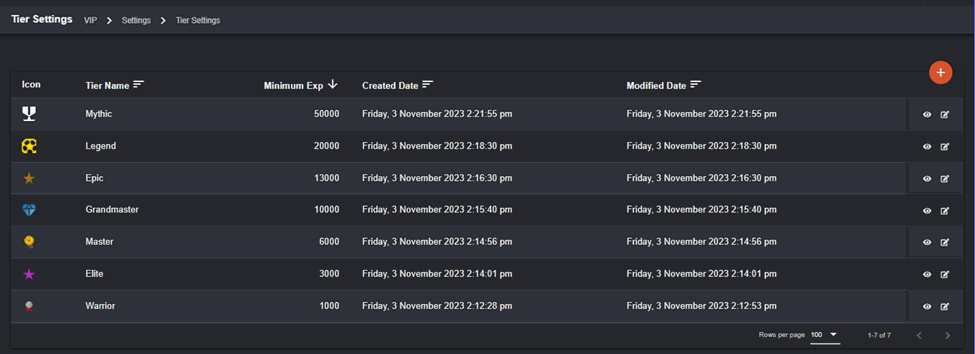 Icon – the image the players will see as a representation of the tier.
Tier Name – refers to the name of the tier which indicates the player level.
Minimum Exp – refers to the point-requirement the players need to meet to achieve the tier or level up.
Created Date – tier creation date.
Modified Date – date when the tier is last updated. Click the eye icon to view the details of each Tier. To make changes to the tier, you may click the pencil icon.
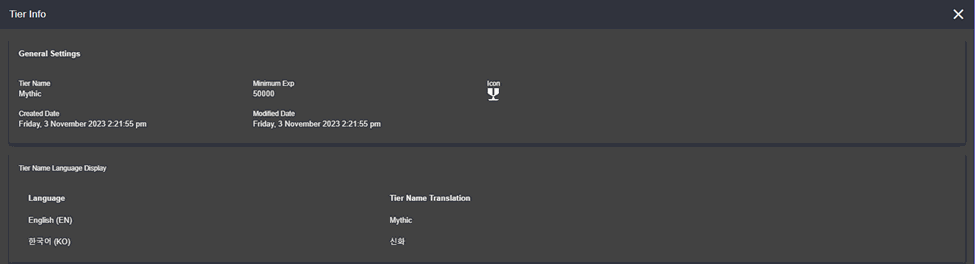
 This is what will appear when you click the eye icon.
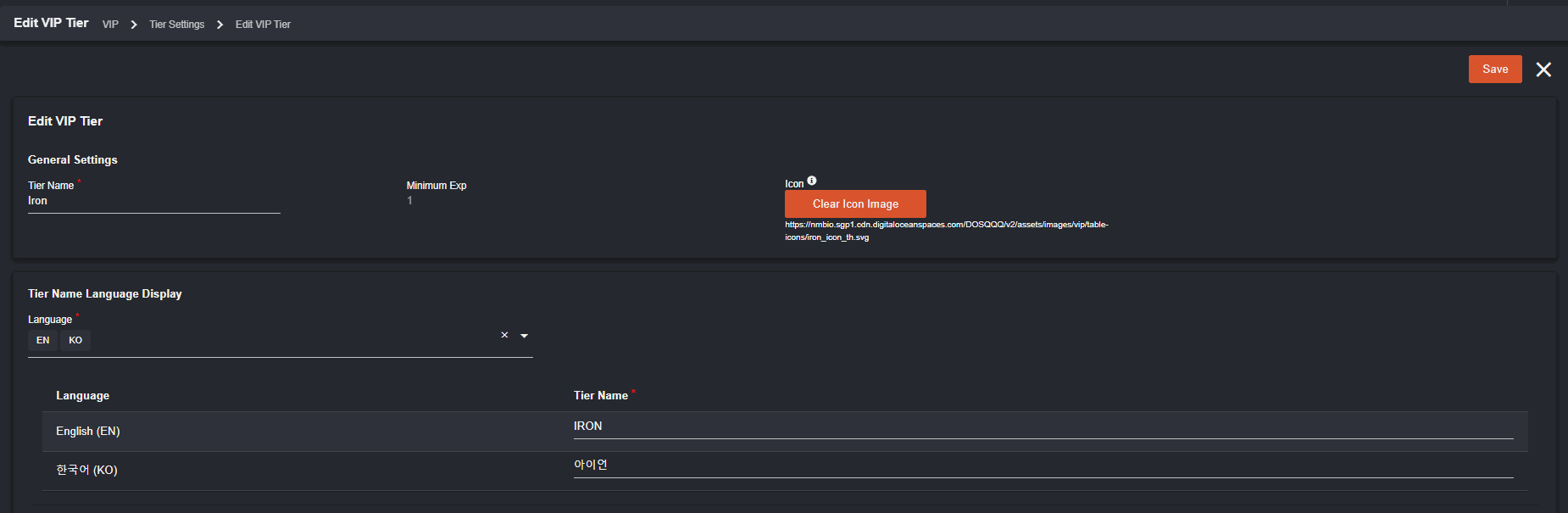
 When edit icon is clicked, this will appear. You can edit all the details except for Minimum Exp.
 To create a New VIP Tier, click the orange plus icon.
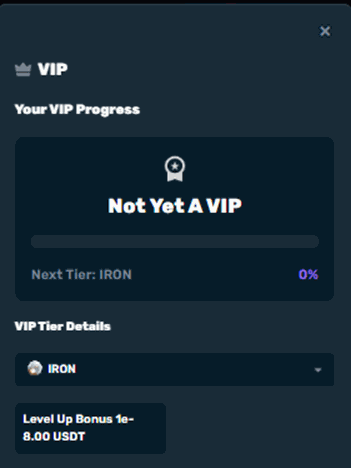
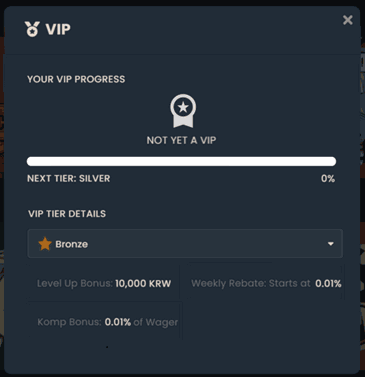
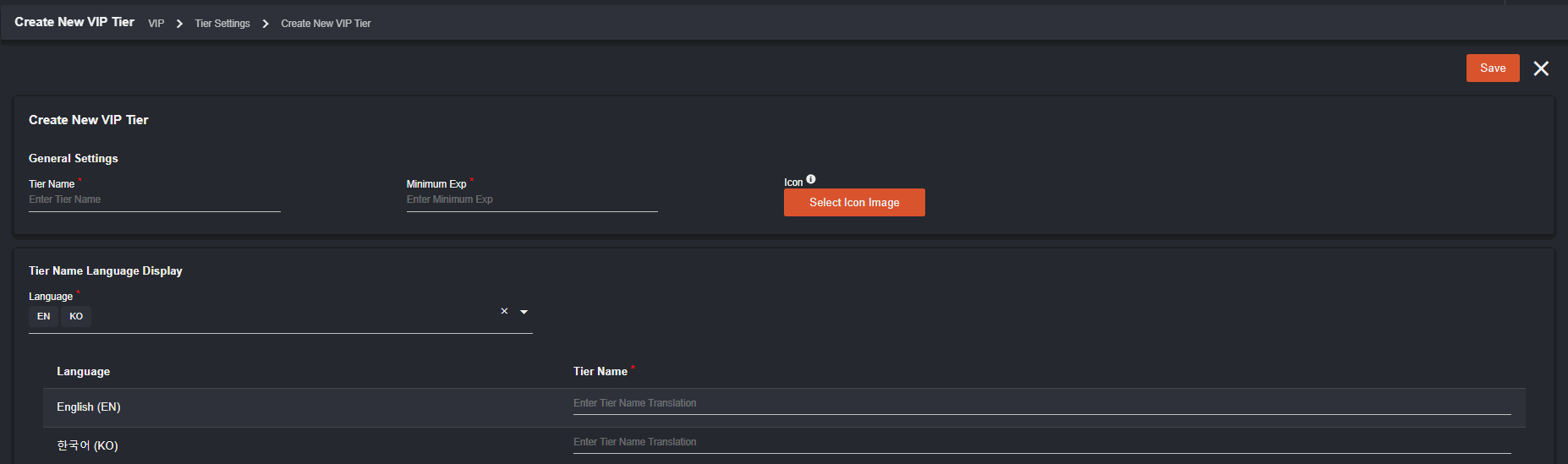 Once set up, VIP Tier created will appear in the VIP Pop-up in player page. Tier will update according to the exp reached by the players. This indicates that the progress bar will increase relative to the set exp until the next tier level. Players with no exp will see a default icon which will show a tier name of “Not yet a VIP.”
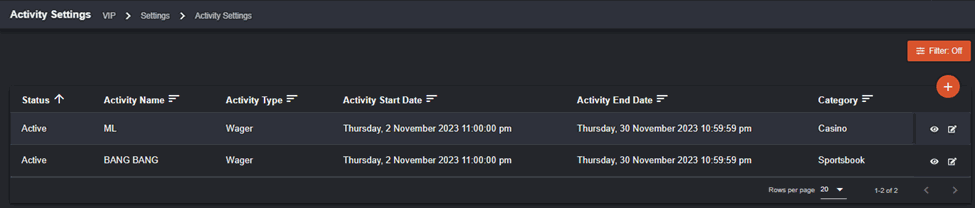
 III. Activity Settings
This will show all the activities made in categories (Sportsbook or Casino).
III. Activity Settings
This will show all the activities made in categories (Sportsbook or Casino).
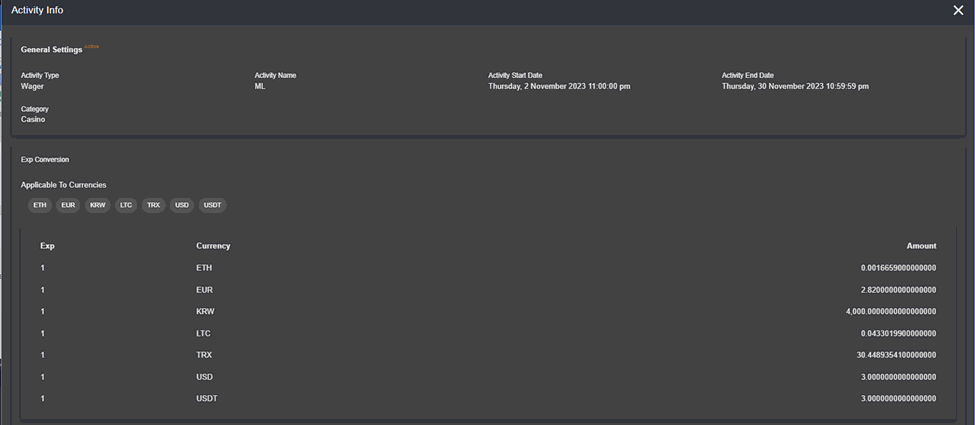
 You can click the eye icon to see more details about the Activity. You can see the corresponding amount of exp in each currency that is set by the operator.
 Only Active and Scheduled activities can be edited. Only Activity Name, Exp Conversion, and Amount can be edited in each category.
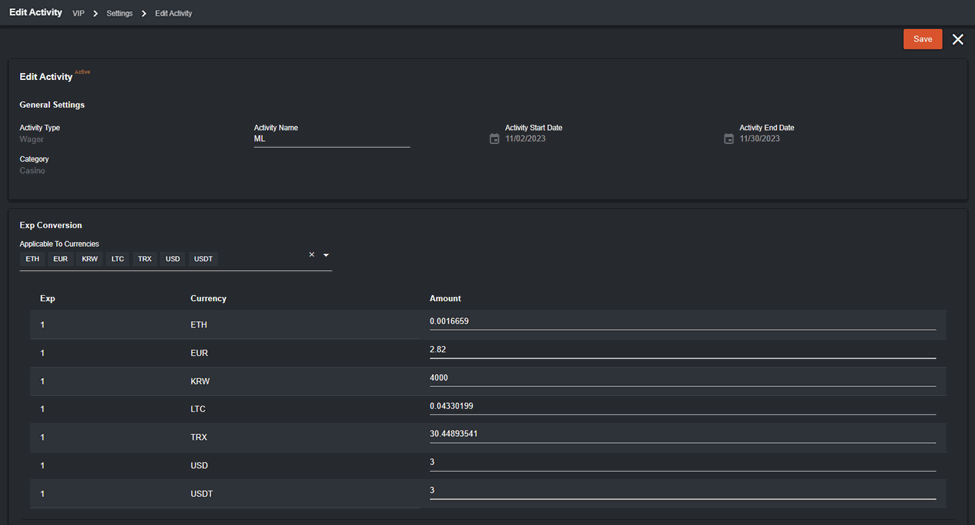 Note that players will receive an equivalent exp for the wager amount configured if currency used is also available.
**_ If you remove 1 EXP = 50 USD in the backoffice, the logged in player will immediately stop receiving EXP for USD wager activity._
Click the plus icon
Note that players will receive an equivalent exp for the wager amount configured if currency used is also available.
**_ If you remove 1 EXP = 50 USD in the backoffice, the logged in player will immediately stop receiving EXP for USD wager activity._
Click the plus icon  to create a new activity. Make sure to fill all the fields.
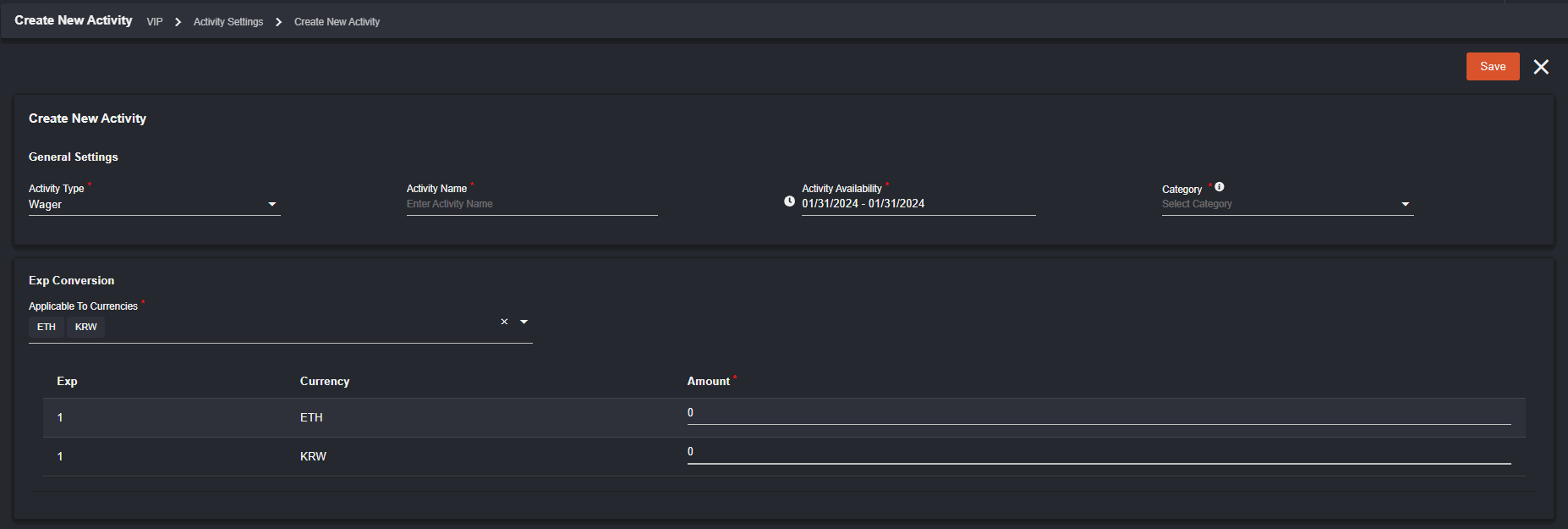 Guidelines in creating a New Activity:
- Activity Type is only for Wager.
- Category can be Sportsbook or Casino.
- Operator can set the Activity to multiple currencies.
- Only one Active Activity per Category can be created at a time. However, you can create future dated activity which is set to Scheduled.
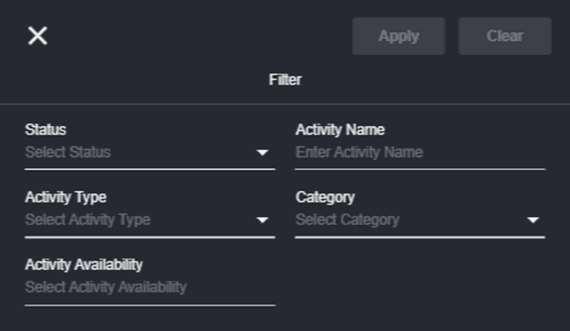 Active – date range is within the current date.
Ended – date range is less than current date.
Scheduled – date range is more than the current date. IV. Level Up Bonus
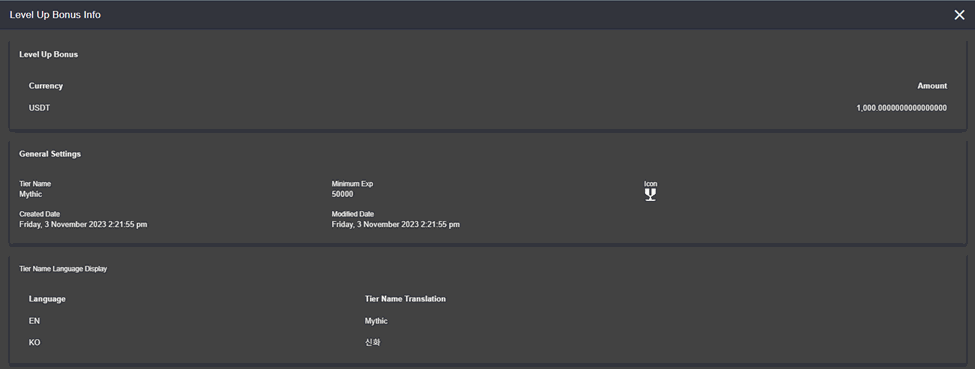
The bonus amount of each tier created will appear here.
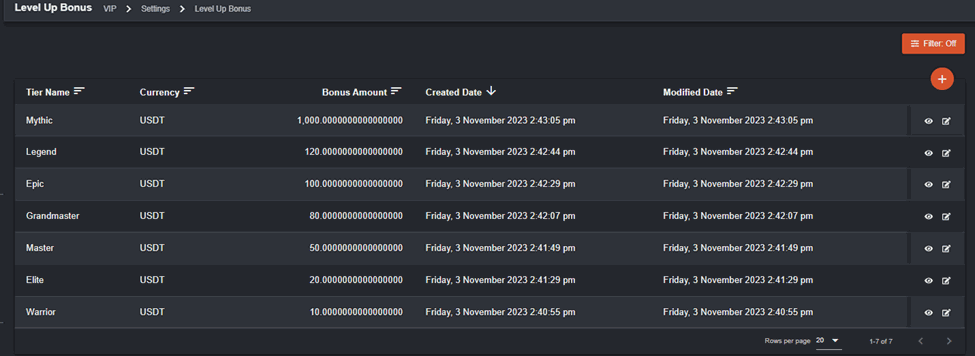 Once you click View in each of the tier, you will see the requirements to attain the tier. Sample info of Mythic (tier) which includes the minimum exp requirement.
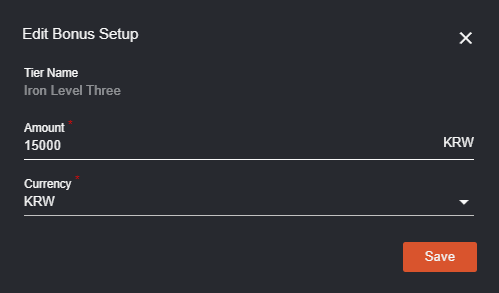
 Only bonus amount and currency can be edited.
 Players receive bonus amount upon leveling up.
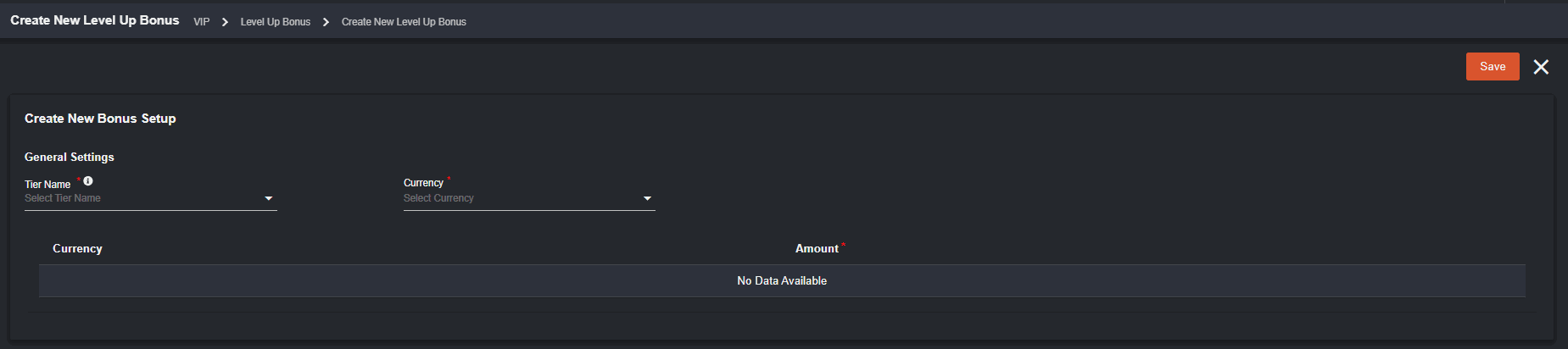
Click the plus icon to create a new bonus set up. The dropdown options in the General Settings will appear once there is an available VIP Tier in Tier Settings.
Players receive bonus amount upon leveling up.
Click the plus icon to create a new bonus set up. The dropdown options in the General Settings will appear once there is an available VIP Tier in Tier Settings.
 V. Cash Rebate
The backoffice user has the capability to disable/enable Cash Rebate.
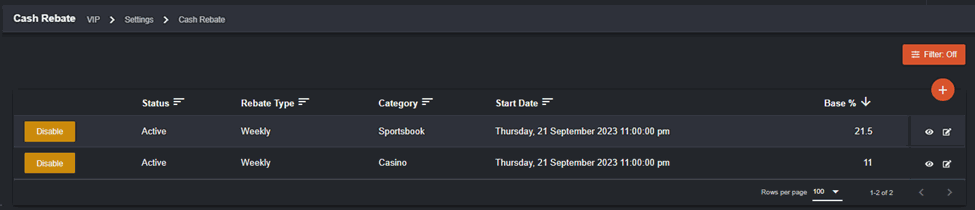 To know more about the specific rebate, click the view icon. The Cash Rebate Info will provide the VIP Tiers with their equivalent percentage, and the payout for currencies.
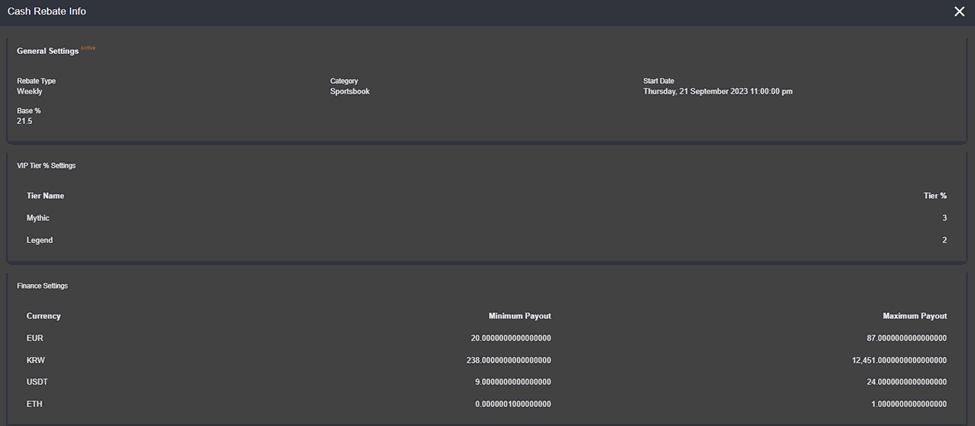 Only those underlined fields can be edited.
Click the plus icon to create a new Cash Rebate. Make sure to fill all required fields before saving.
Only those underlined fields can be edited.
Click the plus icon to create a new Cash Rebate. Make sure to fill all required fields before saving.
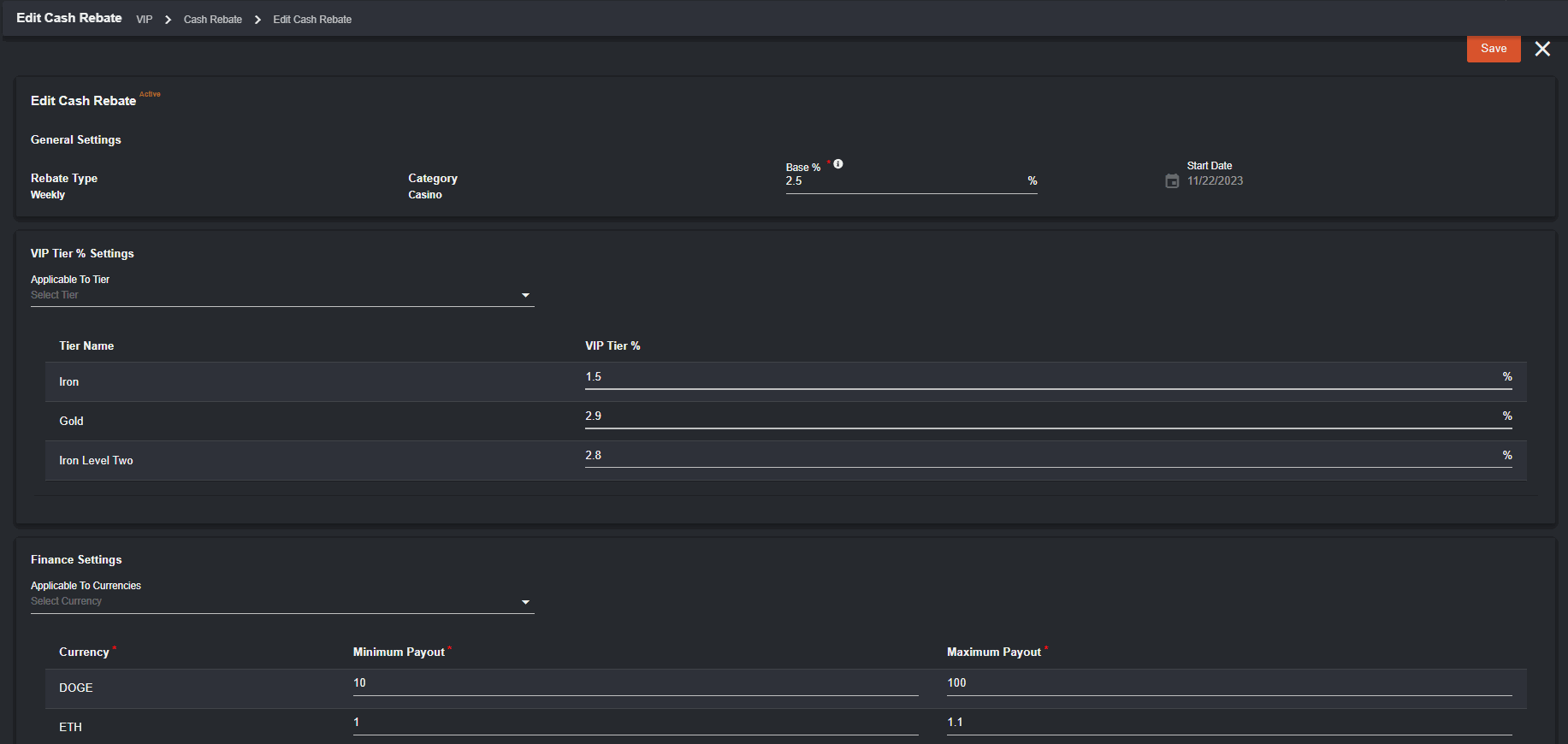 Additional Notes in creating a Cash Rebate:
- Only one Cash Rebate per Rebate type & Category can be created.
- Rebate Type is set to Weekly only.
- Beside Base is (i) which provides the calculation committed wager * (Base % + VIP Tier %).
- In Start Date, only current or future dates.
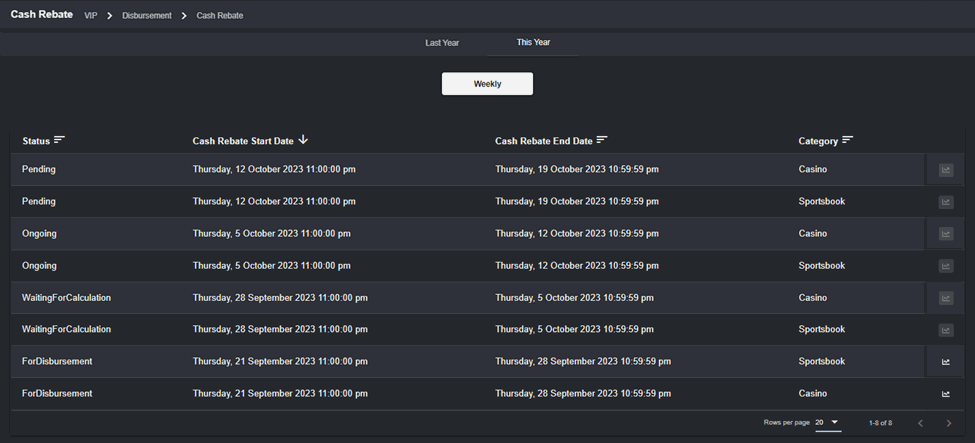
a. Status
- Pending – cash rebate that is outside of the start date or not yet starting
- Ongoing – active cash rebate within the current date
- Waiting for Calculation – pending status after 7 days will be now ready to be calculated
- For Disbursement – awaiting to be disbursed
- Disbursing – in progress for disbursing
- Disbursed – means that the cash rebate was already generated and done
c. Cash Rebate End Date – refers to the date and time format on operator end day
d. Category – Casino or Sportsbook
e. Report Icon – is only enabled and can be viewed when status is For Disbursement, Disbursing, or Disbursed.
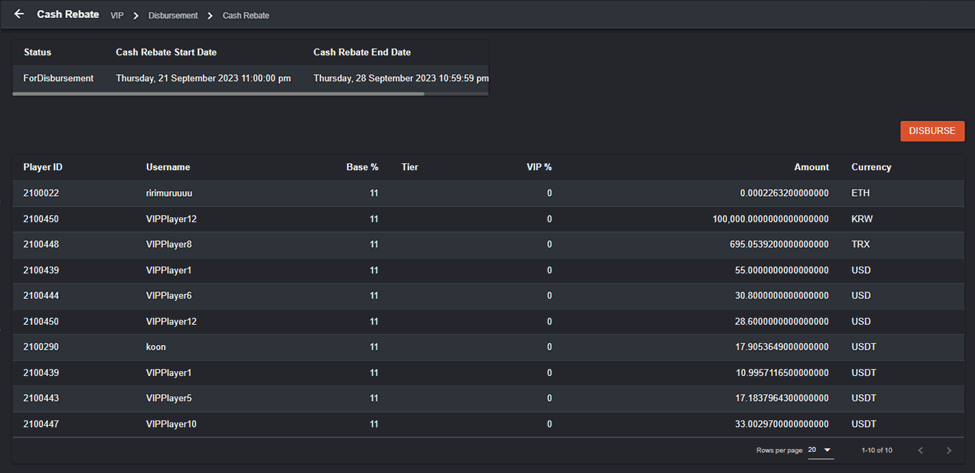
 When report is clicked, the cash rebate details will appear. Disbursement button is available. Once clicked will disburse the weekly cash rebate.
 Get started with VIP: Introduction to VIP Program
How players see VIP: How Players see the VIP Program
Get started with VIP: Introduction to VIP Program
How players see VIP: How Players see the VIP Program
How Players see the VIP Program
VIP details will be available in the player page if feature has been set up and enabled by the operator. This is what the player will see in the player page. To start, click the Player Avatar icon on the top right corner. Select VIP from the player menu options. When a player has not yet met the minimum exp for VIP tier, a “Not yet a VIP” pop-up will appear.
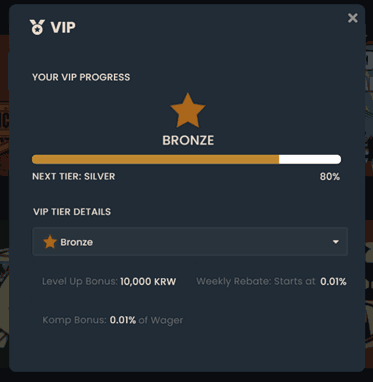
 If a player belongs to a VIP tier, this is what they will see. In the pop-up, the player will see the details of the VIP tier, their next tier when exp is met, details about the weekly rebate and level up bonus.
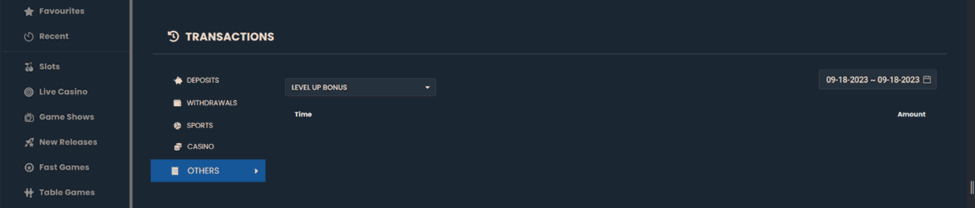
 To see all transactions related to VIP Program such as the Level Up Bonus and Cash Rebate, the player can go to Player transactions > Others.
 To get started with VIP, you may view this: Introduction to VIP Program
To guide you set up VIP: How to Set Up VIP
To get started with VIP, you may view this: Introduction to VIP Program
To guide you set up VIP: How to Set Up VIP
VIP Player Tier Report
Navigation: Reports > VIP Program > Player Tier Report In order for the Player Tier Report to be accessible by the backoffice user, manage the individual permission in the User Management which can be set to Not Permitted, Permitted, and Can Modify Refresh icon will allow you to refresh the table details.
CSV will allow you to download reports in CSV.
Settings will allow you to select the columns to be displayed.
Refresh icon will allow you to refresh the table details.
CSV will allow you to download reports in CSV.
Settings will allow you to select the columns to be displayed.
 Filter will allow you to filter specific details that you would like to appear.
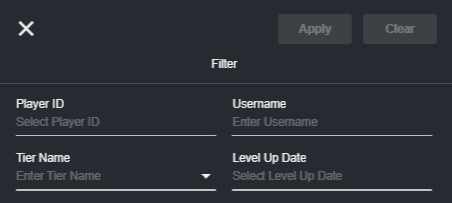 This is what you will see in the Player Tier Report.
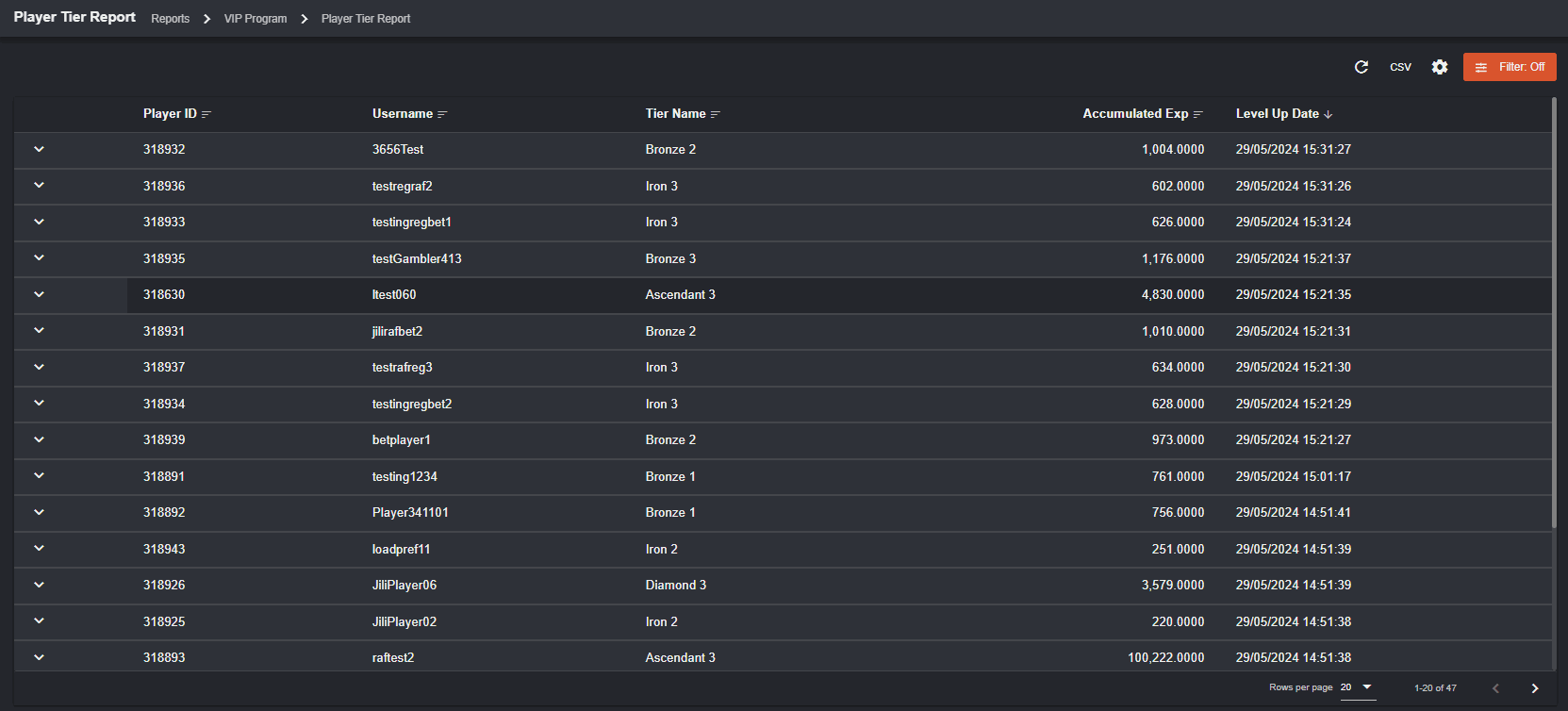 Player ID - refers to the player who executed the activity to earn Exp
Username - username who executed the Activity to earn Exp
Tier Name - corresponding Tier Name record of the player when Activity was executed
Accumulated Exp - corresponding Accumulated Exp earned by player when activity was executed
Level Up Date - latest date and time when player tier changes. The time on “Level Up Date” must be the same with the Level up bonus in the player transaction.
You can expand to see more details.
Player ID - refers to the player who executed the activity to earn Exp
Username - username who executed the Activity to earn Exp
Tier Name - corresponding Tier Name record of the player when Activity was executed
Accumulated Exp - corresponding Accumulated Exp earned by player when activity was executed
Level Up Date - latest date and time when player tier changes. The time on “Level Up Date” must be the same with the Level up bonus in the player transaction.
You can expand to see more details.
 Activity Type - for now, will only contain Wager Activity Type
Category - can either be Casino or Sportsbook
Accumulated Exp - show Exp only for corresponding category and activity type
Activity Type - for now, will only contain Wager Activity Type
Category - can either be Casino or Sportsbook
Accumulated Exp - show Exp only for corresponding category and activity type
VIP Level Up Bonus Report
Navigation: Reports > VIP Program > Level Up Bonus Report In order for the Player Tier Report to be accessible by the backoffice user, manage the individual permission in the User Management which can be set to Not Permitted, Permitted, and Can Modify. Refresh icon will allow you to refresh the table details.
CSV will allow you to download reports in CSV.
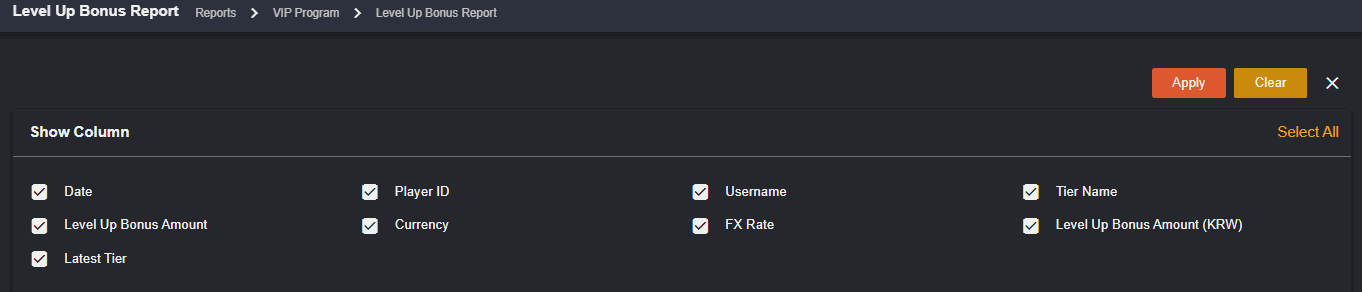
Settings will allow you to select the columns to be displayed.
Refresh icon will allow you to refresh the table details.
CSV will allow you to download reports in CSV.
Settings will allow you to select the columns to be displayed.
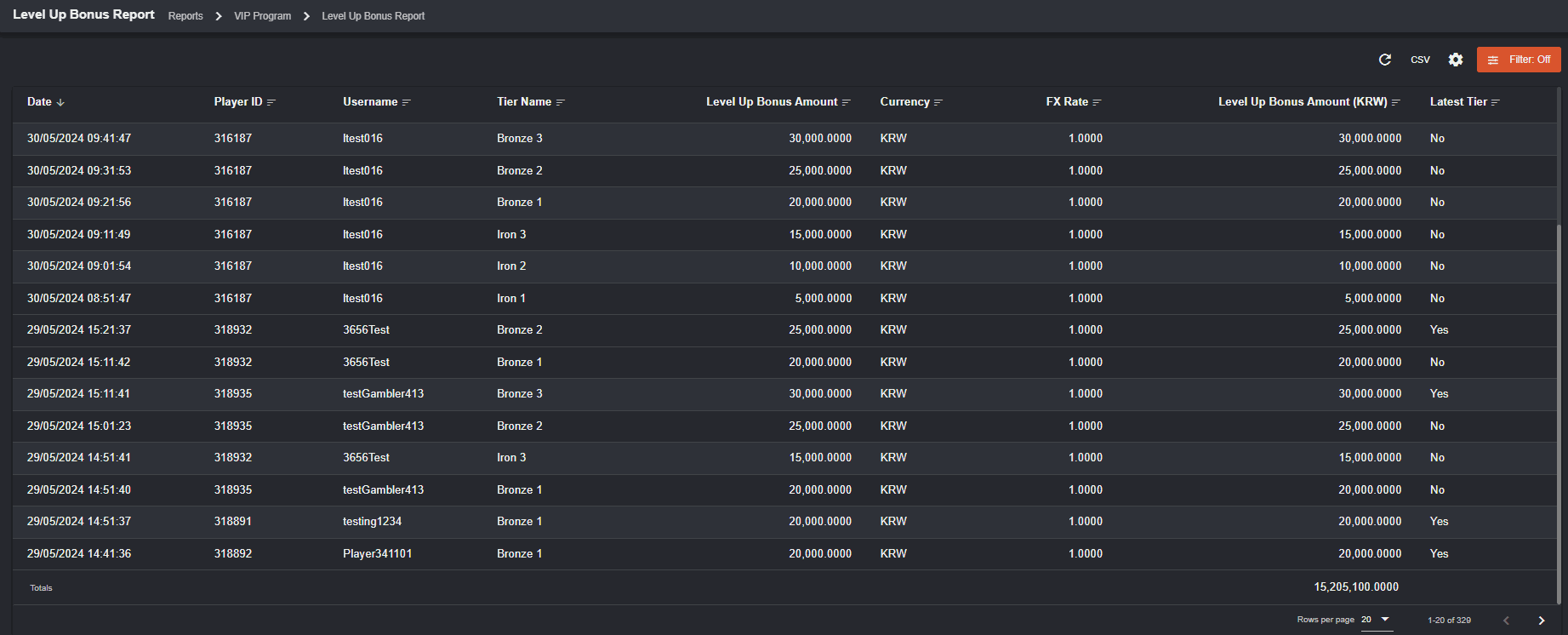 Date - date when VIP Tier Level Up Bonus was received by player
Player ID - player ID who received the Level Up Bonus
Username - username who received the Level Up Bonus
Tier Name - corresponding Tier Name for the Level Up Bonus
Level Up Bonus Amount - corresponding Bonus Amount for the Tier Level Up Bonus
Currency - corresponding Currency for the Tier Level Up Bonus
FX Rate - FX Rate when VIP Tier Level Up Bonus was received by player
Level Up Bonus Amount (MC) - bonus amount in the operator’s Main Currency
Latest Tier - Yes if record is player’s latest tier when VIP Tier Level Up Bonus was received
Date - date when VIP Tier Level Up Bonus was received by player
Player ID - player ID who received the Level Up Bonus
Username - username who received the Level Up Bonus
Tier Name - corresponding Tier Name for the Level Up Bonus
Level Up Bonus Amount - corresponding Bonus Amount for the Tier Level Up Bonus
Currency - corresponding Currency for the Tier Level Up Bonus
FX Rate - FX Rate when VIP Tier Level Up Bonus was received by player
Level Up Bonus Amount (MC) - bonus amount in the operator’s Main Currency
Latest Tier - Yes if record is player’s latest tier when VIP Tier Level Up Bonus was received