Version 4.69 - Latest
Improvements & Fixes
Enhanced Platform Reliability
- We have made updates to how the system manages connections to our data storage (Redis/Valkey) to reduce the chance of timeouts and interruptions.
- These changes help ensure smoother and more reliable performance, especially during busy periods.
- If there are any temporary connection issues, the system will now handle them more gracefully, minimizing any impact on users.
- These improvements are being introduced first for the Player Website, with plans to extend them to other areas in the future.
Back Office Notification Improvements
- Notification delivery in the Back Office has been refined to ensure timely and consistent alerts for important actions.
- Sound notifications are now more reliable, helping users stay informed of key events.
- For the best experience, we recommend using Firefox or Chrome browsers for Back Office notifications.
Version 4.68
New Features
Smart wallet memory for TenCoins crypto withdrawals
- Implemented a smart memory system that saves the wallet address after a successful withdrawal for each unique Cryptocurrency and Network combination.
- Autofill the saved wallet address when the player:
- Selects a single-network coin (e.g., BTC), or
- Selects both Currency and Network for multi-network coins (e.g., USDT-TRC20 vs USDT-ERC20).
- Ensures the address field remains empty when no saved address exists for the selected Currency + Network, so players can safely enter it for the first time.
- Allows the same physical wallet address to be reused and stored across multiple currencies or networks, while still treating each Currency + Network as a separate saved entry.
- Clears the wallet address field and re-checks for a matching saved address whenever the player changes the selected network, preventing accidental use of an address on the wrong chain.
Confirmation popup for changed wallet addresses
A new confirmation popup protects players from unintentionally overwriting their saved wallet address when submitting a withdrawal with a modified address.- Detects when the current wallet address input differs from the previously saved address for the same Currency + Network at the time the player clicks Withdraw.
- Displays a confirmation popup only in this case, acting as a hard block until the player confirms or cancels.
- Uses standardized button labels and title style:
- Title**:**
Update Saved Wallet Address - Buttons: Continue and Cancel
- Title**:**
- Clarifies in the popup message that:
- The player is updating their saved address for [Currency + Network] (for multi-network coins, both currency and network are shown).
- If they continue, the new address will be used for future withdrawals for that specific Currency + Network.
- On Continue:
- Proceeds with the withdrawal request.
- Updates the saved wallet address in the database only after the withdrawal succeeds.
- On Cancel:
- Closes the popup and returns the player to the form so they can review or correct the address without changing the saved value.
Improvements
Wallet address validation
- Disallows spaces anywhere in the wallet address (no leading, middle, or trailing spaces) to avoid invalid copies of addresses.
- Shows a clear validation message if spaces are present:
“The Cryptocurrency address field must not contain spaces” - Allows valid special characters (for example:
-,_,., and other commonly used symbols) so that addresses from various chains and protocols are not unintentionally blocked. - Keeps the maximum length of the wallet address at 255 characters to remain compatible with supported blockchain address formats.
Fixes
- Updated the system’s message service settings and security certificates to support using a new Kafka provider, without changing any user-facing features.
- Updated how GMAG pending bets are shown and refreshed the related API documentation to match this behavior.
Version 4.67
Release Date: 2026-01-19Improvements
Faster loading for Player Website
The Player Website now loads site settings together with the header, footer, and navigation through a more streamlined process, helping key pages become usable faster while keeping existing configurations and behavior intact. Summary of updates:- Extended the site settings optimization so that header, footer, and navigation content are now retrieved in a single, coordinated layout request for faster page loading.
- Reduced the number of separate calls needed for both configuration and shared layouts, improving responsiveness on the homepage and other frequently used pages.
- Preserved existing visual designs, menus, and tracking elements so partners do not need to change any current setup or content.
- Ensured that default options (such as language, currency, and other display-related behaviors tied to layouts) continue to work consistently across the Player’s Website.
Manual Bonus Notes and Reporting Enhancements
A new optional notes field has been added when manually assigning bonuses, with these notes now clearly shown in key bonus and transaction views to support better record-keeping and review.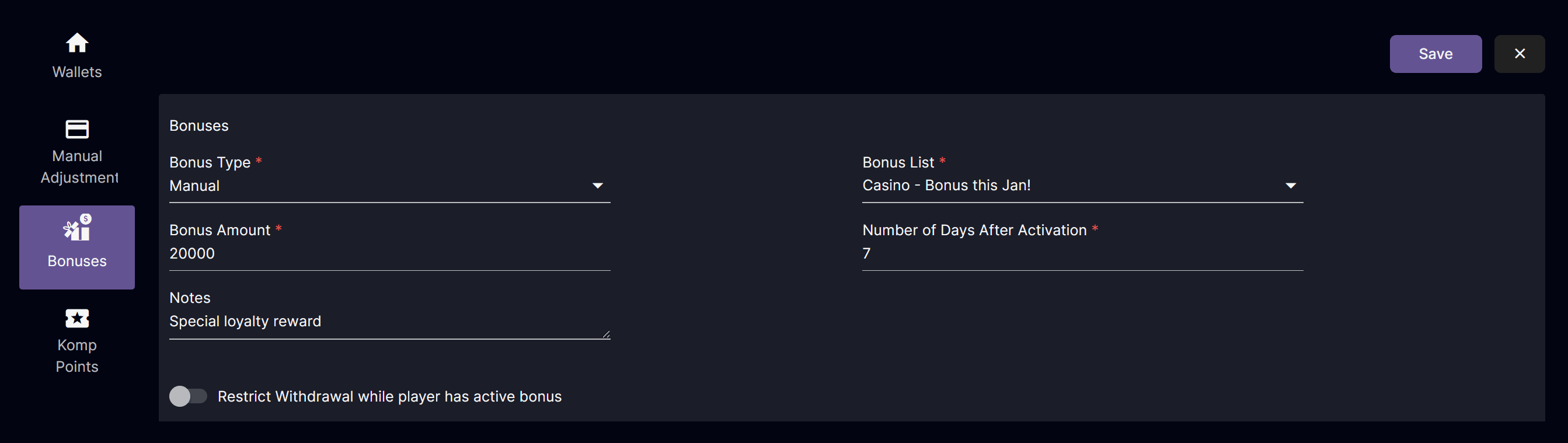
- Operators can enter an optional short note when manually crediting a bonus to a player.
- Notes are displayed in Player Management bonus details to make follow-up checks easier.
- Notes are included in bonus reports for manual bonuses, helping teams review and audit bonus activity.
- Notes appear in the player transaction view so bonus context is visible alongside other player activity.
Fixes
- Updated the label text on the Crypto Payment Withdraw page to clearly indicate cryptocurrency selection for withdrawals rather than payments.
- Ensured player logins remain available by adjusting single-session handling and introducing a configuration flag to safely disable single-session behavior when needed.
- Updated redeemed bonus records so that the Modified field now displays the player’s username instead of “system” when bonuses are redeemed via Komp points for Casino and Sports.
Version 4.66
Release Date: 2026-01-05New Feature
Cashback Recurrence
This feature streamlines the creation of new cashback campaigns with the same settings by automatically generating scheduled campaigns during the cashback period, which we call “children” of that period.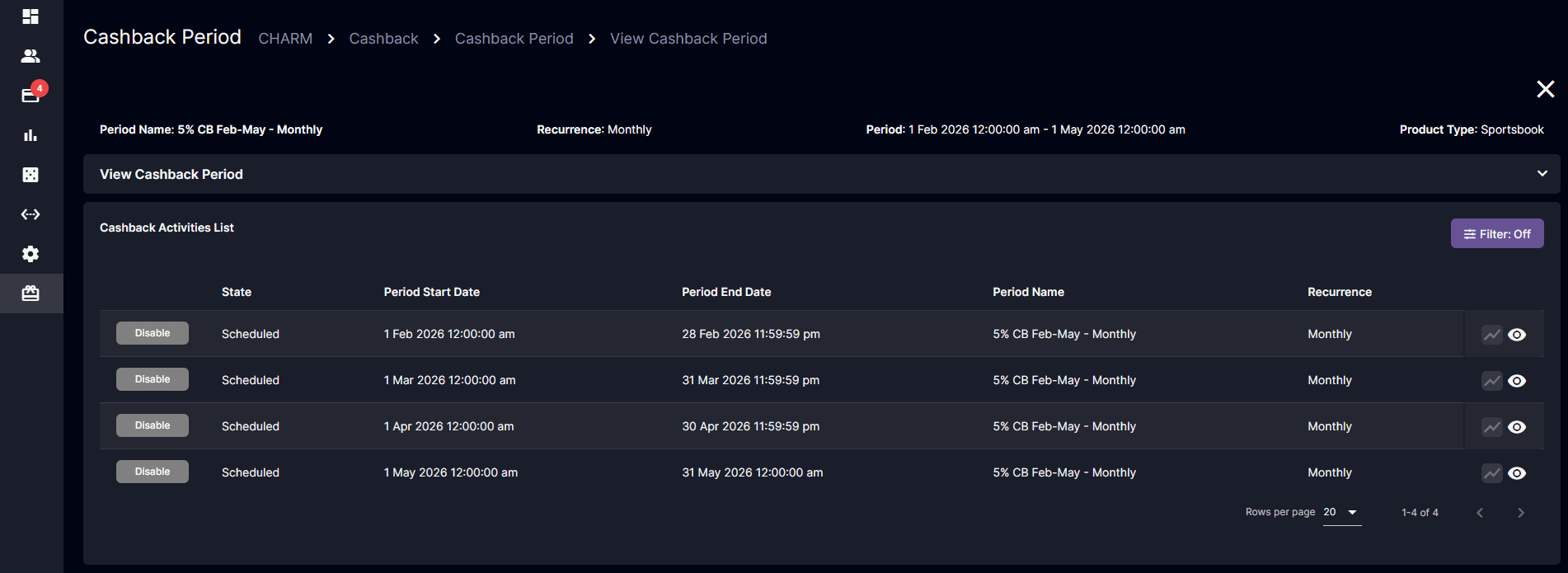
Highlights
- The supported recurrence types are: One-time, Daily, Weekly, and Monthly.
- When changing the Cashback Bonus Attachment or other editable properties, the system will only update active and scheduled child campaigns.
- While editing an existing Cashback Period, the Start Date, End Date, and Recurrence Type cannot be modified.
- Cashback reports can be viewed within the details of the Cashback Period.
- Previously created cashback campaigns are classified with a One-time frequency.
Fixes
- Improved validation handling for the back-office change password and reset PIN process to ensure correct and reliable password update behavior.
Version 4.65
Release Date: 2025-12-23New Feature
Player Security Pin
The Player Security PIN introduces an additional layer of security for player accounts. It allows players to authorize sensitive actions such as withdrawals. At the same time, this enables the Back Office user to assist with PIN resets.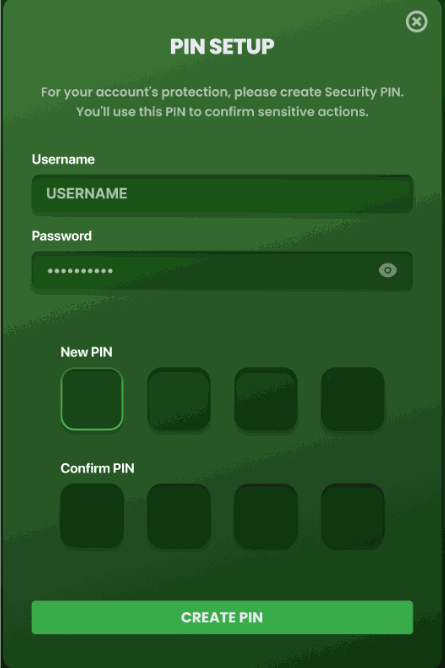
PIN-Setup
Highlights
- Player PIN Setup: Players can create a Security PIN via their profile or when prompted during a withdrawal or login. PIN must be verified with the account username and password.
- Player PIN Reset: Players can reset their PIN if they know the current PIN. Input validation ensures the new PIN differs from the current PIN.
- Back Office PIN Reset: Authorized BO users can reset a player’s PIN with a mandatory reason. Players are prompted to set a new PIN on their next login or withdrawal.
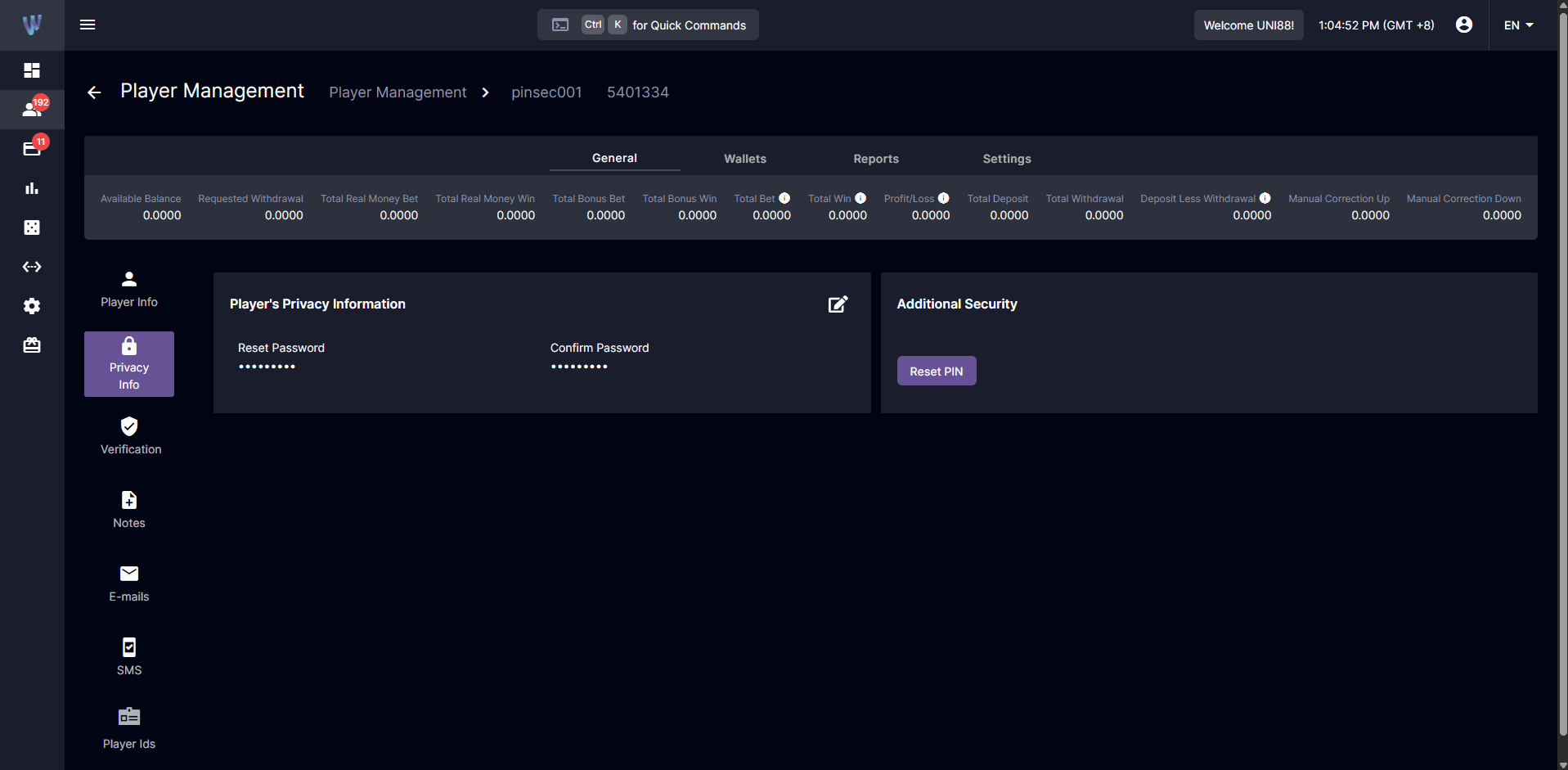
Back Office PIN Reset
- Withdrawal Security: PIN entry is required before completing a withdrawal; configurable by payment method. Players without a PIN are prompted to set one before proceeding.
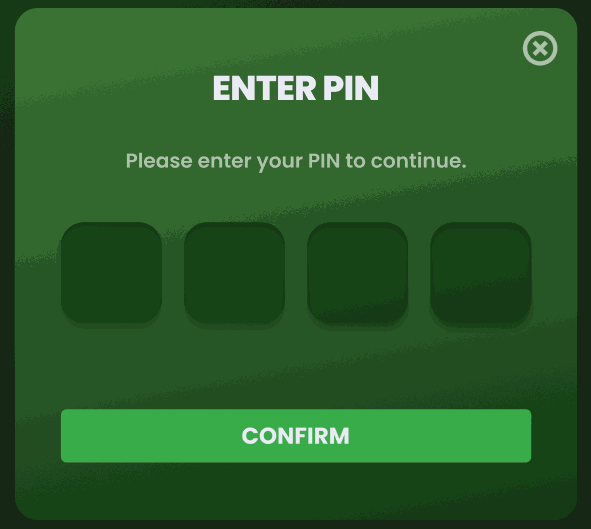
Enter PIN
- Lockout and Cooldown: Accounts lock after failed attempts (3 default attempts), with a cooldown period (default 15 minutes).
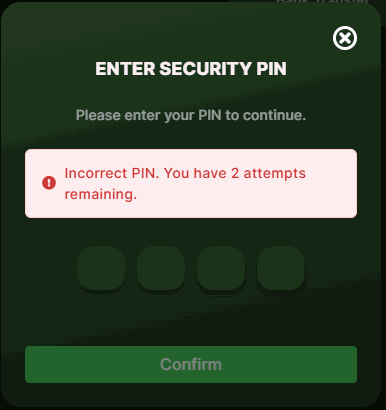
PIN Failed Attempts
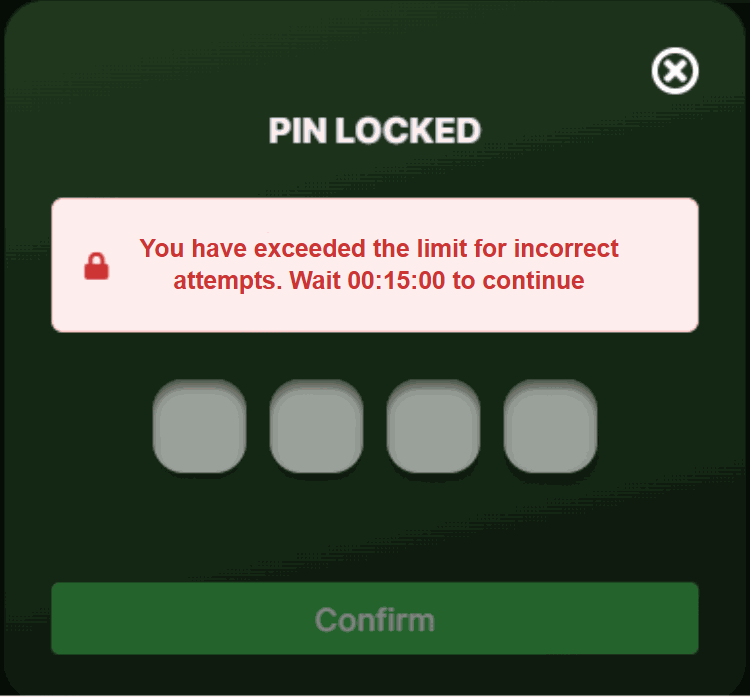
PIN Lockout - Cooldown Time
- Audit Log: All PIN-related actions (Setup, Reset, Failed attempts) are logged with clear tracking of the user (player or operator).
Improvements
Deposit and Withdrawal UI/UX
The updated Backoffice Deposit and Withdrawal pages now support concurrent transaction processing, allowing users to initiate and manage several deposit and withdrawal requests at the same time without waiting for previous actions to complete. A background data refresh mechanism ensures that the latest transaction statuses and details are reflected in the UI without interrupting ongoing work.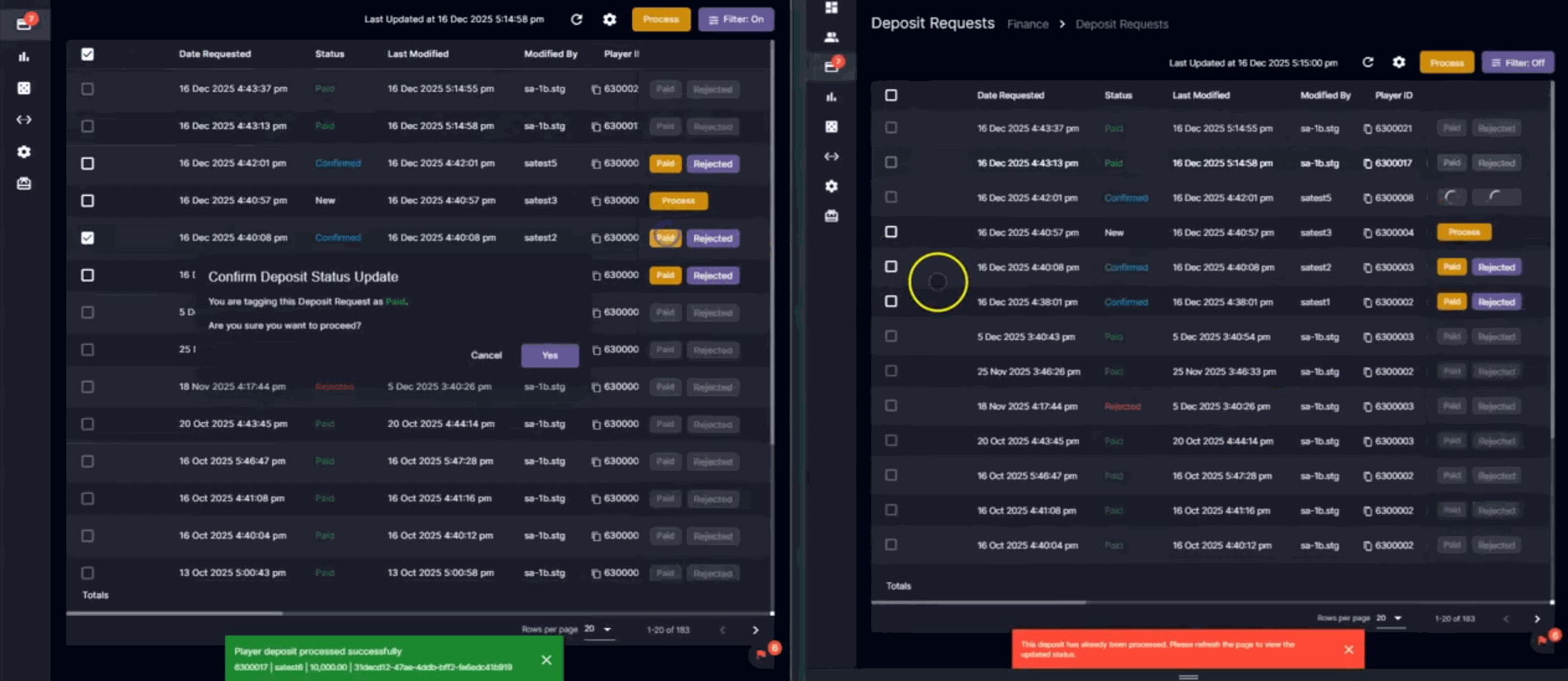
Highlights
- Support for parallel processing of multiple deposit and withdrawal transactions, reducing wait times for users and improving overall productivity.
- Non-blocking automatic and manual data refresh, ensuring that newly created or updated transactions are highlighted briefly so users can easily identify recent changes.
- Responsive UI behavior during processing, including disabling relevant action buttons and checkboxes only for in-progress rows while displaying an in-progress indicator.
- Real-time update of key fields such as Status, Last Modified By, and Last Modified Date.
- Clear error handling for conflicting operations, with snackbar messages indicating which specific transaction could not be processed (for example, when it is already being handled by another backoffice user).
Expected Benefits for Clients/Partners
Partners can expect faster handling of manual deposits and withdrawals, enabling teams to respond more quickly to player requests and peak-volume periods. The improved responsiveness and clarity of transaction status updates help reduce operational friction and support more efficient financial operations across managed brands.Player Management: Display Last Login IP on Account Info
This improvement enhances Player Management by prominently displaying each player’s last login IP address, alongside the existing registration IP, and providing direct IP control tools to support clearer monitoring and management of login activity.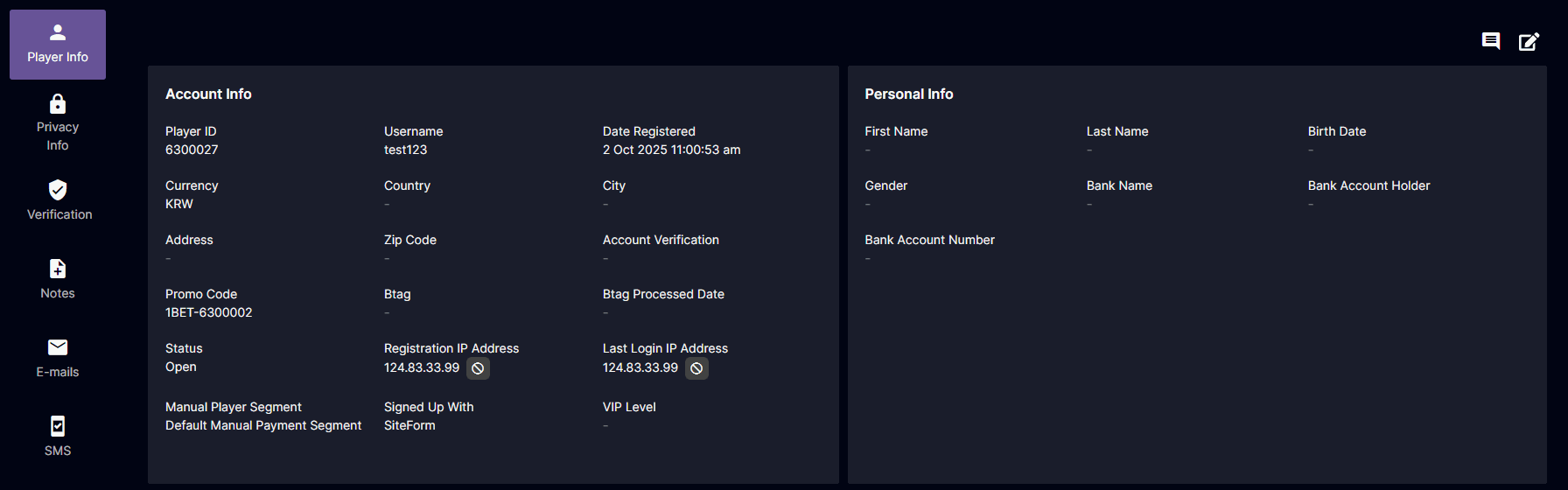 The Account Info section now shows a dedicated Last Login IP field, which is kept distinct from the Registration IP so operators can compare origin and recent access points per player. A Block IP action is available beside the Last Login IP, and this IP value is also exposed as a column and filter in the Player Management > Players list to streamline investigations and operational checks.
Fixes
- Improved bonus accuracy and usability (including correct modifier tracking, prevention of expired-bonus betting, corrected settled amounts, real-time bonus balance updates, and unfulfilled-bonus timing)
- Prevented wagering with expired bonuses by adding validation to block bets once a bonus has reached its expiration.
- Corrected the calculation of deposit bonus settled amounts so that the value shown on Back Office bonus records now accurately reflects the total bonus winnings converted to real money.
- Ensured that bonus balances now update in real time across supported casino and sports modules for BTI and Pinnacle.
- Refined bonus settlement handling so that bonuses are no longer marked unfulfilled when a qualifying last bet is being settled at the same time.
- Aligned the Last Login section layout with the existing registration IP styling so that long text now wraps correctly and spacing remains consistent.
Version 4.64
**Release Date:**2025-12-08Improvements
- Improved Handling of Bonus “Modified By” Information
Fixes
- Bonus validity enforcement update
- Correction to the display of the bonus settlement amount on the Back Office bonuses page.
Version 4.63
Release Date: 2025-10-16New Feature
Bonus: Assignment Expiration
This feature allows for greater control over bonus availability. The Assignment Expiration timer begins when a bonus is assigned and governs the time a player has to claim it. This configuration applies to all types of Bonuses.Highlights
- The system now distinguishes expiration timers:
- Assignment Expiration – How long a player has to claim a bonus after it’s assigned.
- Real-time countdowns ( hh:mm:ss ) are shown in the Player’s website.
Back Office Changes
[BO] Bonuses: Assignment Expiration
Navigation: CHARM > Bonuses > Create New Bonus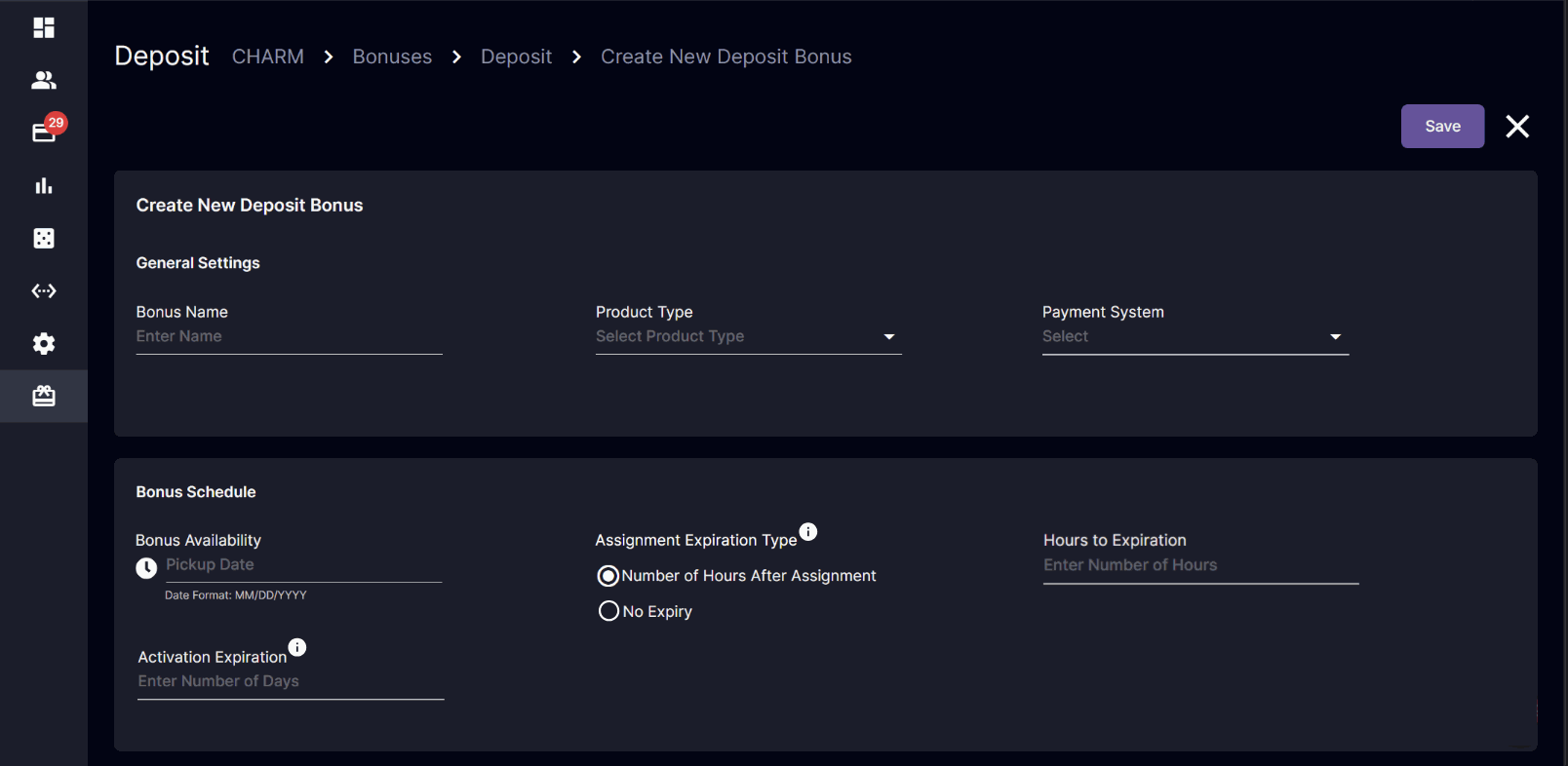 Bonus Schedule Block (New Section)
- Introduced a dedicated Bonus Schedule configuration section.
- Consolidated the following fields into this new section:
- Bonus Availability
- Activation Expiration (formerly Number of Days after Activation)
- Assignment Expiration Type
- Number of Hours After Assignment enables “Hours to Expiration” input.
- No Expiry, it disables the “Hours to Expiration” input.
- Tooltip:
- Activation Expiration - Expired: “Bonus was claimed but not completed within the time limit.”
- Assignment Expiration - Voided: “Bonus was assigned to the player but was not claimed within the time limit.”
- Bonuses with “No Expiry” will not display ‘Hours to Expiration’.
[BO] Bonus Report
Navigation: CHARM > Bonuses > Bonus Report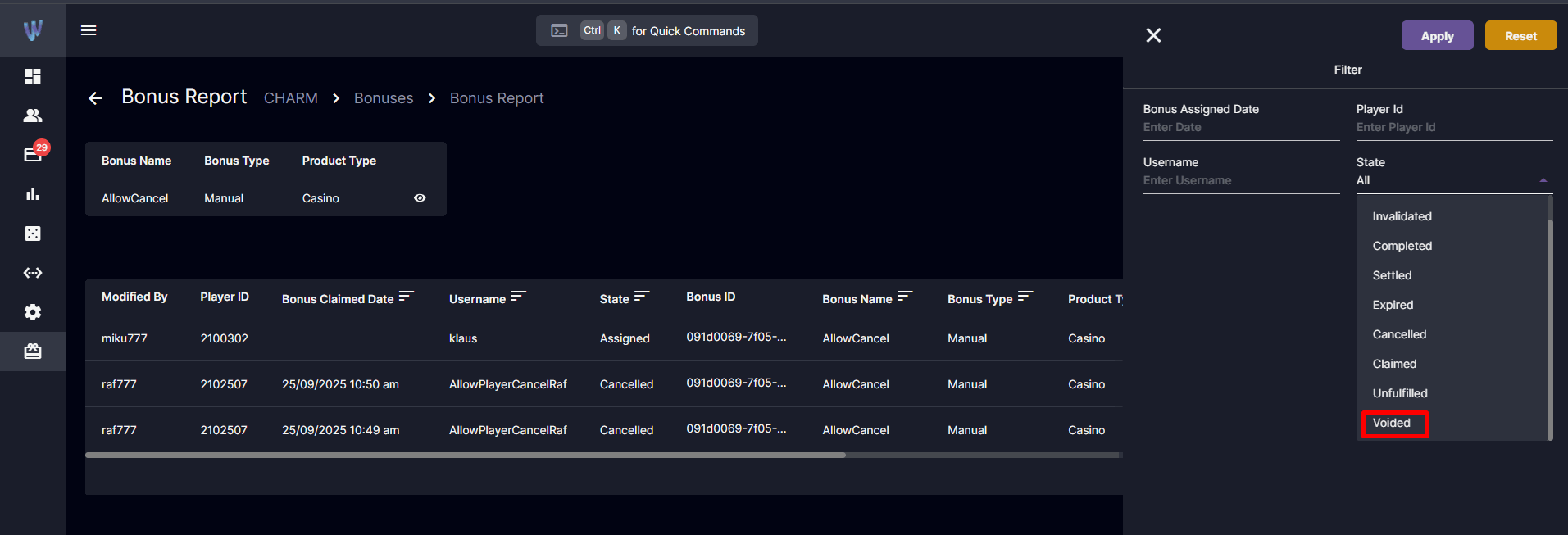
Bonus Report
- New Filter Option: “Voided” status
- New Columns Added:
- Bonus Assignment Expiration – Displays the deadline for claiming the bonus.
- Modified By – Shows the entity that made the last modification (e.g., System for automated changes).
- Last Modified: Shows the exact date and time when there was any “movement” or change to the bonus.
[BO] Player Management: Wallets - Bonuses
Navigation: Players > Player Management > Wallets > Bonuses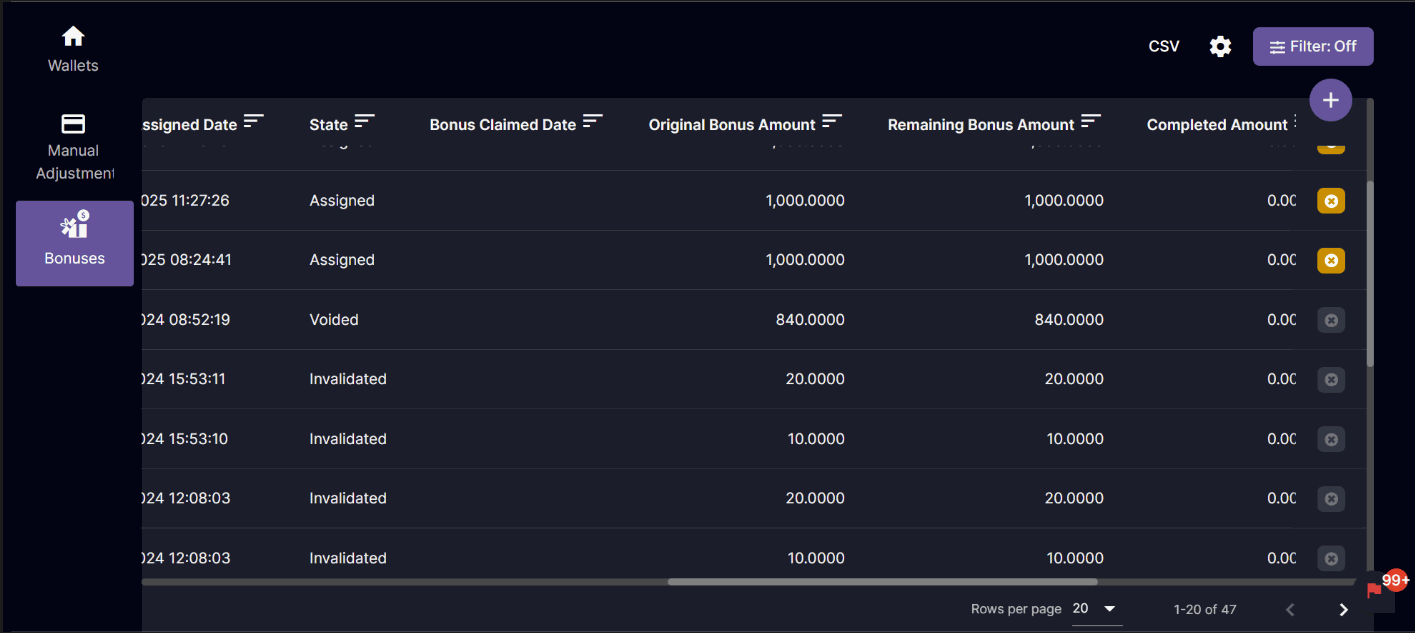
Player Management - Bonuses
- Enhanced to display bonuses with their corresponding statuses, including Voided.
- Added a new filter option for “Voided” status.
[BO] Player Management: Assign Bonus Manually
Navigation: Players > Player Management > Wallet > Bonuses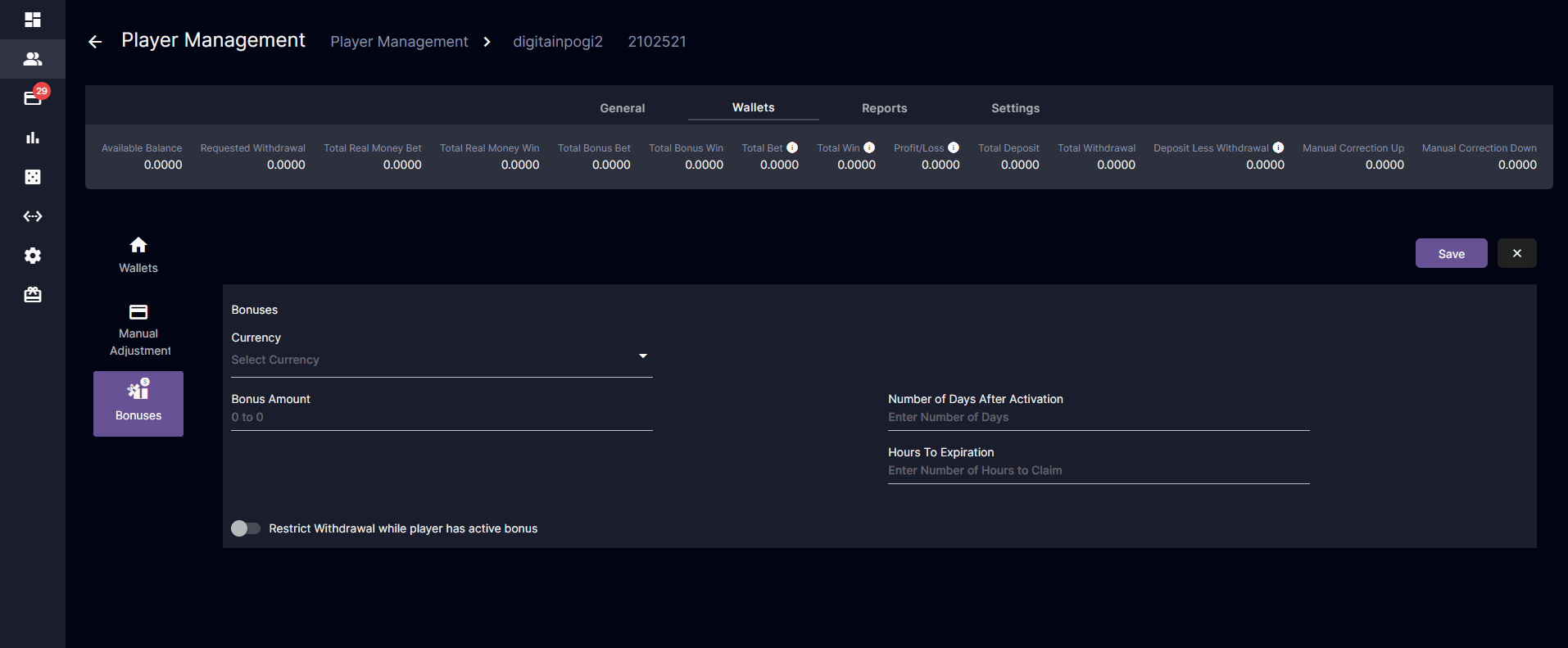
Bonus: Manual Assignment
- If the Assignment Expiration Type = No Expiry, the “Hours to Expiration” field will be hidden during manual assignment.
- When a bonus is selected, the Number of Days After Activation and Hours to Expiration auto-fill based on the bonus setup, but remain editable.
New Metric Field
Navigation: Dashboard > Metrics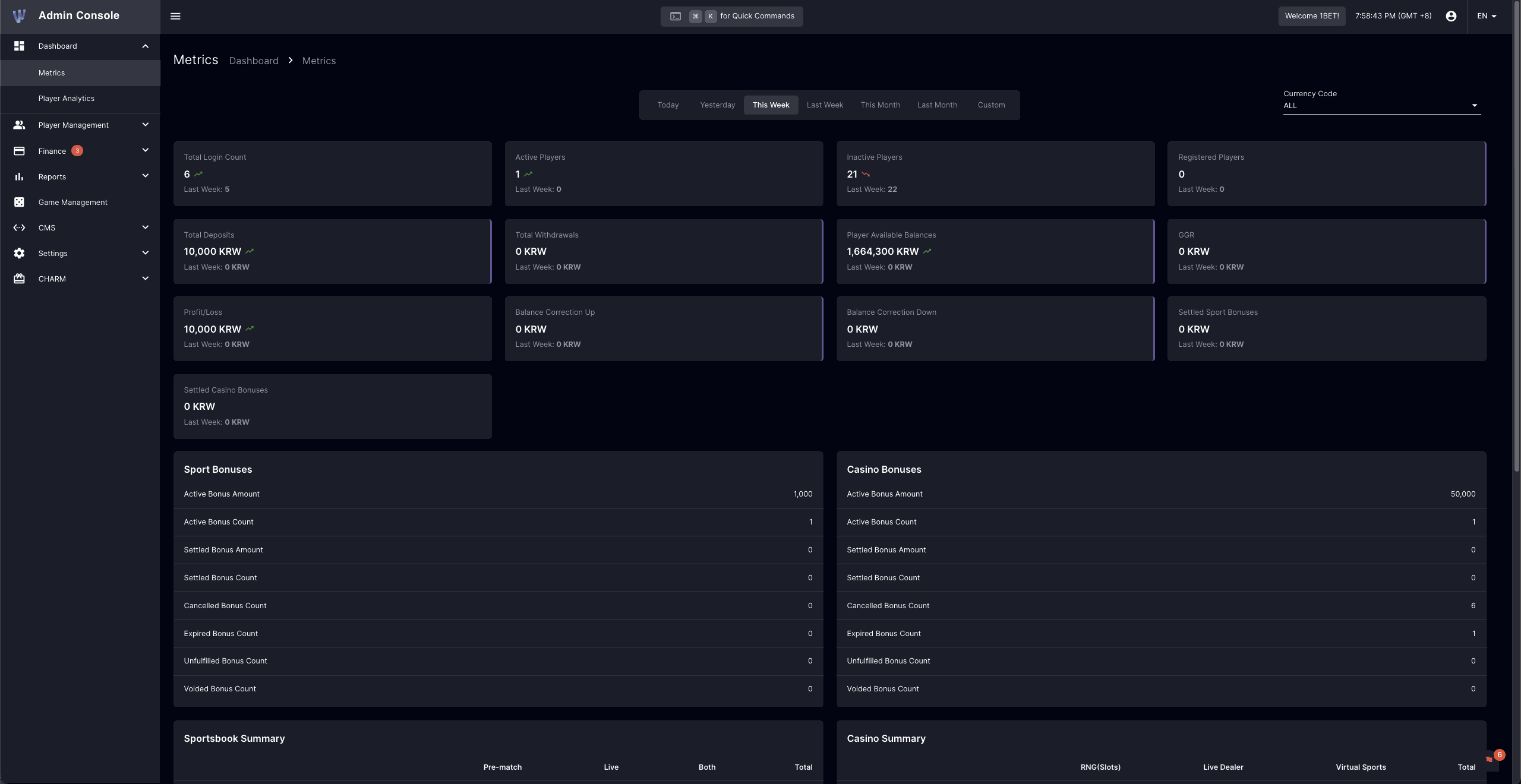
BO: Metrics
- Added a field to display the total count of bonuses marked as Voided.
[BO] Bonuses
Navigation: CHARM > Bonuses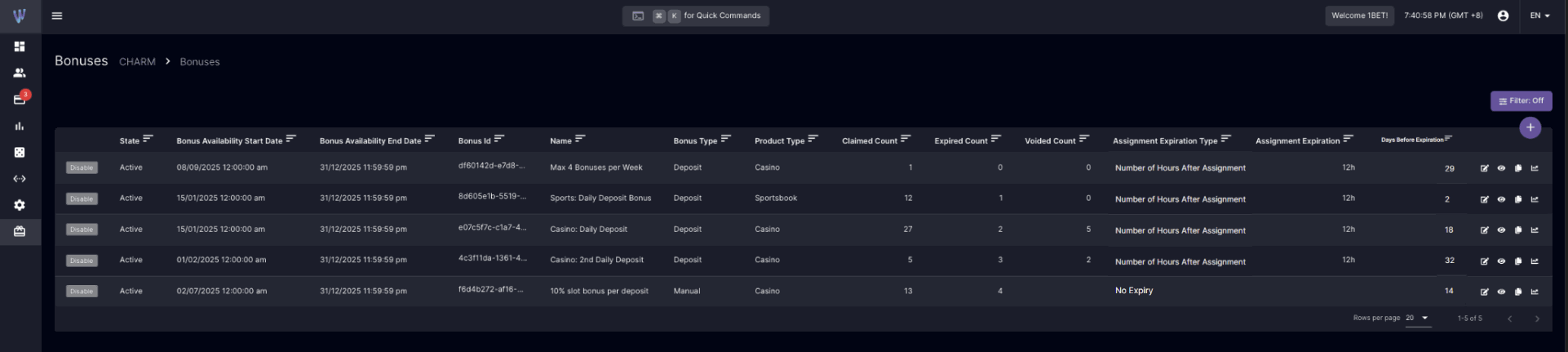
Available Bonuses
- Assignment Expiration Type: Defines how long a player has to claim an assigned bonus.
- Available Values:
- Number of Hours After Assignment
- No Expiry
- Available Values:
- Assignment Expiration: Shows the number of hours allowed for bonus claiming (empty when “No Expiry”).
- Voided Count: Shows the total number of bonuses that were assigned but not claimed within the time limit.
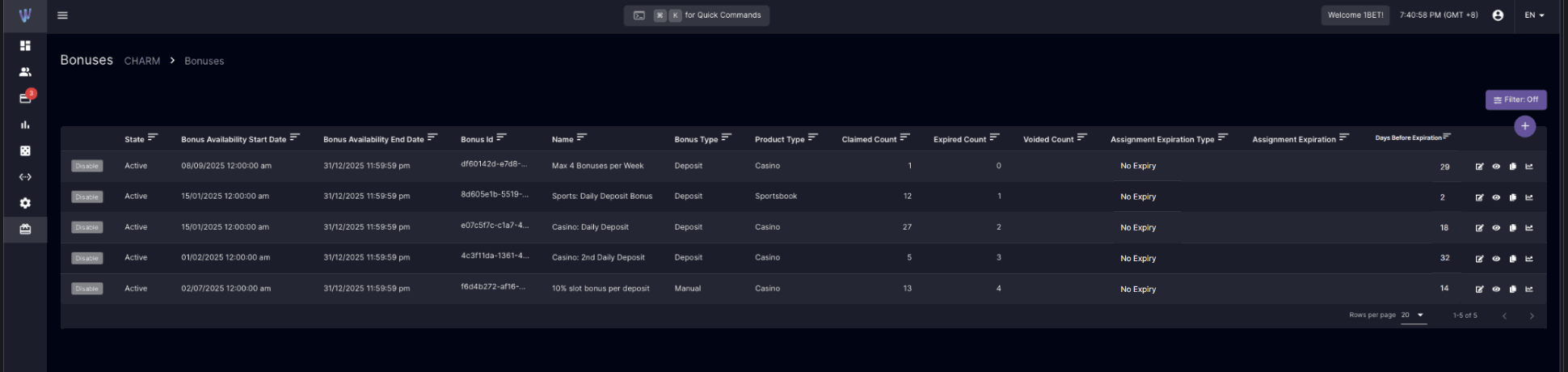
Previously Existing Bonuses
- Bonuses created before this update will display:
- Assignment Expiration Type: No Expiry
- Assignment Expiration: (Empty)
- Voided Bonus: (Empty)
Player’s Website Enhancements
Active Bonuses

Claimable Bonus
- Once a bonus is assigned:
- A countdown timer displays the time remaining for the player to claim it.
- Format: “72h:15m:22s”
- If Assignment Expiration Type = No Expiry, no countdown timer is shown.

- When the player successfully claims a bonus:
- The Number of Days (Activation Expiration) will appear in the bonus details.
Voided Bonus Behavior
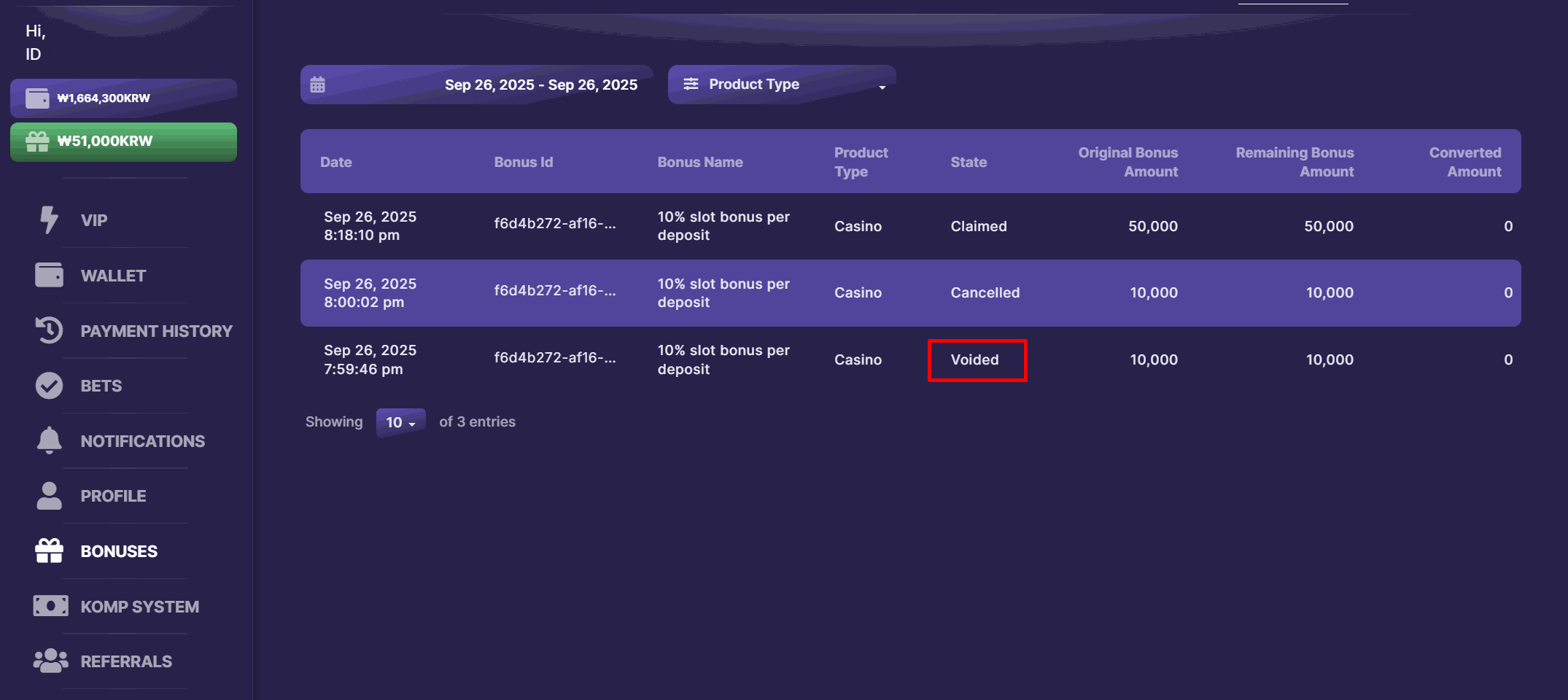
- If the claim timer expires:
- The bonus is removed from Active Bonuses.
- It appears under Bonus History with a “Voided” status.
- The date displayed corresponds to the last modified timestamp.
- If the player remains idle on the bonus page and the timer reaches 00:00:00:
- The claim button is disabled.
- Bonus will automatically transition to the “Voided” state.
Improvements & Fixes
- Adjusted the Admin Panel to refresh deposit and withdrawal requests every 20 seconds for improved efficiency and user experience.
- Referral tab now displays all referred players by default, simplifying access by removing the date filter.
- Enhanced processing logic to ensure only valid deposits are credited to wallets, improving transaction reliability.
- CSV exports now support UTF-8 with BOM to ensure correct display of multilingual characters, including Korean
Version 4.62
Release Date: 2025-10-10Bonuses: Cashback Attachment Max Bonus Amount
This update introduces a Maximum Bonus Amount cap for Cashback Attachments. It helps to manage bonus liability by ensuring a player will not receive a bonus higher than the defined cap, regardless of their computed cashback amount.Back Office Changes
Finance Settings
Navigation: CHARM > Bonuses > Create Bonus > Cashback > Finance Settings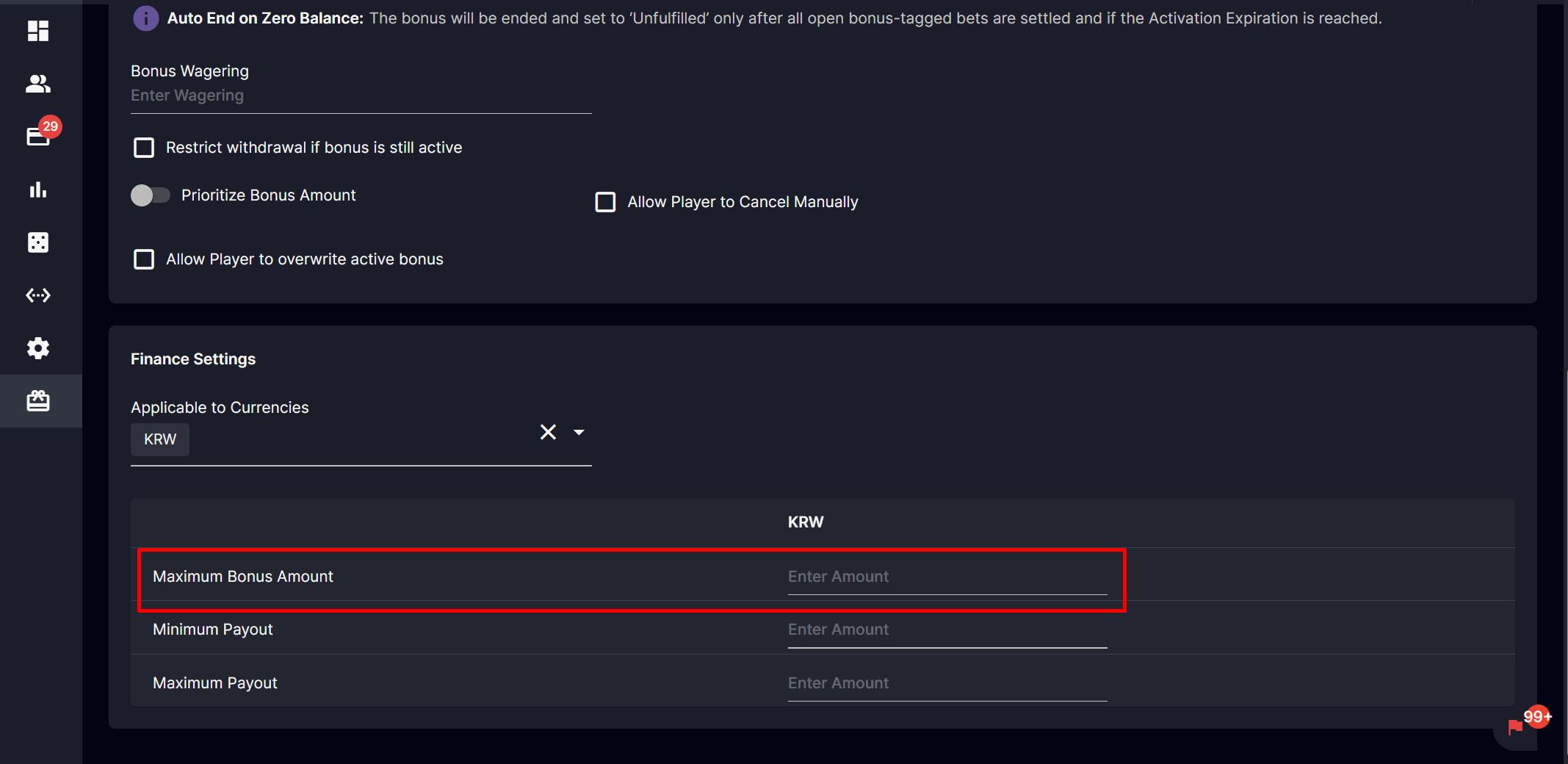
Cashback: Maximum Bonus Amount
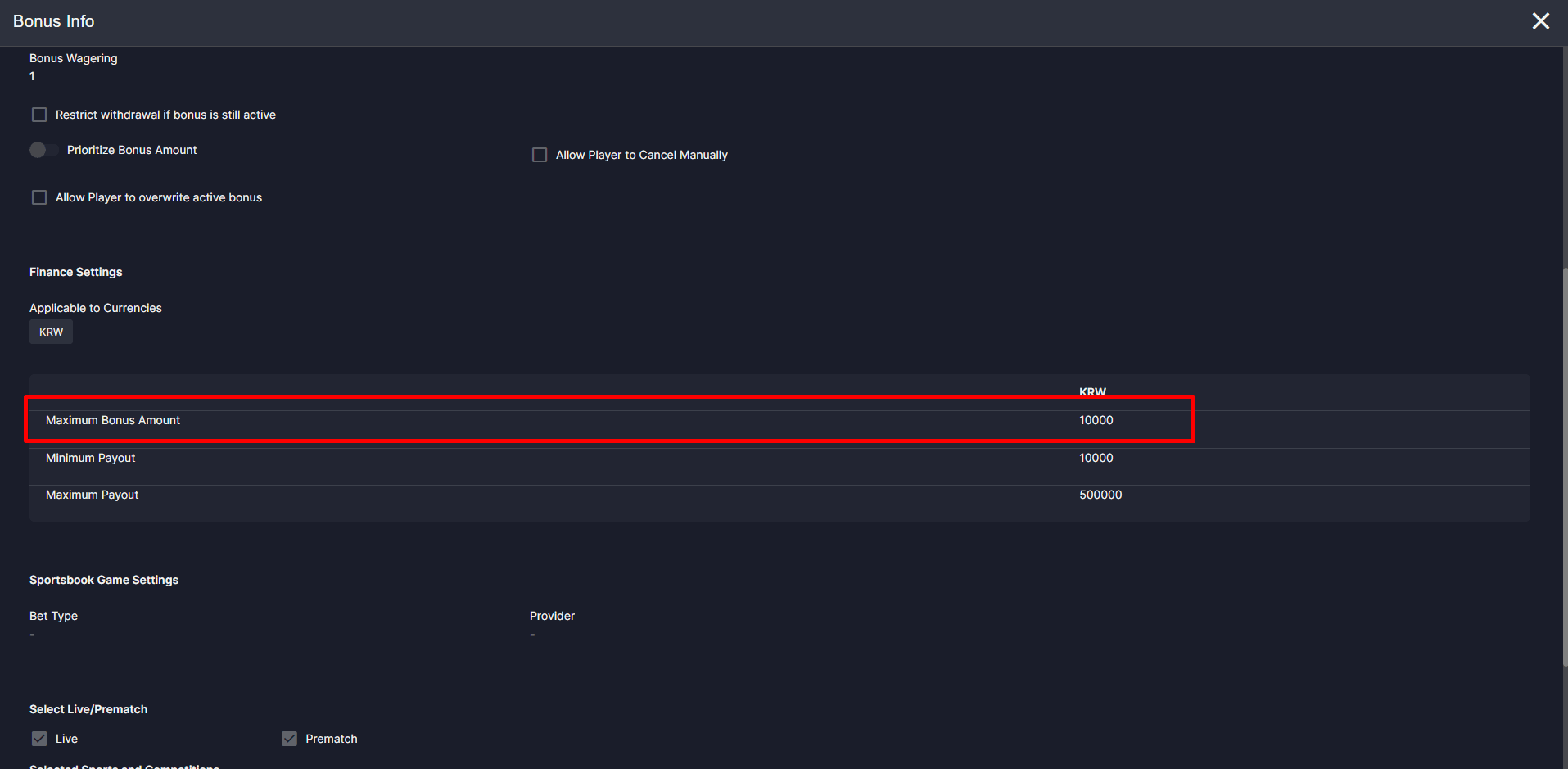
Cashback: Bonus Info
Fixes and Improvements
- Financial reports: Faster load times with currency and username filters for quicker analysis and daily reconciliation.
- Player Management: Streamlined navigation and filters, plus quick-access links to deposit, withdrawal, and bonus reports.
- Bonus reports: Focused filters on ‘Transfer In’ and ‘Transfer Out’ for simpler, consistent reporting.
- Bonus timing: Unfulfilled bonus delay is now configurable to the second for precise status timing.
- Platform compatibility: Internal upgrades enhance compatibility for a smooth, consistent experience.
- Referral disbursements: Reinforced to ensure on-schedule, consistent bonus releases.
- Transaction reconciliation: Enhanced alignment of wins and returned amounts across supported providers for reliable main wallet reporting.
- Localized reporting: Refined translations in Player Management for clearer outputs.
- Player experience: Automatic refresh and clear messaging when leaving GameStage during system updates for a seamless flow.
- Status clarity (Digitain): Updated terminology from ‘Rejected’ to ‘Cancelled’ for clearer status tracking and reporting alignment.
- Service reliability: Strengthened bonus processing and faster affiliate registration handling for predictable operations.
Version 4.61
**Release Date:**2025-09-22New Feature
Auto-End Unfulfilled Bonus
The Auto-end Unfulfilled Bonus is a new feature that automatically ends a bonus and changes its status to “Unfulfilled” when the bonus balance reaches zero after all bets have been settled. This feature reduces the need for manual intervention and provides clearer reporting on bonus lifecycles. This new functionality applies to Deposit, Manual, Komp, and Cashback bonuses.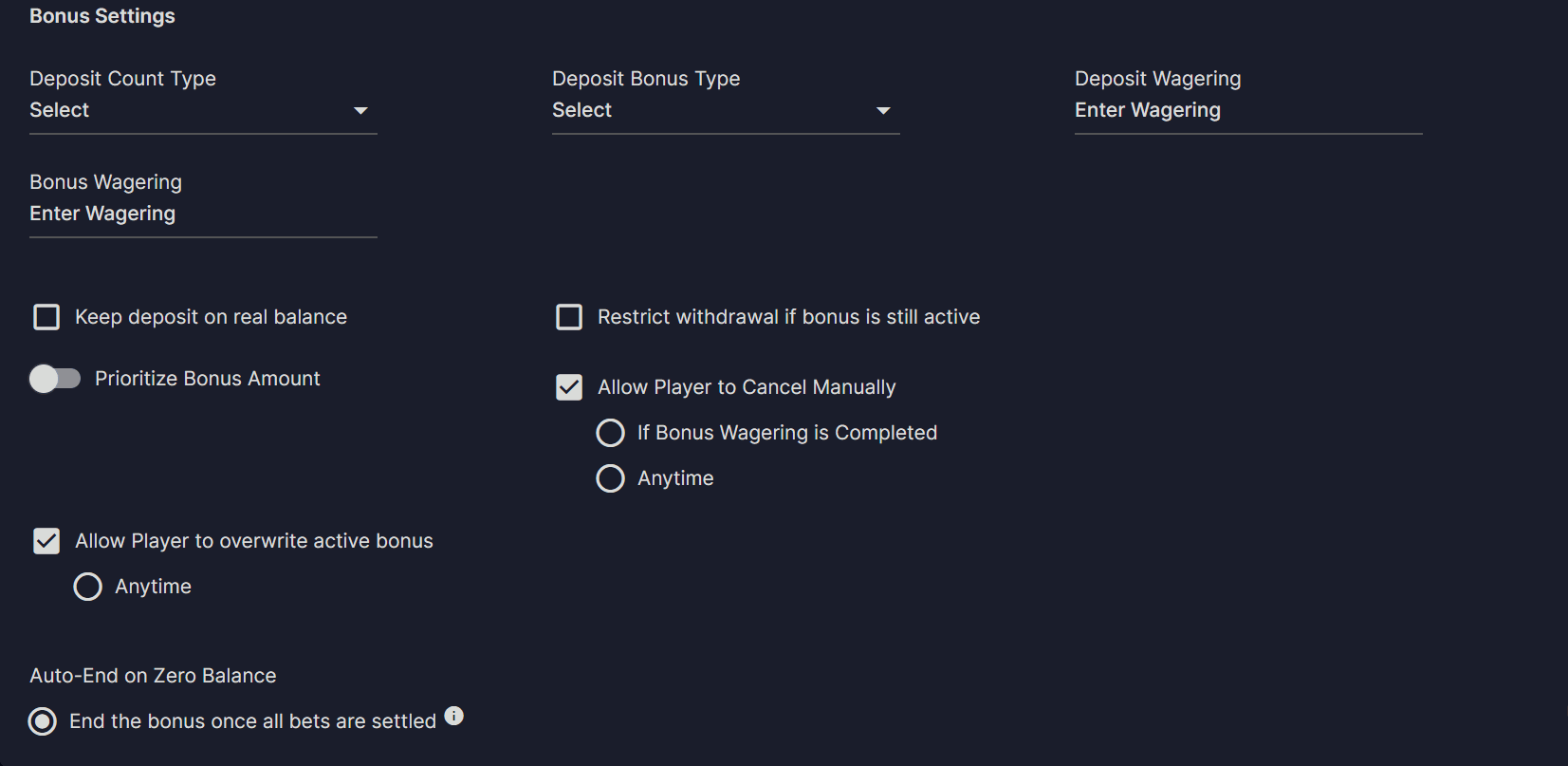
Bonus Settings
Highlights
- Changes to the Existing Bonus Setting
- A new option called “Auto-End on Zero Balance” has been added. By default, the selected option is “End the bonus once all bets are settled“.
- The option “If bonus balance is 0” has been removed from the Bonus Settings when you select both “Allow Player to overwrite active bonus” and “Allow Player to Cancel Manually”.
- Changes to the Bonus Report
- We’ve made some changes to the Bonus Report to improve clarity and reporting in Back Office.
- The “Finished” status has been replaced with “Unfulfilled”.
- You can now use a new filter to search for bonuses by the “Unfulfilled” status.
- A new “Last Modified” column has been added to the report, which shows the exact date and time when a bonus was updated to “Unfulfilled”.
- We’ve updated the Bonus Report to improve clarity for players.
- The “Finished” status in a player’s Bonus History has been replaced with “Unfulfilled”.
- We’ve made some changes to the Bonus Report to improve clarity and reporting in Back Office.
- New Dashboard Metrics
- The Sport and Casino Bonuses section now includes a new field that displays the total count of bonuses marked as “Unfulfilled,” giving you a clear overview of bonus lifecycles.
Instant Withdrawal
A new withdrawal request mode for manual bank transfers has been introduced to enhance operator convenience and streamline transaction processing. This optional feature allows operators to efficiently manage player withdrawal within a designated payment segment, reducing steps for a faster workflow while still supporting the existing process for those who prefer it.
Highlights
- Players with Payment Segment
- Withdrawal requests automatically set to Approved upon Player submission of withdrawal request.
- New statuses are skipped.
- Badge notifications is triggered for all Approved requests.
- A sound notification is triggered for Approved transactions initiated by the player.
- Paid and Rejected buttons added; Process button removed.
- Instant Withdrawal Mode – No Payment Segment & Non-Instant Withdrawal Mode
- Standard functionalities remain unchanged.
Improvements
- Enhanced Dual Mode Registration & Logo flow with redirect to the home page after completion.
- Implemented Webcompiler setup for smoother development workflow.
- Increased Promocode limit: adjusted maximum length to 20 characters.
Fixes
- Resolved issue with bonus pop-up behavior for smoother user interaction.
- Digitain: Fixed real-time balance update to reflect immediately after bets.
- Digitain: Corrected issue preventing credit bets from being processed in batch when balance is insufficient.
- All Sports: Sports ID now updates correctly when a competition changes its associated sport name.
- Fixed SMS Verified status incorrectly reverting to “No” after player information updates.
- Corrected Sports Tree error impacting navigation.
- Added missing Korean translation for Dashboard Metrics.
- Fixed wallet display issue when switching currencies in GameStage.
Version 4.59
Release Date: 2025-07-28New Feature
Enhanced Localization for Player Websites
We’re excited to announce the integration with SimpleLocalize, our new platform for streamlined translation and localization management, across all our player website brands! This enhancement significantly improves our ability to deliver more accurate and consistent language support, providing a seamless and truly localized experience for players in various regions. You can expect faster updates to language content and an overall better user experience for our international audiences.Fixes
- (Brand Specific) Fixed search bar loader when results are already available.
Version 4.58
Release Date: 2025-07-21New Feature
PMGate Deposit Payment Method
We’re excited to introduce PMGate, a newly integrated payment method designed to streamline KRW deposit transactions. Please review the following key details to ensure a smooth user experience:Highlights
- KRW Deposits Only
PMGate currently supports deposit transactions in Korean Won (KRW) exclusively. - Bank Information Requirement
Users must provide complete bank details for each deposit request. - Pop-Up Behavior
PMGate launches in a separate browser window. Ensure that the pop-up blocker is disabled to proceed with the transaction. - Timeout Protocol
If a deposit remains idle for 70 minutes, the transaction will be automatically cancelled. - Retry Option Available
A Retry button is accessible from the deposit info section in the Back Office, allowing users to verify if a timeout has occurred. - Amount Reconciliation
If the deposited amount through PMGate differs from the originally requested amount, the system will mark the transaction as Paid, based on the final amount confirmed by PMGate.
PMGate Deposit Payment Method Guidelines
As we introduce a new deposit payment method, these guidelines ensure accurate transaction processing and financial integrity.PMGate Access and Transaction Verification:
Operators are exclusively responsible for PMGate back-office management. Always verify transaction status in PMGate before making any manual updates on the back office.Corrective Action for Discrepancies:
Please adhere to the following procedures in the rare event of a discrepancy between the Winka platform and PMGate:Scenario 1: Incorrectly Marked as ‘Paid’ (but not processed in PMGate)- Immediately disabling the player’s capability for betting and withdrawal transactions.
- Manually adjust the player’s wallet to reflect the correct amount.
- Communicate with the player to create a new manual bank deposit transaction with the same details and process as ‘Paid’.
Gaming Platform Support Scope:
Our support team assists with technical defects within the Winka platform. Issues or discrepancies arising from PMGate operations or manual operator errors are outside this scope.Following these guidelines will help us minimize issues and ensure seamless transactions.Thank you for your continued diligence and cooperation.Improvements
- Streamlined Player Site Performance
Removed duplicate system requests to improve website responsiveness. - Faster Game Searches
Optimized game search feature for quicker results and smoother user experience. - Enhanced PartnerMatrix Reporting
Bets with cashout status are now included in PartnerMatrix data for improved transparency.
Fixes
- Komp Points Now Credited
Resolved issue where komp points were not properly credited to players. - Stable Segment Management Filters
Fixed disappearing filters when managing multiple players. - Referrals Date Filter Restored
Corrected broken date filter in the player site’s referrals page for accurate reporting
Version 4.57
Release Date: 2025-07-01Improvements
Referral: Daily Period Calculation
- Credit bets made within qualification period
- Improved Transparency in Commission Reporting
Monthly Reports
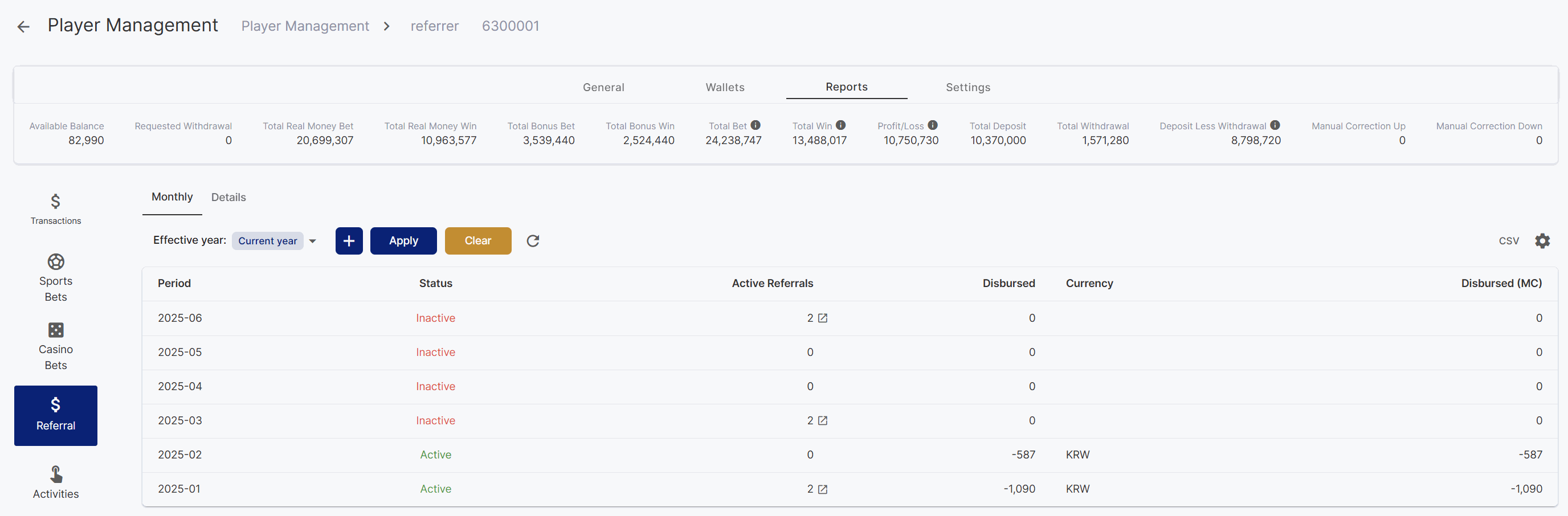
Monthly Period Referral Reports
Daily Reports
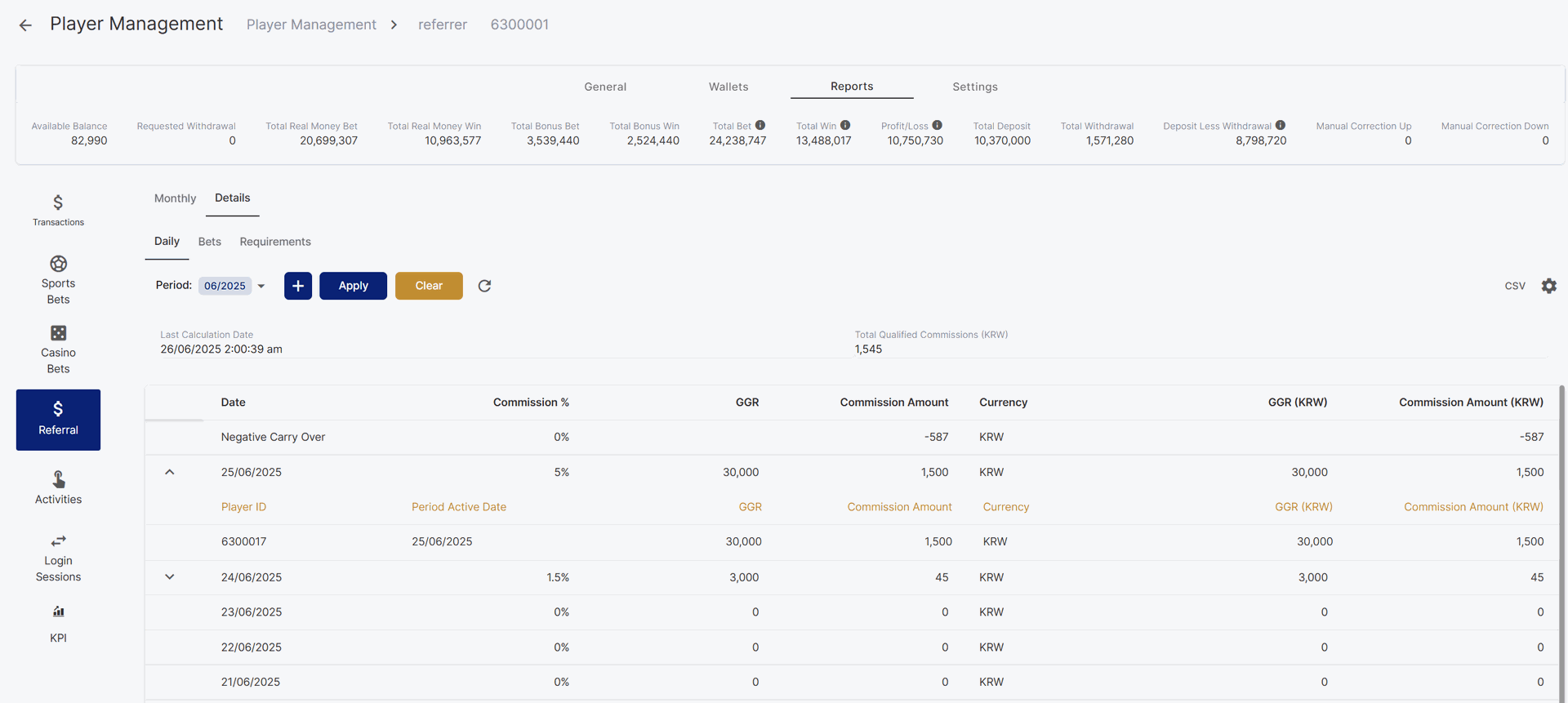
Daily Period Referral Reports
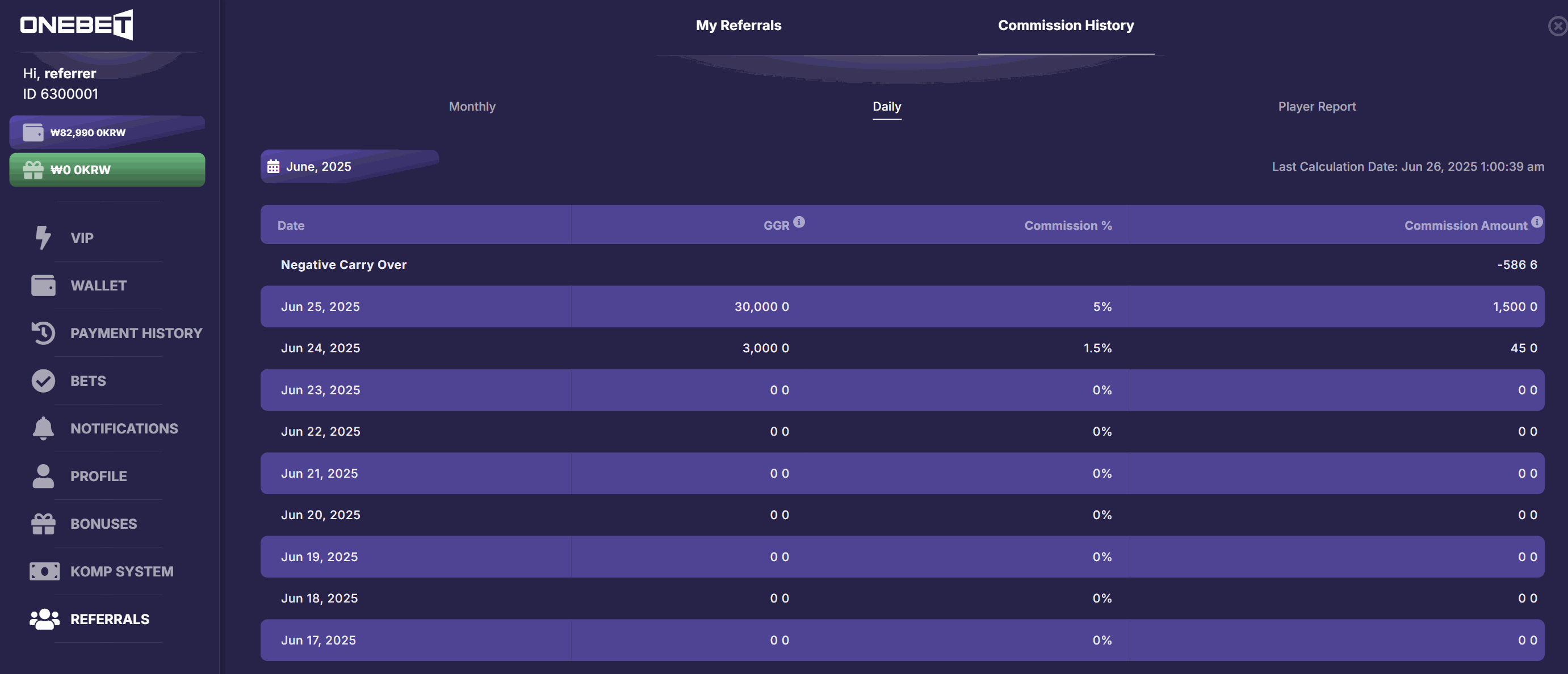
Player view of Daily Commission History
- If there are bets placed for the day, but no referrals meet the qualification criteria, the commission percentage displayed will default to the lowest rate defined in the active referral count tier of the player’s Commission Plan.
- If a referral becomes qualified at a later date and the configured minimum active referral count is reached, commission amounts will be retrospectively applied to any previously unqualified days within the same period.
Bet Reports
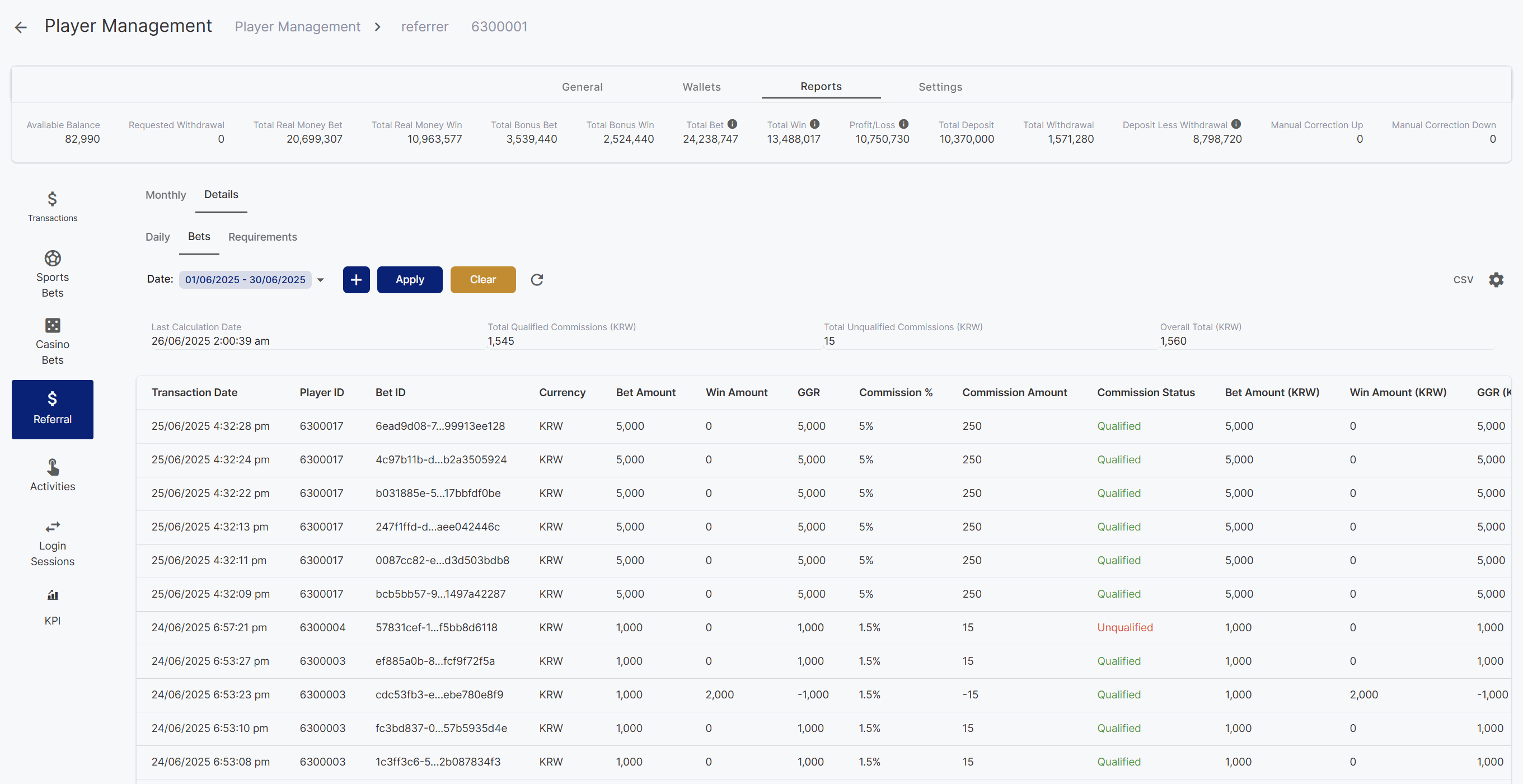
Referral Bet Reports
Requirements Report
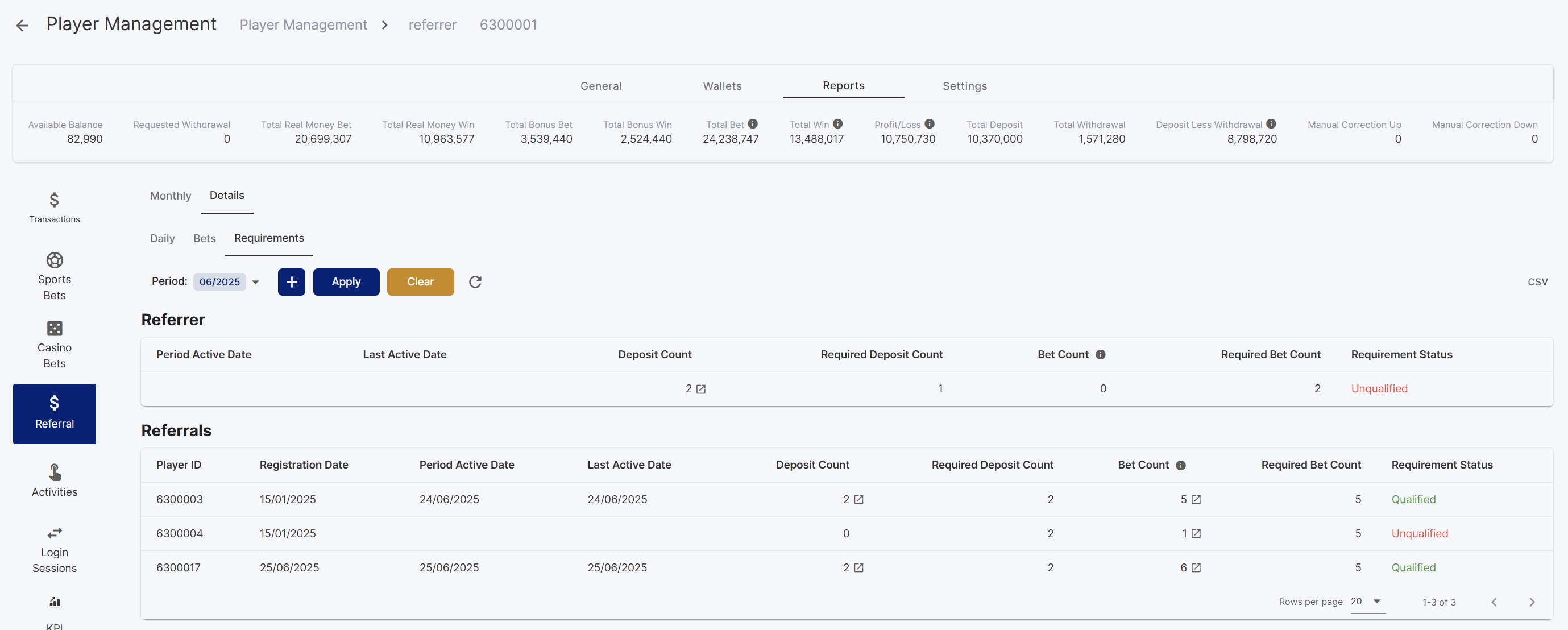
Referral Requirements Report
Fixes
- Fixed error handling of pop-ups
- Support Digitain BetBuilder
- Added a rollback mechanism when an error occurs during deposit processing
- Fixed player management finance summary display due to numeric precision handling
- Fixed cryptocurrency deposit processing
- Change operation type of partial cashout to cashout
- Fixed deposit bonus claiming for players with duplicate username
Version 4.55
**Release Date:**2025-06-02New Feature
Command Palette: Bets
This release introduces an enhanced Command Palette for Sportsbook and Casino bet search, enabling operators to swiftly locate specific bets using shortcut commands and instant result previews, improving operational efficiency and reducing search time.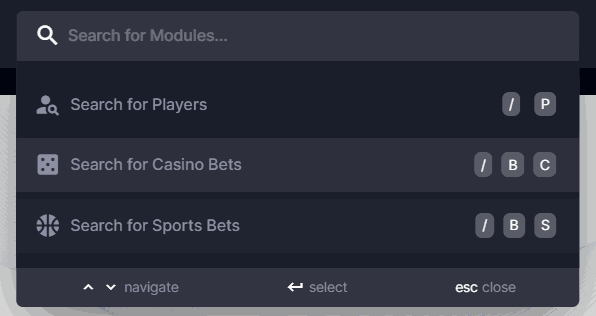
Command Palette when opened and clicked
Casino Bet Search
To quickly search for casino bets, type in/ B C then search using the Player ID, Bet ID or Provider Transaction ID.

Casino Search Result
Sports Bet Search
To quickly search for casino bets, type in/ B S then search using the Player ID, Username, Bet ID, External ID (only exact match search)

Sports Search Result
Additional Improvements
- The Shortcut Key for Player search has been changed from
Uto/ P
Version 4.54
Release Date: May 26, 2025New Feature
Game Credit
A new feature is available for new brand operators to help monitor and manage the Game Credit balance. This feature ensures sufficient funds to cover the player’s bet, which can help the operators control their expenses and provider costs.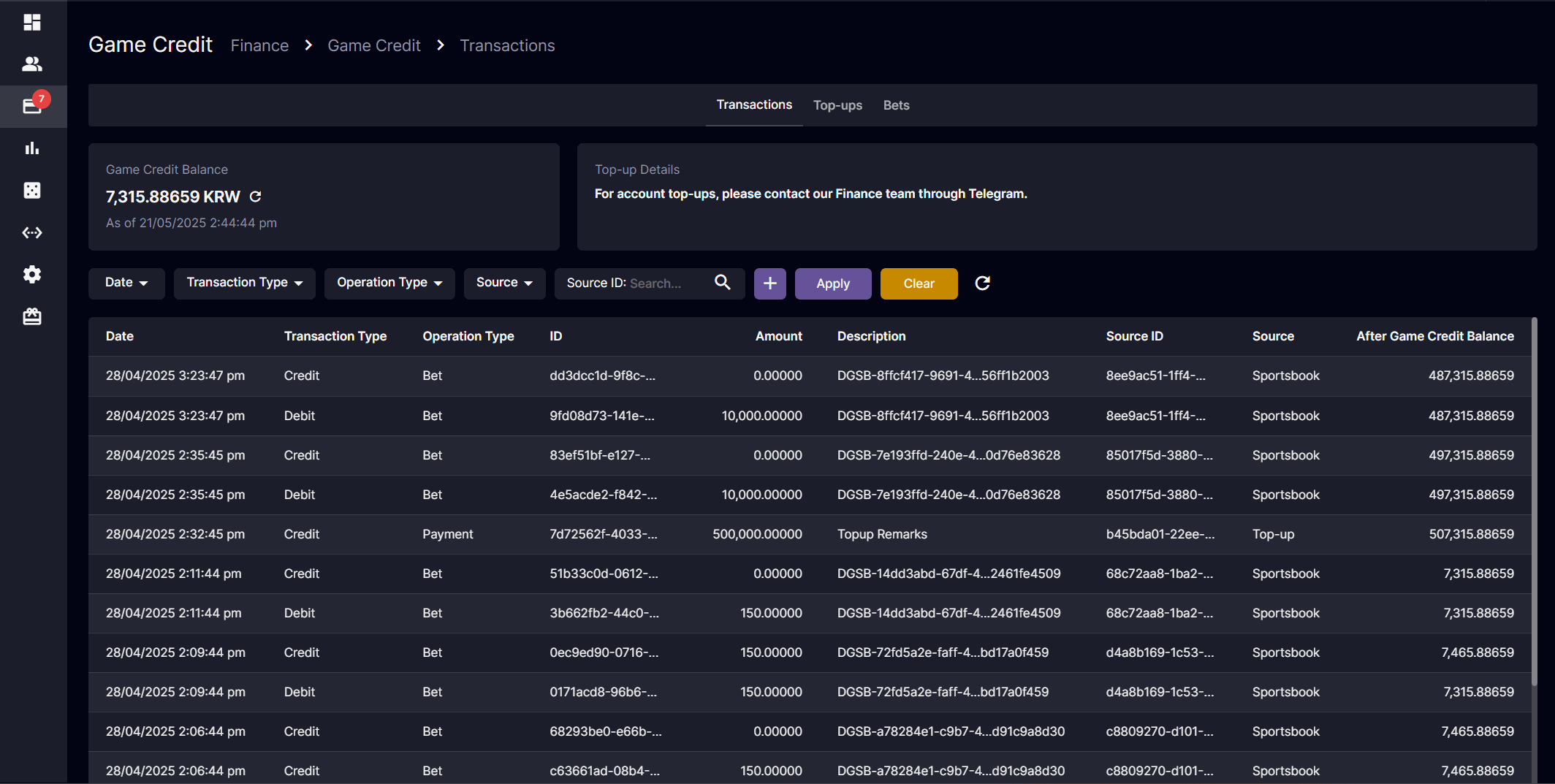
- Game Credit Balance Card: Easily track available Game Credit Balance. Click the refresh button or reload the page to get the updated Game Credit balance.
- After Game Credit Balance: To view the Game Credit Balance after each transaction in the dedicated column.
- Transaction Tab: Display all the activities that affect the Game Credit Balance
- Top-ups Tab: Monitors the top-up and adjustment activities.
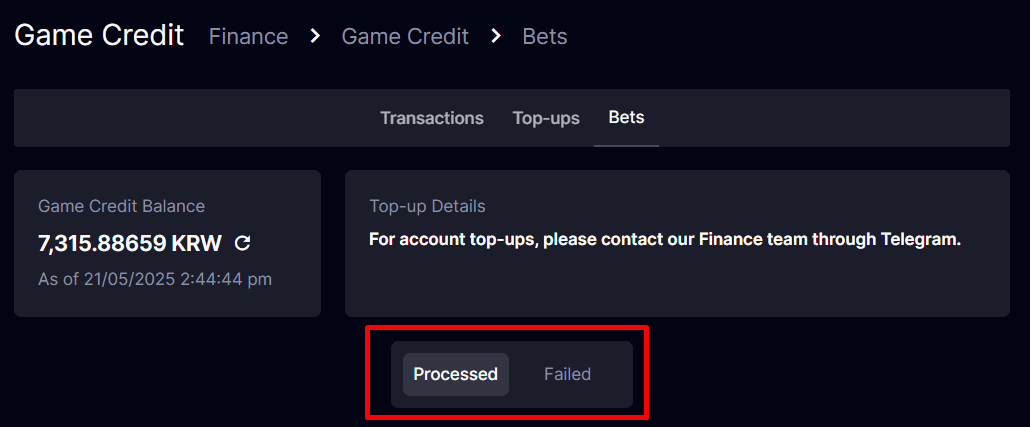
- Bets Tab: View of all bet-related transactions affecting the Game Credit Balance.
- Processed Tab: List of successful Bet Transactions
- Failed Tab: List of failed bet transactions due to insufficient Game Credit.
- Filters: Locates the specific records by using the filter.
- Notification Sound: A sound alert will notify the logged-in operator when the low balance limit is reached.
- Snack bar: A snack bar will appear when the balance is low. If the snack bar is closed, it will still be shown under the High Risk Bets.

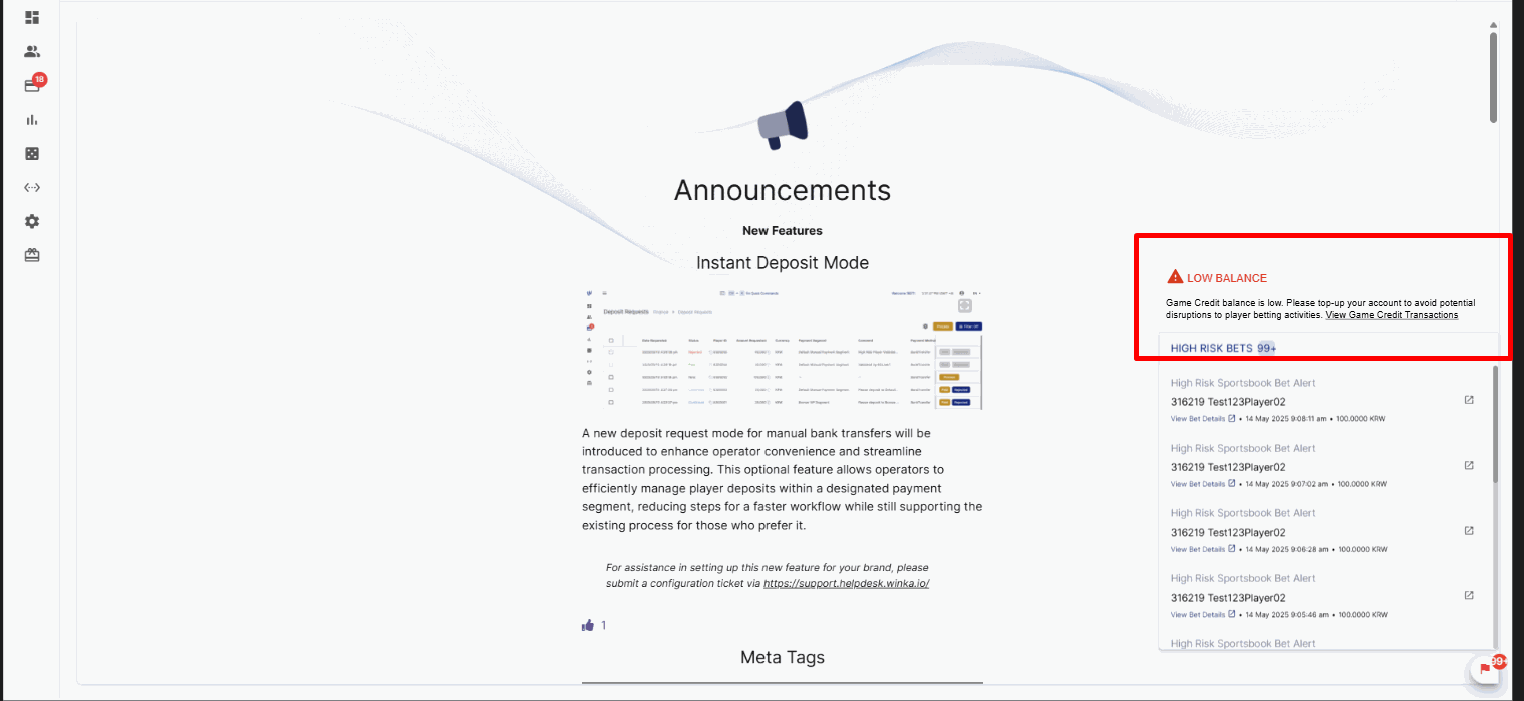
Low Balance - High Risk Bets
Version 4.53
Release Date: 2025-05-13New Feature
Instant Deposit Mode
A new deposit request mode for manual bank transfers has been introduced to enhance operator convenience and streamline transaction processing. This optional feature allows operators to efficiently manage player deposits within a designated payment segment, reducing steps for a faster workflow while still supporting the existing process for those who prefer it.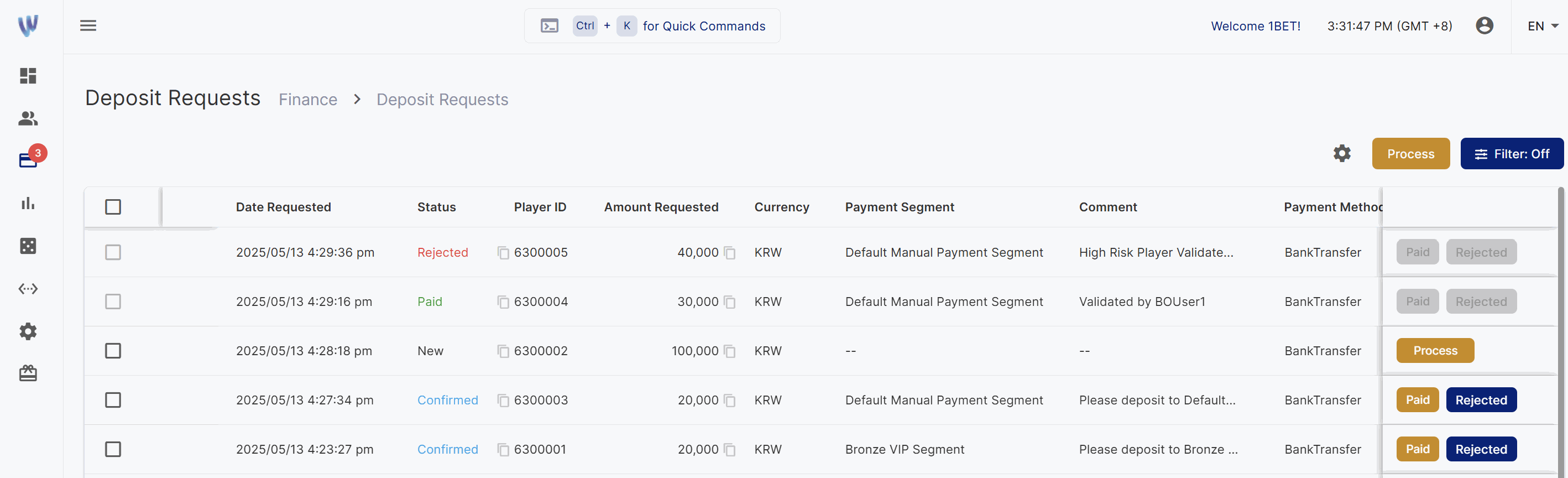
- Players with Payment Segment
- Deposit requests automatically set to Confirmed upon Player submission of deposit request.
- New and Answered statuses are skipped.
- Badge and sound notifications triggered for Confirmed requests.
- Paid and Rejected buttons added; Process button removed.
- Instant Deposit Mode – No Payment Segment & Non-Instant Deposit Mode
- Standard functionalities remain unchanged.
Additional Improvements
- Website Message field limited to 1,200 characters.
- Expandable comment column for easier review.
- Send SMS Message placeholder updated to “Enter Message.”
- Answered option removed from Action dropdown when Confirmed or Answered is selected in multi-processing.
Version 4.52
Release Date: 2025-05-13Improvements
Meta Tags
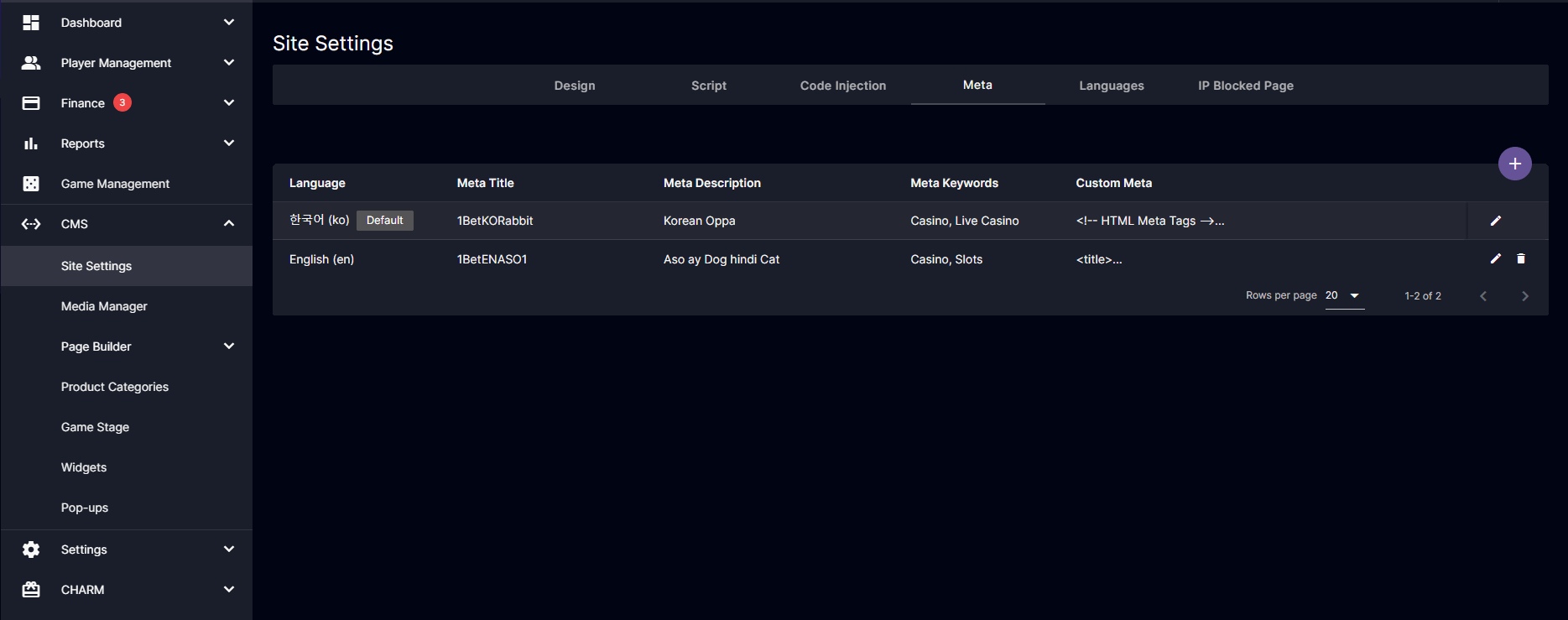
CMS > Site Settings > Meta
- Add Button – Allows Back Office Operators to add a new meta configuration.
- Edit Button – Enables editing of existing metadata, including Meta Title, Meta Description, Meta Keywords, Custom Meta, and the “Set as default” checkbox ( for non-default meta ).
- Delete Button – Let the Back Office Operators delete any non-default meta entries.
“Set as default” Feature
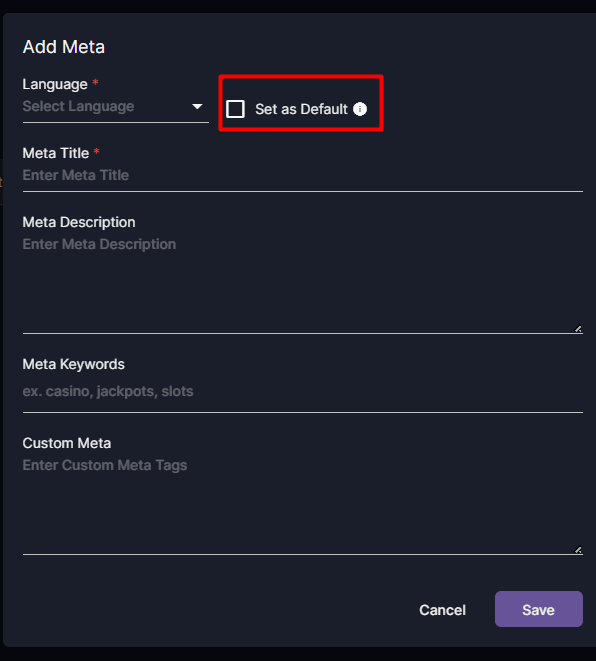
Add Meta Pop-Up Form
- The system now detects the player’s search language to serve relevant meta tags.
- Suppose the player’s language cannot be detected (e.g., due to browser, device limitations, or the language is not configured in the back office). In that case, the system will automatically fall back to the default meta tag language configured in the back office.
Custom Meta Feature
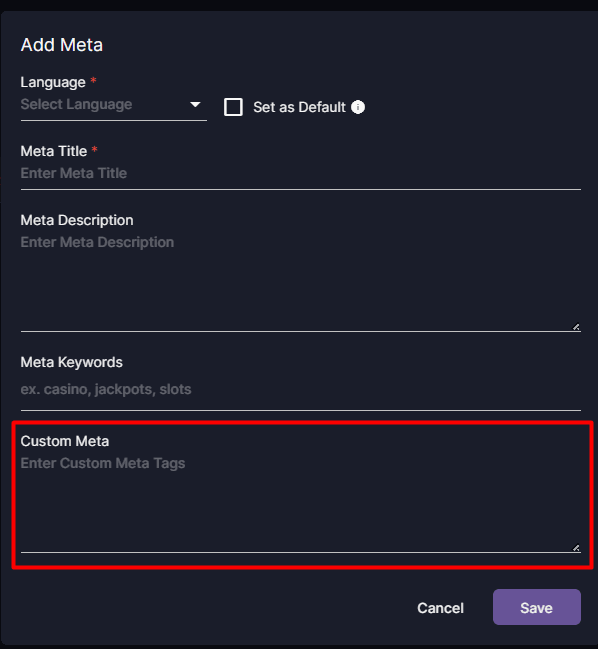
Add Meta Pop-up Form
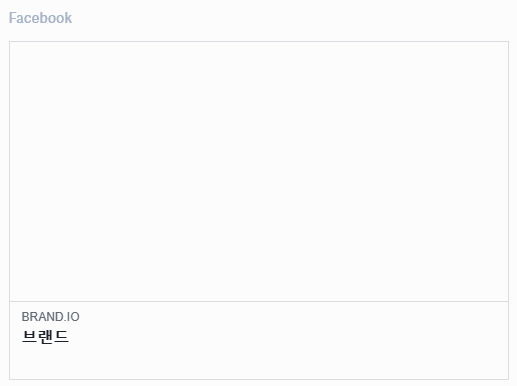
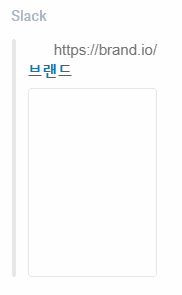
og:site_name.
- Back office operators can now set the site name in the back office, which will appear in social media link previews.
- Ensures a uniform brand presence when links are shared across platforms like Facebook, X (Twitter), and Telegram.
 Facebook
 Slack
Slack
Fixes
- Fixed the problem where the downloaded CSV still contained the filtered data even after the filter had been cleared.
- Resolve incorrect column mapping for data item values for VIP Rakeback Reports
- Fixed logic for saving the column settings of reports table
- Exclude the audit log data table in caching
- Fixed uncredited winnings for succeeding requests
- Fixed router pushing to concatenating path
- Fixed Microgaming free spin cashback issue
- Fixed system auto-disable of capabilities timing of trigger
- Fixed player menu missing slug
Version 4.51
Release Date: 2025-04-21New Feature
Risk Management: Notification for Big Bets
An optional notification feature designed to alert users when substantial single bets are placed, helping to mitigate potential losses from suspected high-risk players.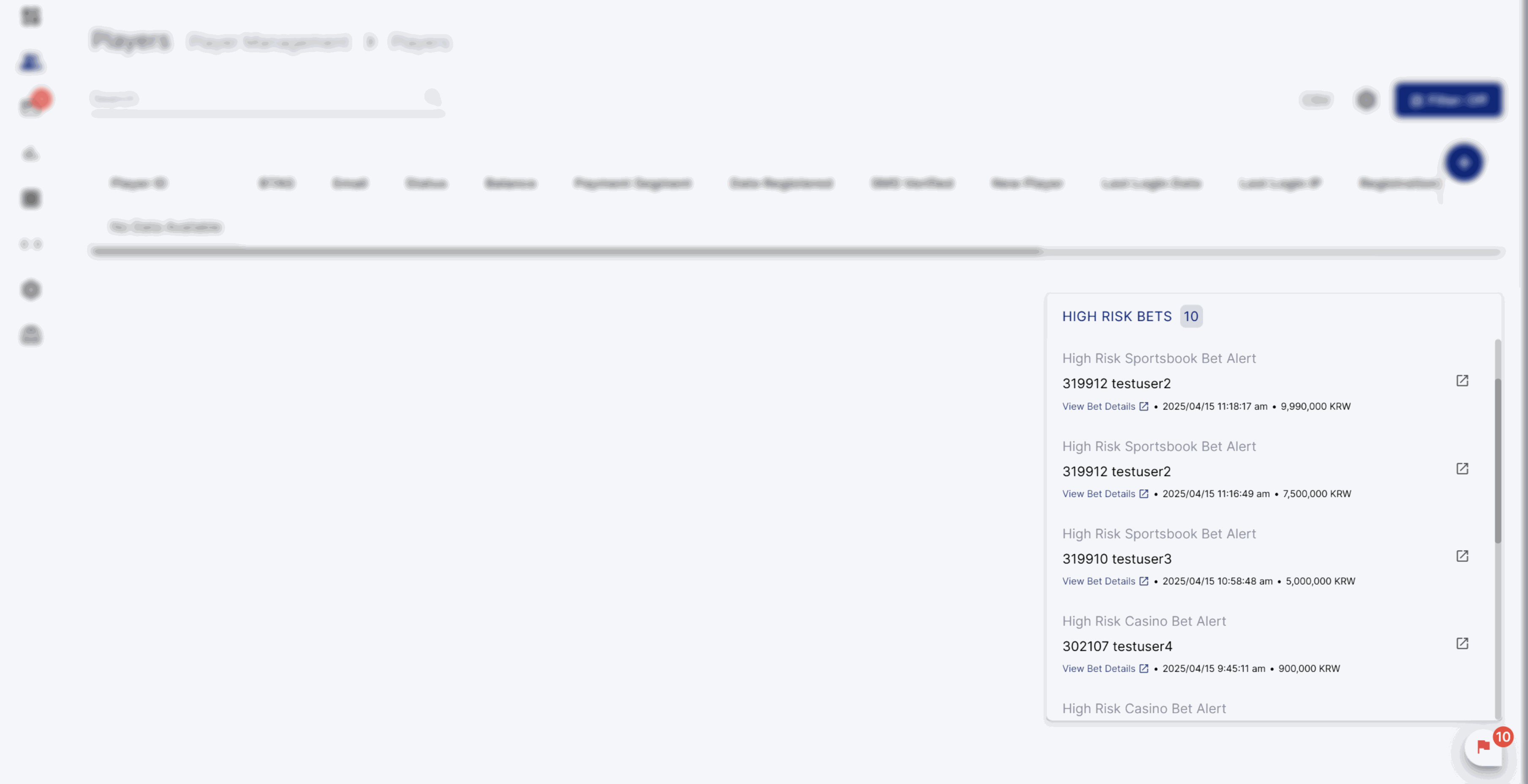 The following settings can be configured for your brand upon request:
- Minimum Bet Amount: Set the lowest bet amount that will trigger a notification to back office users when a player places a high bet (based on the operator’s currency).
- Bet Type: Choose if this is for Casino or Sports (Provide corresponding Minimum Bet Amount per Bet Type)
Note: For Casino, the minimum bet amount is logged based on settled bets. For Sports, it is logged based on open bets.
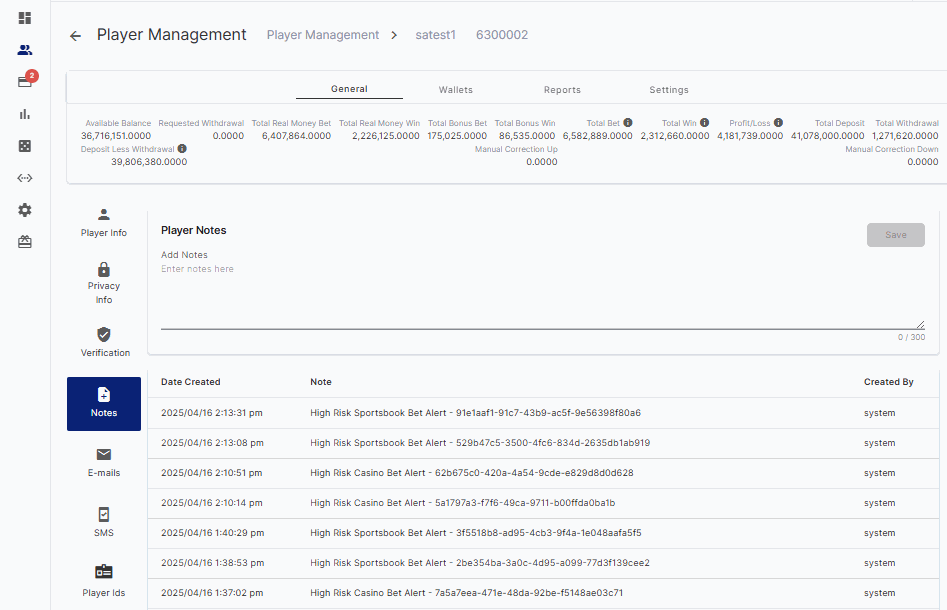
System triggered Player Notes
Risk Management: Auto-disable Capabilities
An optional feature allows the automatic disabling of a player’s capabilities if there are no betting activities within a configured timeframe following a deposit. This aims to reduce potential risks associated with high-risk players and prevent financial losses. The following settings can be configured for your brand upon request:- Minimum Deposit Amount: Set the smallest deposit amount that will mark a player for the watchlist.
- Idle Time (in minutes): Set how long a player can stay inactive before their features are turned off.
Note: The idle time countdown begins as soon as the deposit request has been marked as Paid. - Bet Type: Choose if this is for Casino, Sports, or Both (Select only one)
Note: If “Both” is selected, a player can place bets on either Casino or Sports to avoid being included in the list of players whose capabilities will be disabled due to inactivity. - Disable Features: Pick which features to turn off when the player is inactive.
Note: Future updates will include additional feature options to disable.- Can Bet
- Can Withdraw
- Can Earn Sports Bonus
- Can Earn Casino Bonus
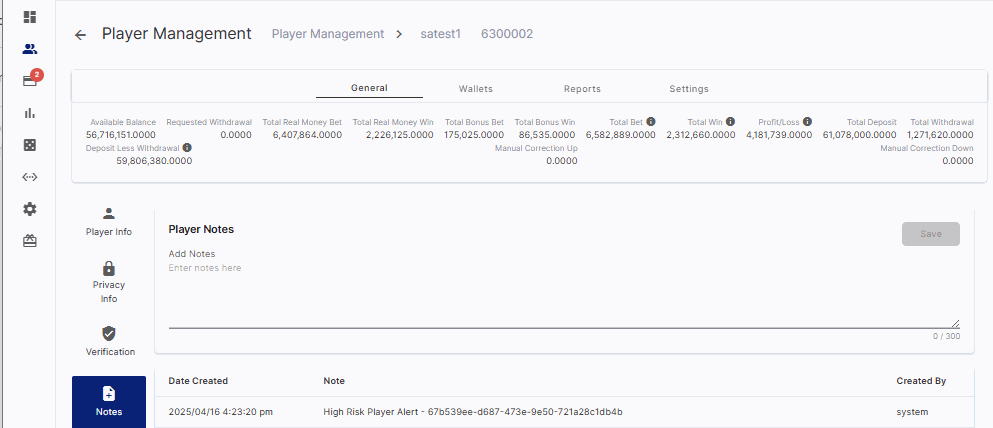
System triggered Player Notes
Fixes
- Security patch
- Fixed column content alignment when updating column arrangement of data tables in the back office
- Fixed player notification message rendering
- Fixed category filter for Player Game Report
Version 4.50
Release Date: 2025-04-14New Feature
Back Office Browser Storage Caching
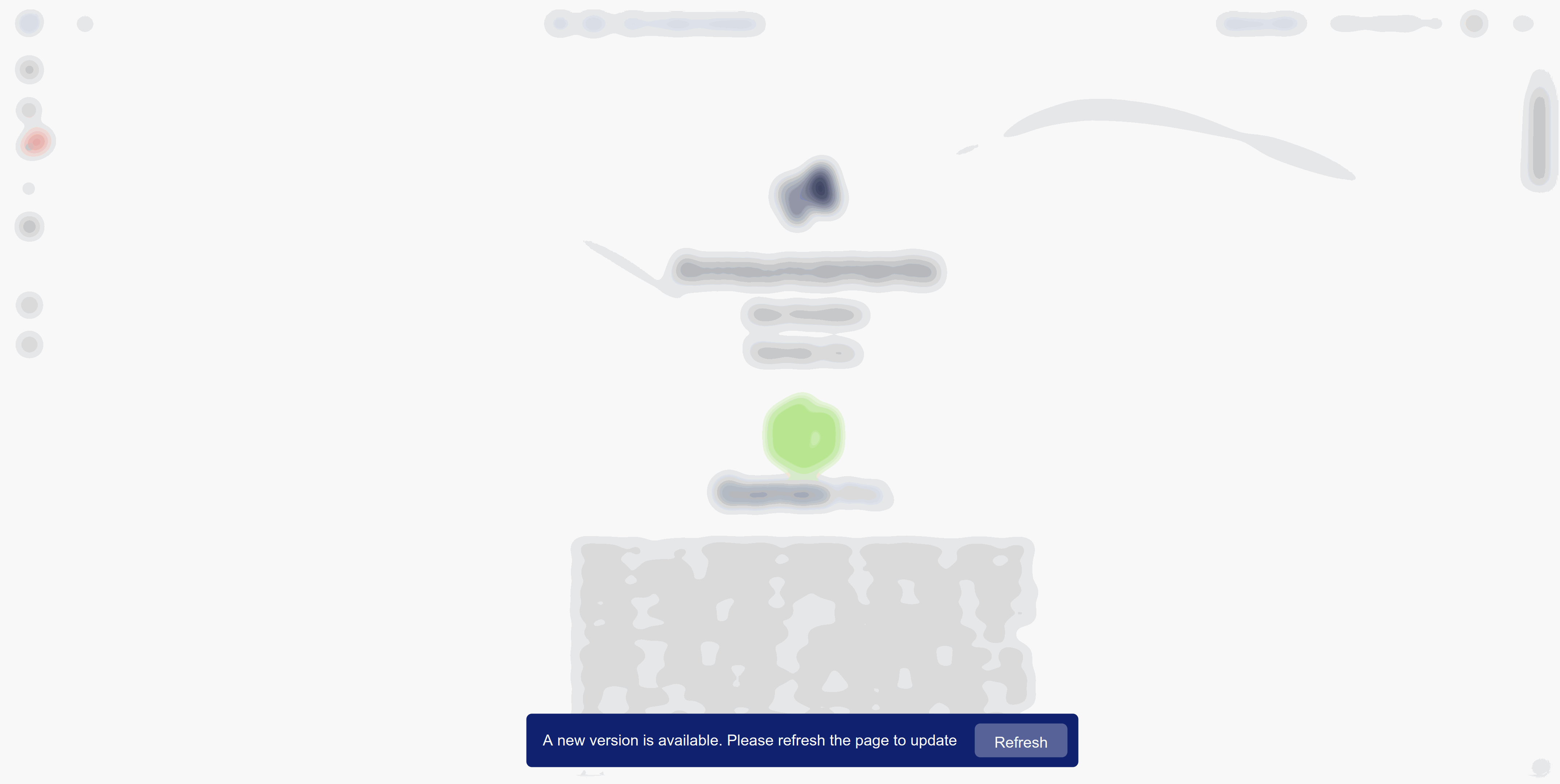 With smarter caching and file size reduction, you’ll experience faster webpage storage and loading. This means quicker access on your first visit and even smoother performance on subsequent visits. Whenever there is a system update, you will receive a notification to refresh cached data. This ensures that you are always using the most recent version, complete with the latest features.
Improvements
- (Mobile) Automatically close Left or Right Panel when clicked/touched outside of the panel
- (Mobile) Collapsible bonus description
- Change “Cancel” button to Close icon button for tournament disbursement
- Remove “Provider” from search bar
- Disable “This website uses audio to play notification sounds” when in the player info page
- Add the VIP level in the account info of the Player details
- Add “Totals” in the downloaded csv file for Player management bet reports
- Code enhancement for generating csv files
- Set time zone to operator’s time zone when no custom preference is set
- Separate Span tag for amount and currency
- Improvement on sports tournament game list display
- New SMS Provider: Dynamic Messaging
- Update menu widget functionalities
- Removed Load Behavior in the CMS Menu settings
- Identify when the menu widget item is the active page in the player website
Fixes
- Fixed bonus settings reload count database saving when not applicable
- Fixed CMS page Access and Status functionality
- Fixed message template notification language
- Code efficiency update
- Fixed payment segment setup saving
- Fixed user permission for CHARM Referral module
- Fixed accordion type in the CMS Menu settings
Version 4.49
Release Date: 2025-03-24Improvements
Audit Log: Filter
Effortlessly filter audit log table data with our enhanced filter UI, designed to conveniently display the applied filter criteria. This functionality will soon extend to other existing filters, ensuring a consistent and streamlined experience across the system.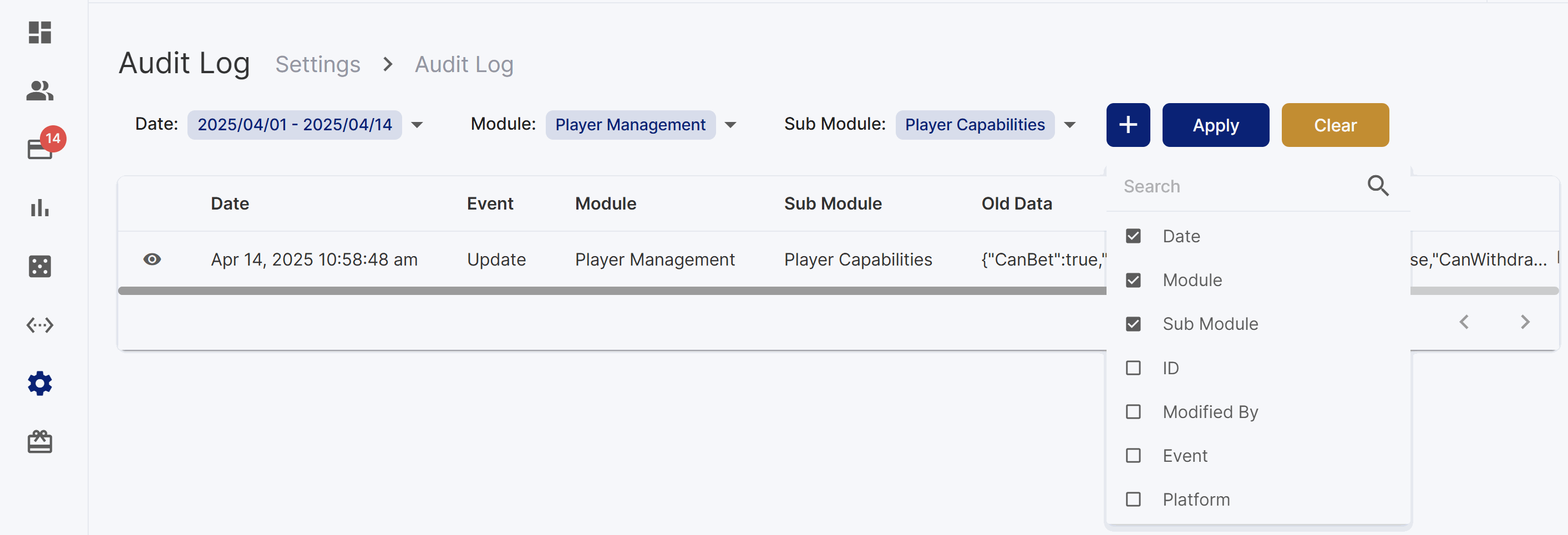
Fixes
- Fixed “After auto login” registration settings behavior.
- Fixed withdrawal request functionality when an error was encountered prior to the request.
- Translation update
- Technical maintenance
- Fixed cashback provider filter
- Fixed first date of the week that affected weekly limits
- Microgaming code maintenance
- Code efficiency update
Version 4.48
Release Date: 2025-03-18New Feature
Audit Log: Player Capabilities
Record website events to track user activity for security and accountability.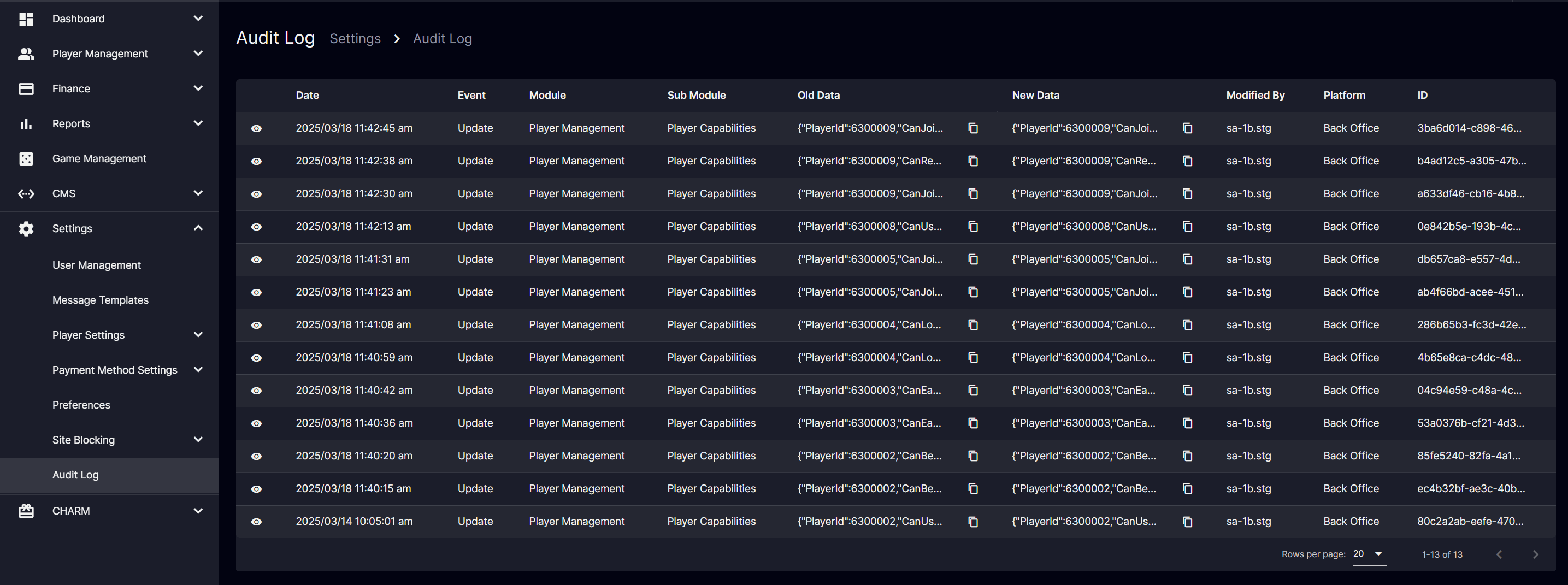 In the coming months, the audit log will undergo further enhancements to better support your operational needs. These improvements will include filtering options and the addition of new audit modules to track a broader range of activities. These updates are designed to ensure better oversight and control.
Improvements
- Deposit and withdrawal request modules now feature a collapsible and expandable account number for enhanced accessibility.
Fixes
- Fixed deposit bonus schedule field. set as required
- Fixed metrics withdrawals to only include Paid withdrawals
- Crypto payment translation
- Fixed real money Komp request error message to include minimum redemption amount requirement
- Fixed logged in and logout display for Komp Page
Version 4.47
Release Date: 2025-03-11New Feature
Command Palette
Effortlessly search across all pages using intuitive keyboard shortcuts.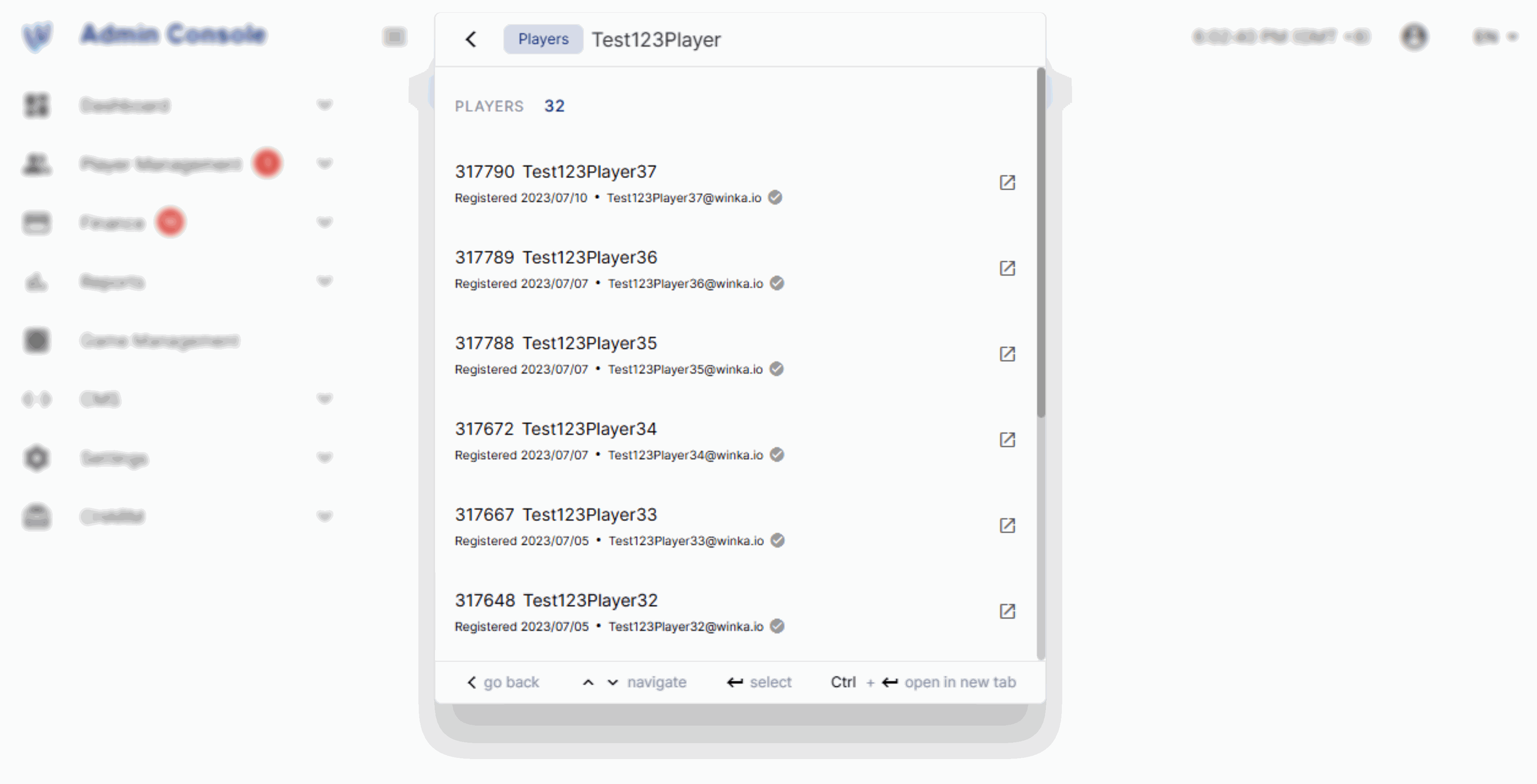

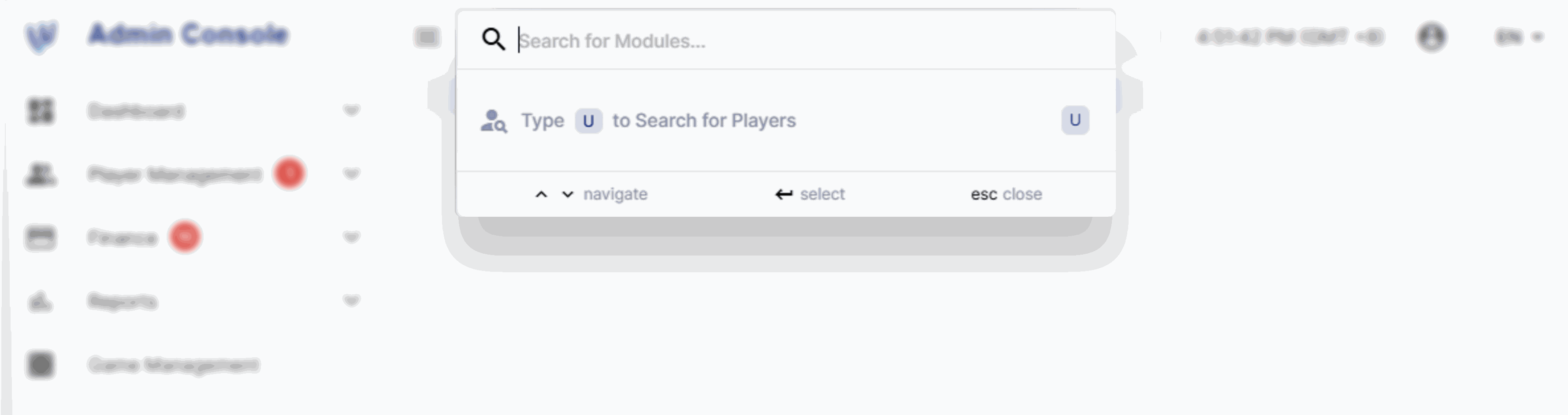 Access the command palette by pressing Ctrl + K (⌘ + K on Mac) or clicking the search bar and typing “U”. This feature is available to users with access to the Player Management > Players module. Future updates are planned to expand this feature with additional search options and action capabilities, further streamlining operations and boosting efficiency.
Integration
Provider Lobbies



 Four new casino lobbies: Evolution, Pragmatic Play, Microgaming, and Imagine Live. Each lobby offers unique features such as Evolution’s AI-powered Smart Lobby, Pragmatic Play’s VIP Tables, Microgaming’s mobile-oriented live dealer, and Imagine Live’s Robot Arm Camera.
Improvements
(Brand Specific) Payment History Shortcut
Added a shortcut to the transaction history page that is filtered for current date, deposit and withdrawal transactions.Fixes
- (Brand Specific) Fixed bonus pop-up function
- Fixed Komp points real money redemption limit
- Applied decimal preference precision to notification template messages
- Fixed referral commission reports display
- Translation update
- Fixed Bonus Game Settings where selecting either Casino or Live Casino will only allow bonus betting for selected Game Type. Betting on a game where corresponding Casino Game Type was not selected will show a generic error message.
- Reset registration field input on close
- Fixed finance notification badge for cryptostatic
- Caching fix for provider list
- Kick cache for can bet upon saving
Version 4.46
Provider Integration
Microgaming
 Microgaming’s extensive library of over 500 high-quality games will be available on our platform. Known for its pioneering role in the online gaming industry and innovative game design, Microgaming offers players a wide selection of popular slots and table games, enhancing their gaming experience with more variety and excitement.
Imagine Live
 Imagine Live offers a standout live casino experience with advanced Robot Arm Technology, innovative game features, and high-quality gaming. Players will enjoy over 30% faster load times compared to other platforms, alongside customizable bet limits and multilingual interfaces for a seamless and engaging experience.
Version 4.45
Release Date: 2025-02-24Improvements
Browser Storage Caching
Our system now uses advanced caching techniques and file size minification to enhance the efficiency of webpage storage locally and loading. As a result, players will experience significantly reduced loading times on their first visit and even faster on subsequent visits. Additionally, a prompt will appear to refresh the cached browser data whenever a new update is available, ensuring players are using the most recent version.Product Categories Widget for Casino Groups
Cater additional product category type “conditional” that will display the product category global widget depending on the game type of the page slug.Date Format Preference
A YYYY/MM/DD date format has been added as an option in the back office.Tournament Casino Bet Link
We’ve added a clickable button in the tournament game’s bet details that can take players straight to the casino game.Loader Display
Gradual transparency for the loader display to show content preview while the page is still loading.Provider Filter Custom Sort
Enable custom sorting of provider list as filter in the game stage to prioritize operator’s preferred providers.Fixes
- Removed PayKo/MGate
- Fixed BTi Odds Widget dots carousel behavior
- Relum code efficiency improvement
- Added a loader for Digitain Sportsbook
- Korean translation update
- Fixed browser uncaught type error when scrolling and clicking
- Update ClusterAlpha settings to decrease cache time to live from 1 day to 5 minutes
- Fixed duplicate paid deposit
- Fixed cashback assignment
Version 4.44
Release Date: 2025-02-10Improvements
Messaging Features
Customize messages for SMS and website notifications for payment segments, access historical SMS data per player for better tracking, and send individual SMS messages directly from the Player Management page. These enhancements are designed to streamline your communication. Customizable Messaging Configure different messages for SMS and website notifications in the Payment Segment Automatic Message.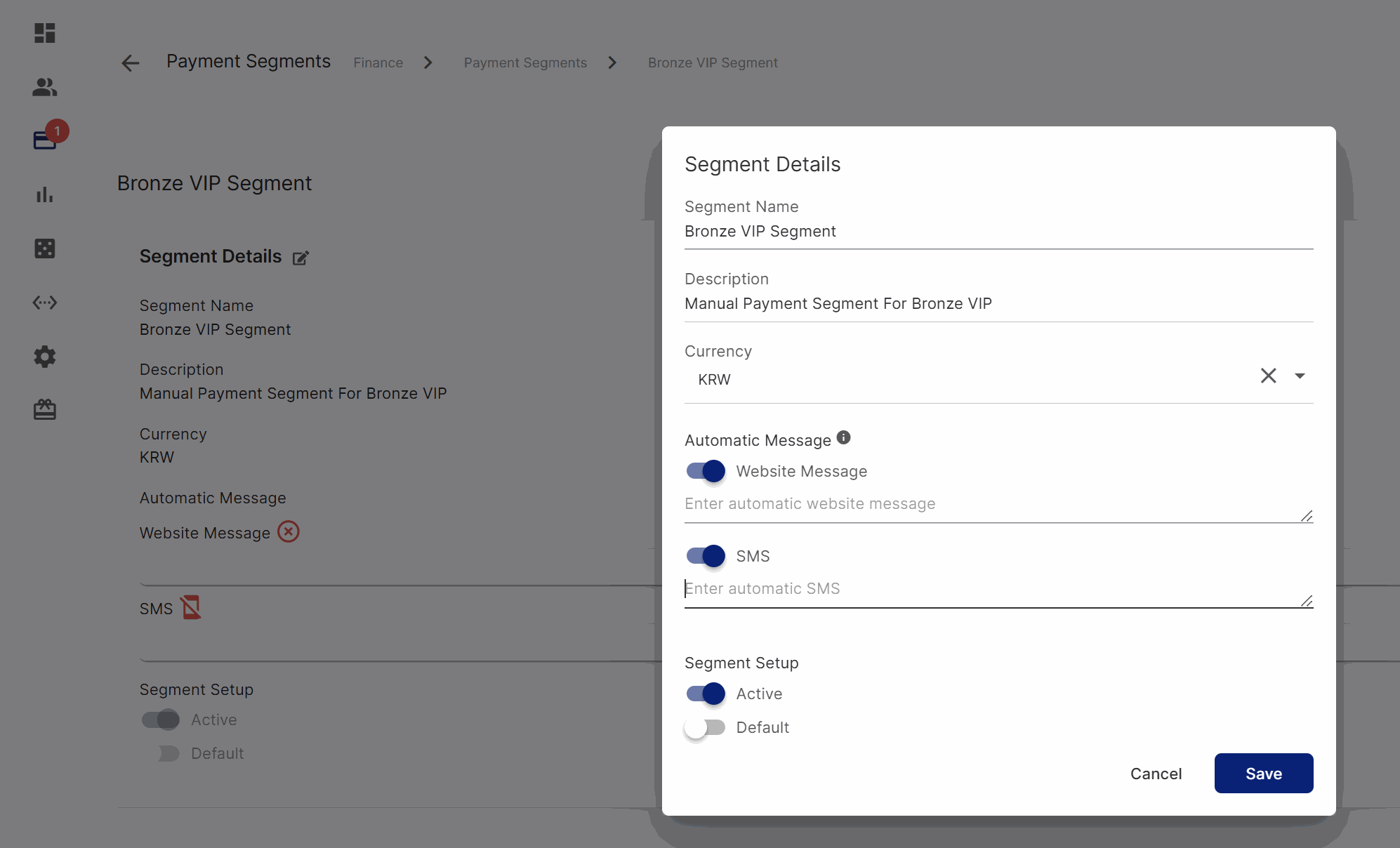
Payment Segment page
Historical Data Access
Access the historical data of SMS messages sent to players for better tracking.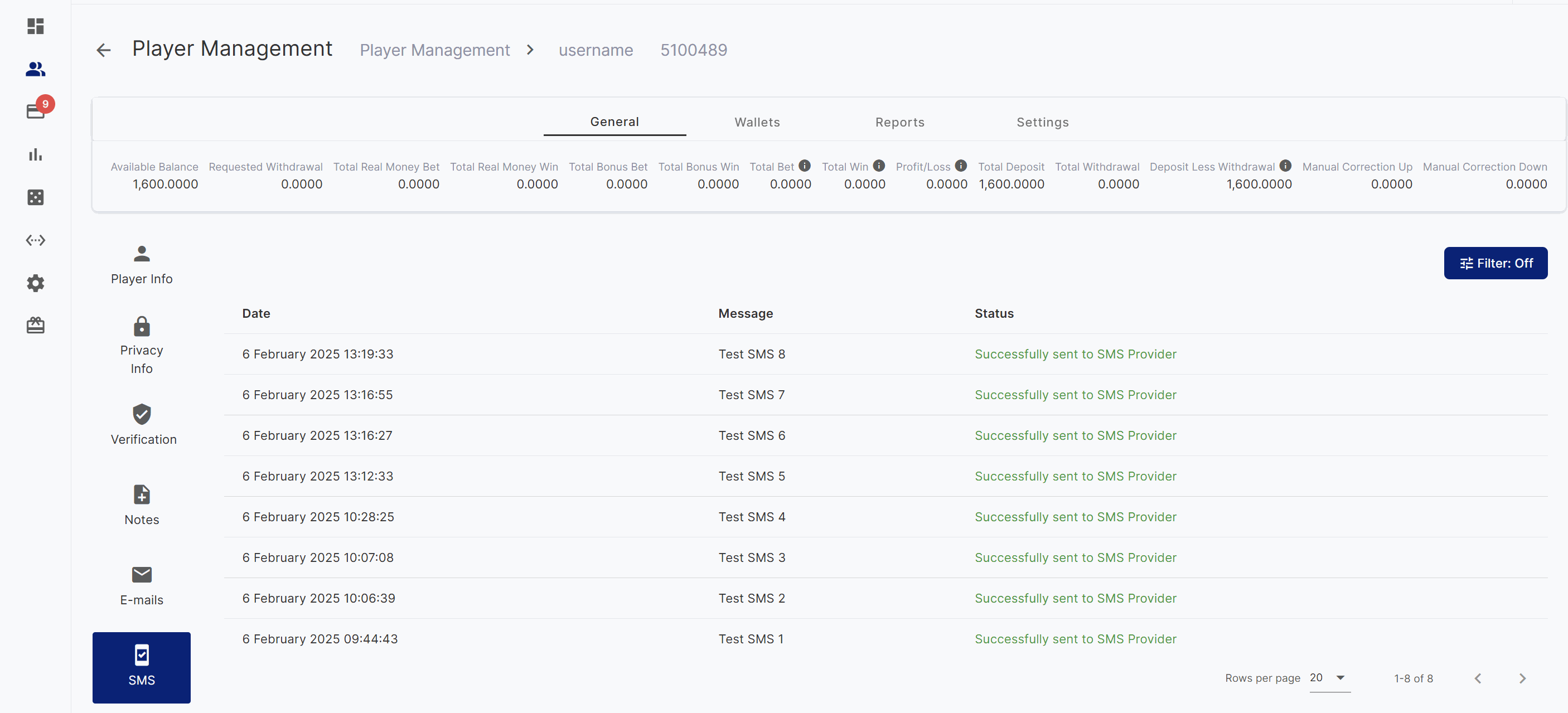
Player Management SMS page
Individual SMS Sending
Send individual SMS messages to players directly through the Player Management page for personalized communication.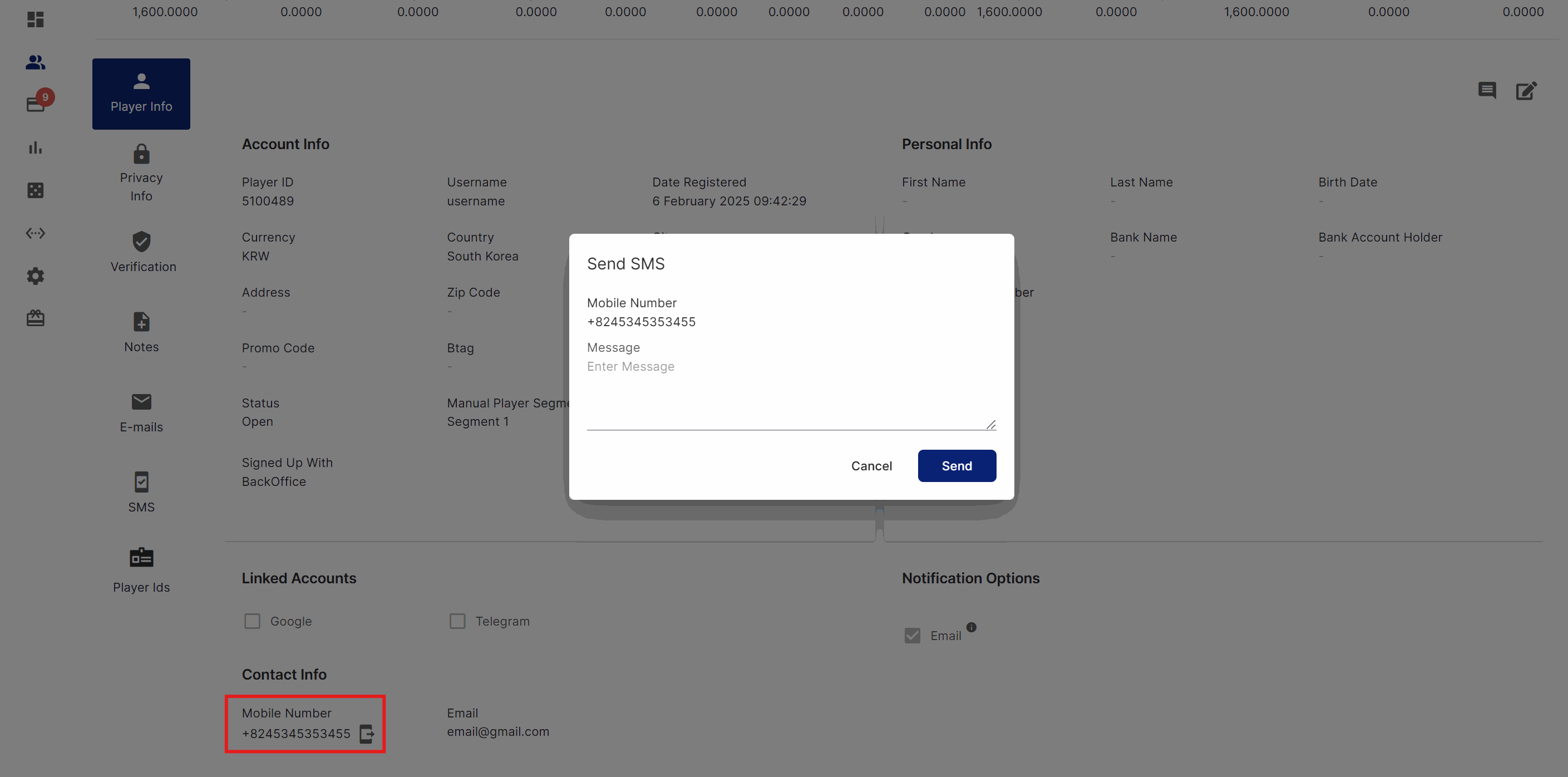
Player Management Player Info page
Referred Players
Improved BO Referred Players table by including a clickable link to corresponding PlayerID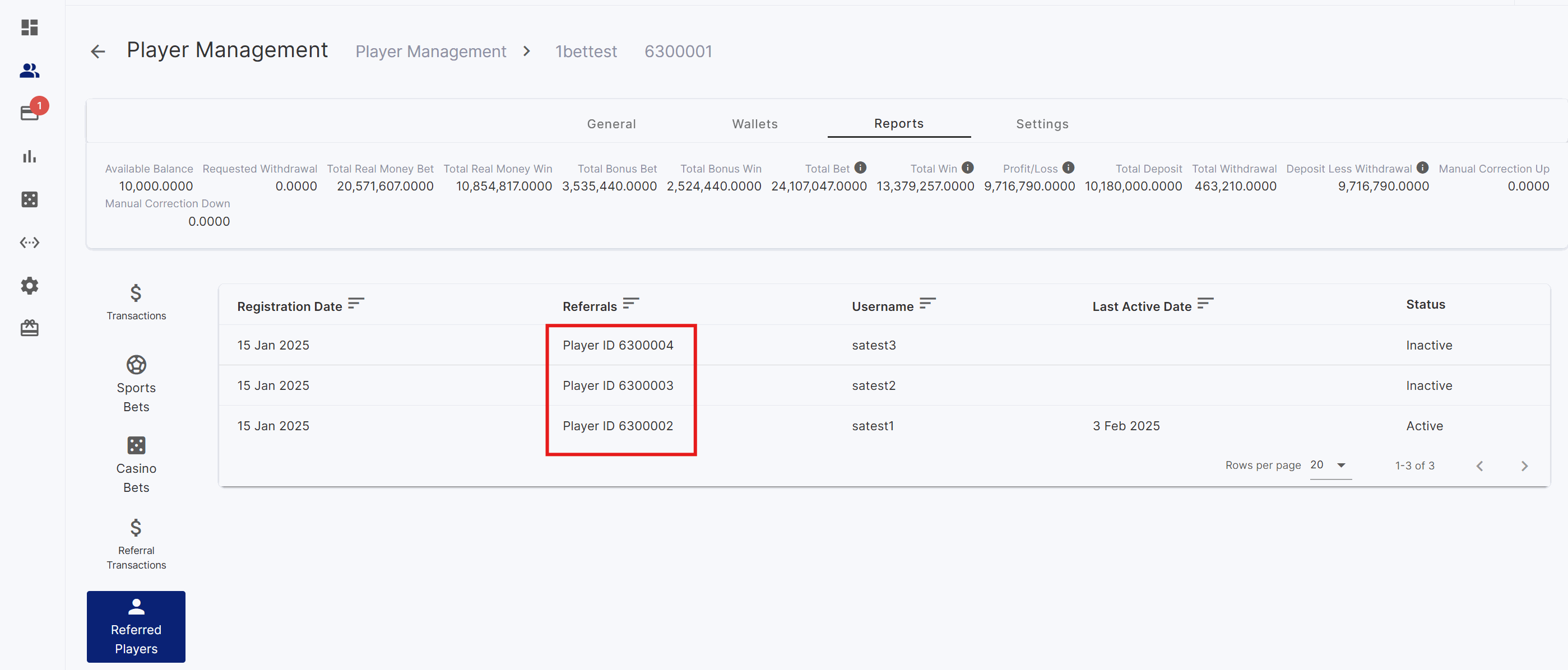
Referred Player page
Other Improvements
- Digitain Deeplinking to Live and Pre-Live games
- (Specific brand) Improved Player Account window logo to be configured as a link to the home page
- Added mock data for leaderboards
Fixes
- Translation improvements
- Fixed BTI Odds Display widget carousel behavior
- Fixed registration valid birthday requirements
- Relum fixes
- Hide the transfer wallet from player page
Version 4.43
Release Date: 2025-01-27Improvements
Apache Kafka: Event handling
Enhanced real-time event activity capture for sports and casino betting using Apache Kafka. Fine-tuned event handling for optimized processing of data.Player Management: Referred Players
Improved Referred Players table in the Back office by including a clickable link to the corresponding referred player.Digitain: Live / Pre-match link
Have the option to directly link to Live or Pre-match sports matches for seamless access.Fixes
- Fixed BTI Odds Display widget carousel behavior
- Fixed registration birthdate restrictions
- Translation improvements
- Relum error handling
Version 4.42
Release Date: 2025-01-21New Feature
CMS Provider List: Filter as Chips
Extended the functionality of the Provider List for flexible design options. View all providers and filter games using an easily accessible chips display.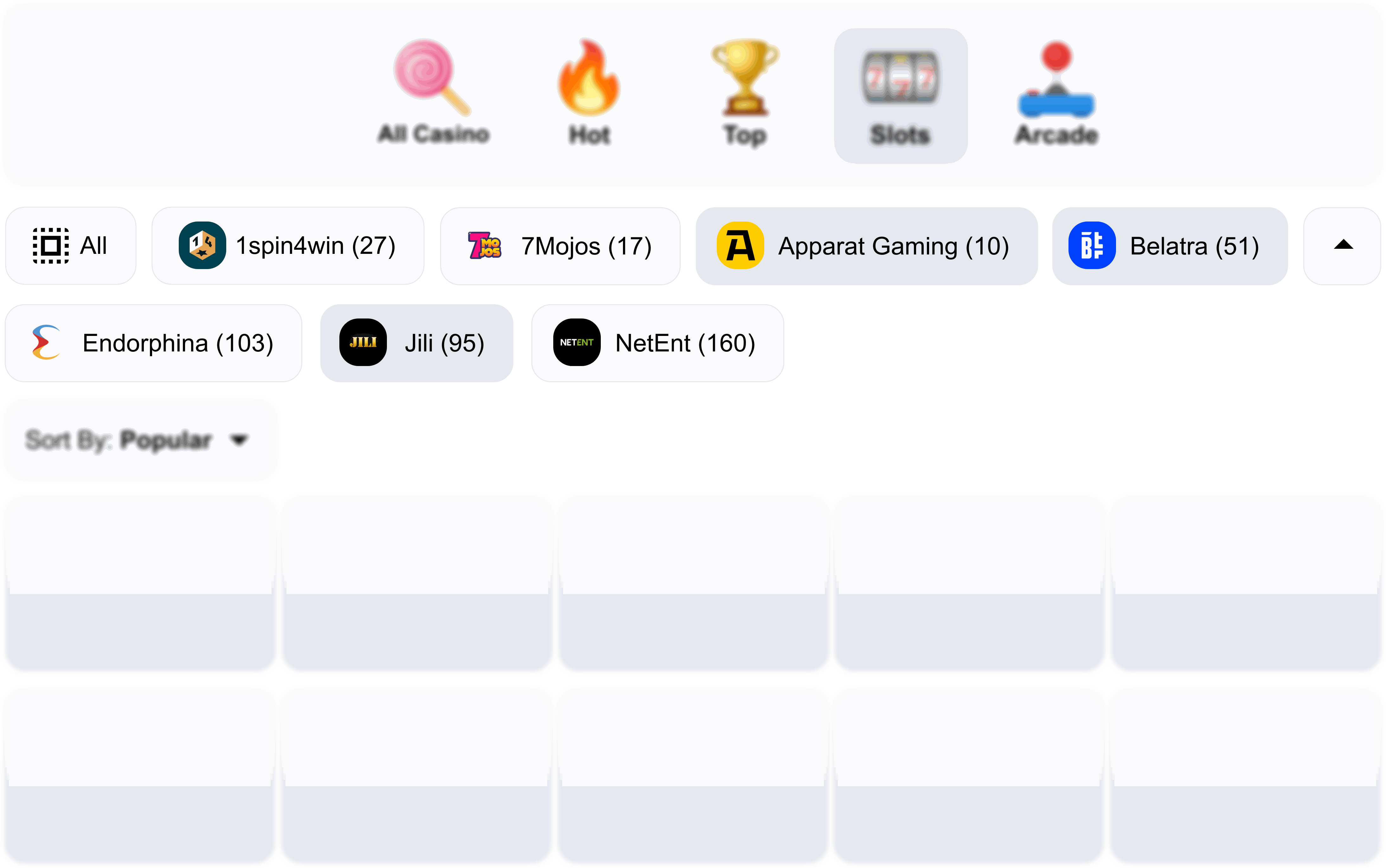
Improvements
Player Analytics: Loader
Clear previous data being displayed and display a loader while graphical data is still being processed.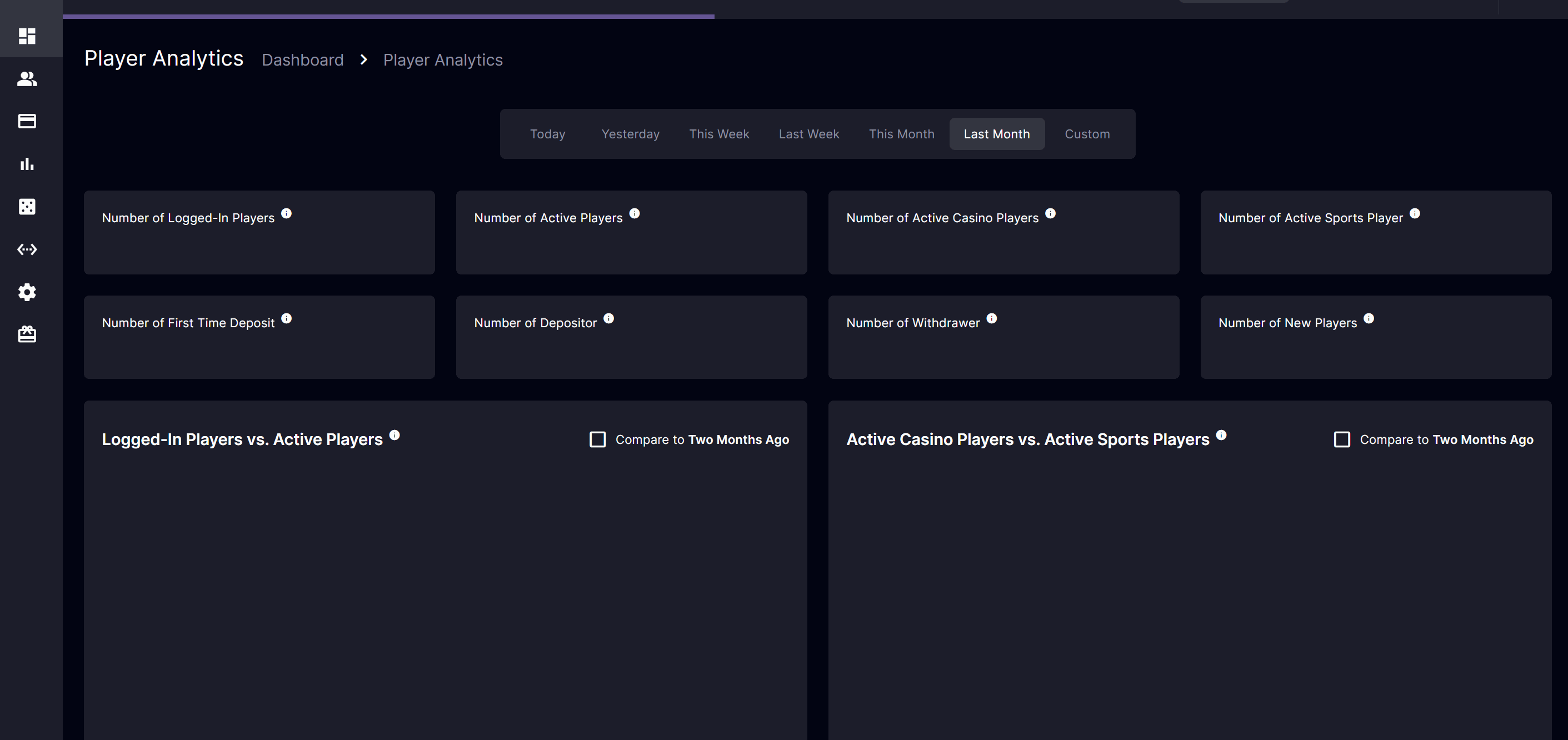
Fixes
- Performed code clean-up maintenance for a retired feature
- Relum error code handling
- Fixed display for Predefined Amounts to disregard updates made when Cancel is clicked
- Fixed long loading times for some players for BO Player Management
- Fixed BTI Sports Odds Display widget settings to show Link Types and URL Slug as required fields
- (Specific Brand) Fixed BTI odds widget deep linking
Version 4.41
Release Date: 2025-01-20New Feature
Product Categories
Introducing a new feature to highlight the Casino and Live Casino categories. Players can easily navigate on the displayed categories from any page featuring the Product Categories widget. This widget can be configured through the back office CMS Product Categories page.Player Website

Sample Product Categories widget for Live Casino

Sample Product Categories widget for Casino
Back Office
Product Categories Configuration
Explore the new Product Categories section, where you can effortlessly customize images for each language, adjust the display order of categories, and configure text settings to suit your needs.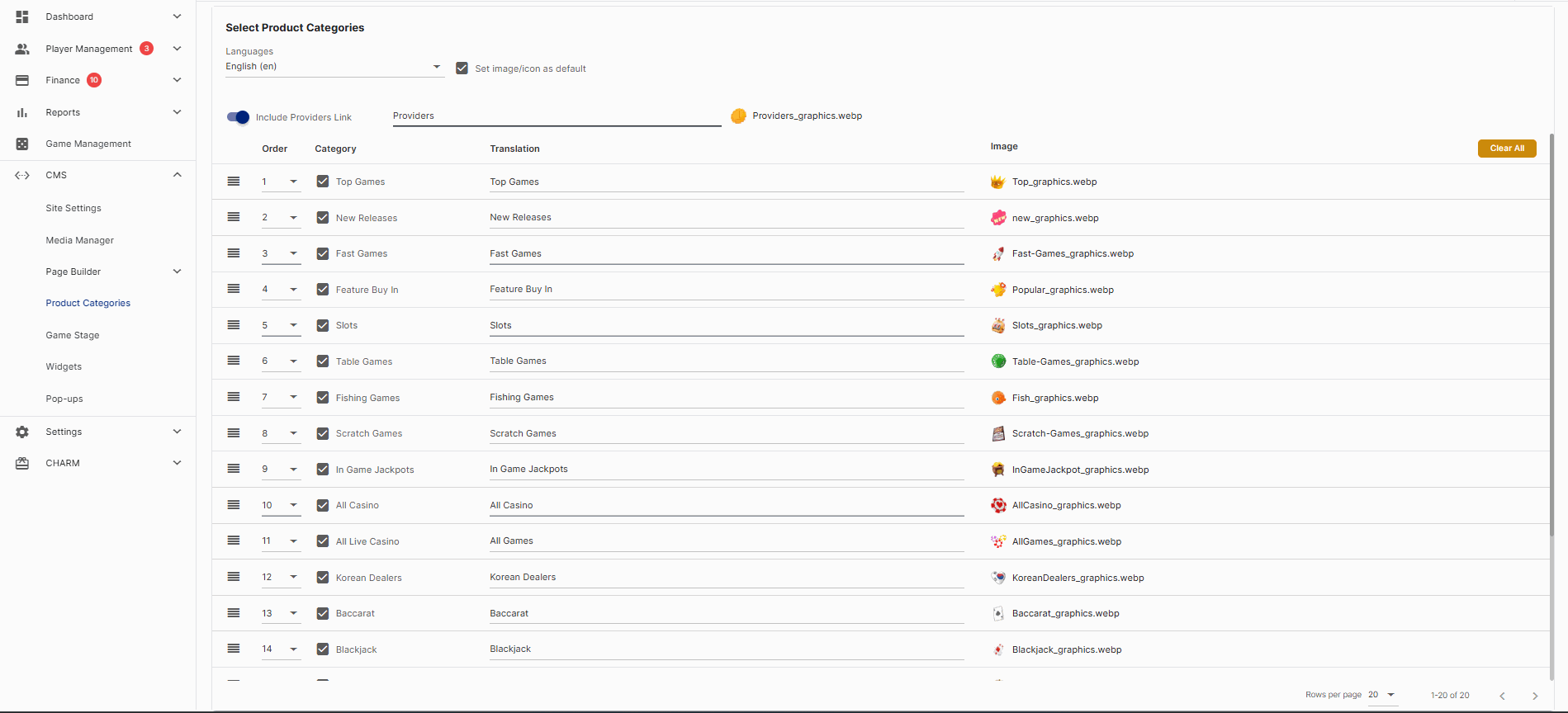
Product Categories Configuration Page
Improvements
Bonus Report: Show Column Settings
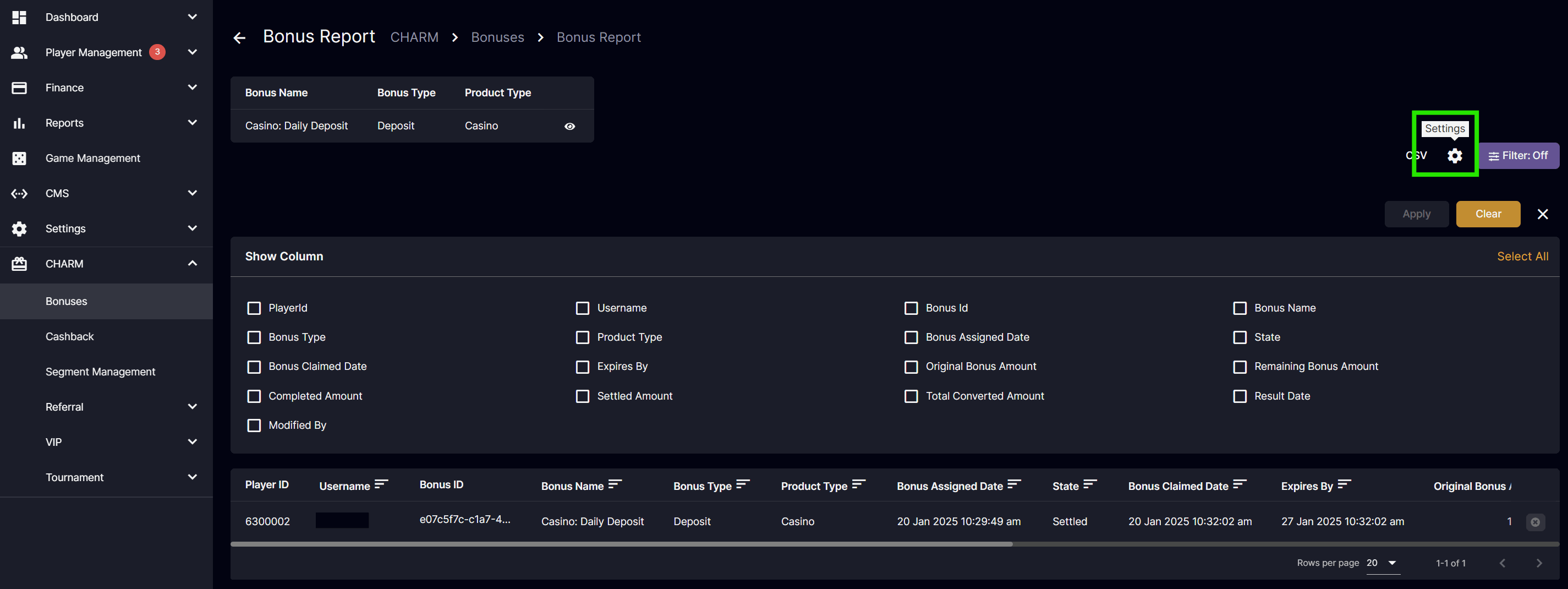 Introduced show column settings for the Bonus Report, allowing customization of the displayed columns.
Fixes
- Show column settings for Bonus Report
- Fixed Date and Time display for PayKo Verified Accounts
- Fixed Casino Bet Report Bonus Type column displaying as Real for bet with Cashback bonus
- Implemented code maintenance to prevent pending bets for Jili, Digitain, Relum, and World Entertainment
- Performed code clean-up maintenance for a retired feature
Version 4.40
Release Date: 2025-01-13New Feature
BTi Sports Odds Display
Introducing a new feature to highlight live and upcoming sports matches for BTi Sports. Players can easily place bets on the displayed matches from any page featuring the BTi Sports odds widget. This widget can be configured through the back office CMS Widgets page.Player Website
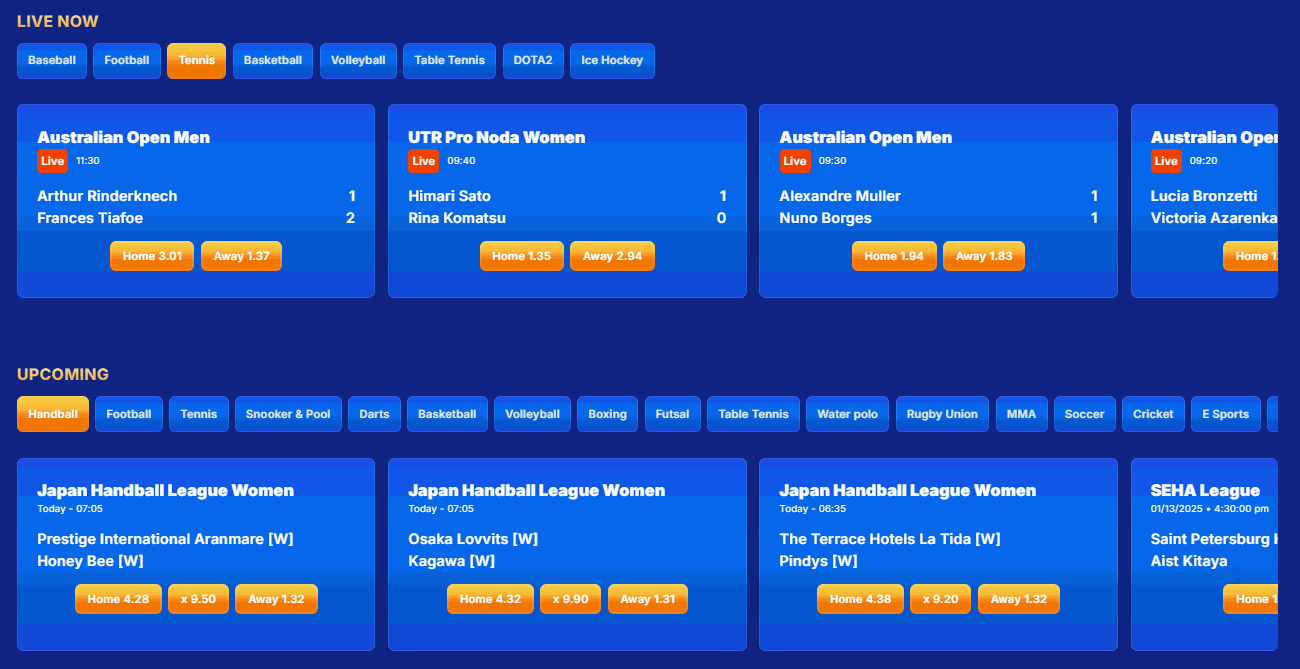
Live Now and Upcoming Sports Matches
Back Office
Widget Creation
Configure the display options for live matches, upcoming matches, or both. Choose the odds format, set the maximum number of events to display, and define the date range for upcoming games. Adjust the navigation display, set optional auto-slide behavior, and configure link redirection behavior.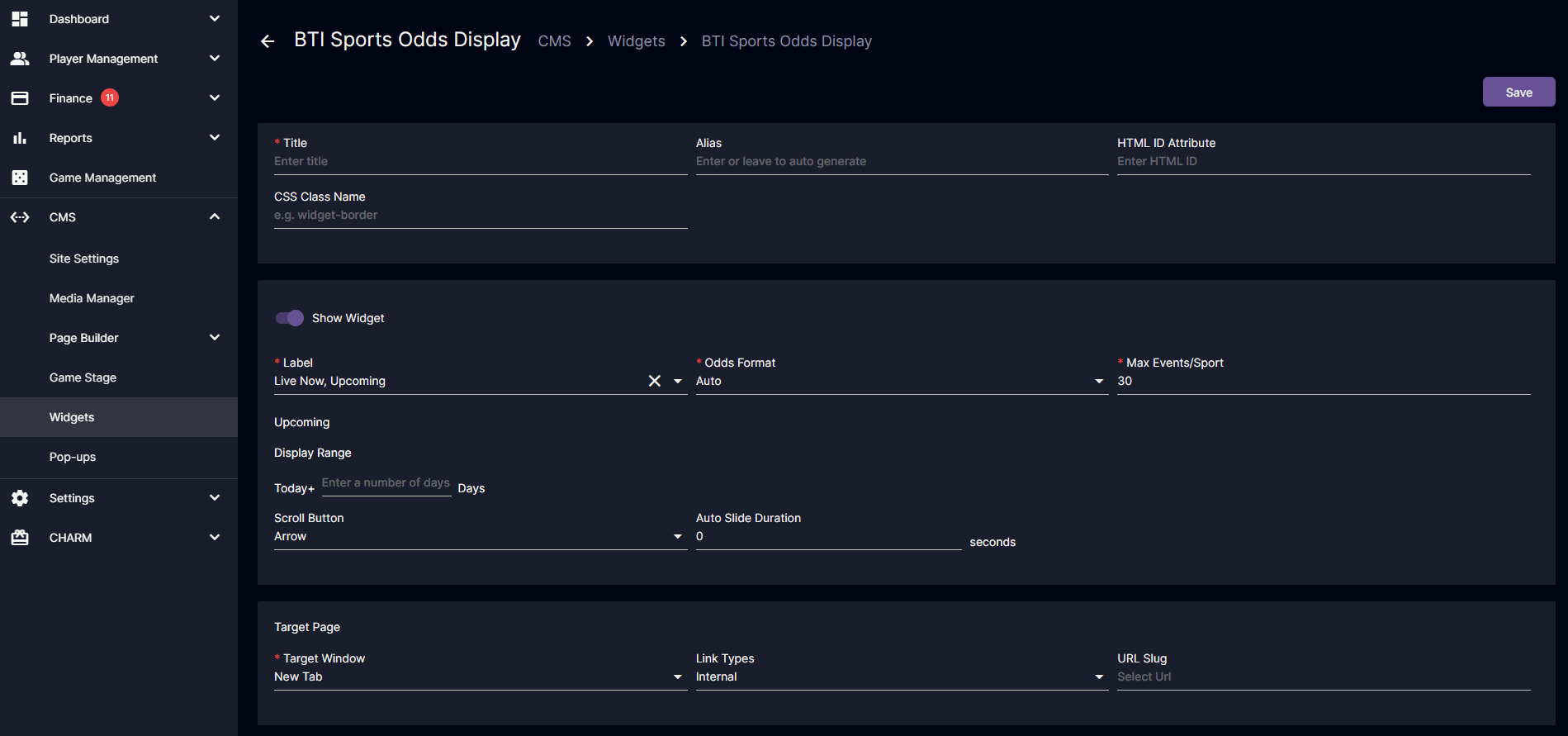
New BTi Sports Odds Display Widget Creation
Sportsbook Game Management
Through the Game Management page, you can arrange and manage the order of available sports games displayed in the BTi Sports Odds Display Widget.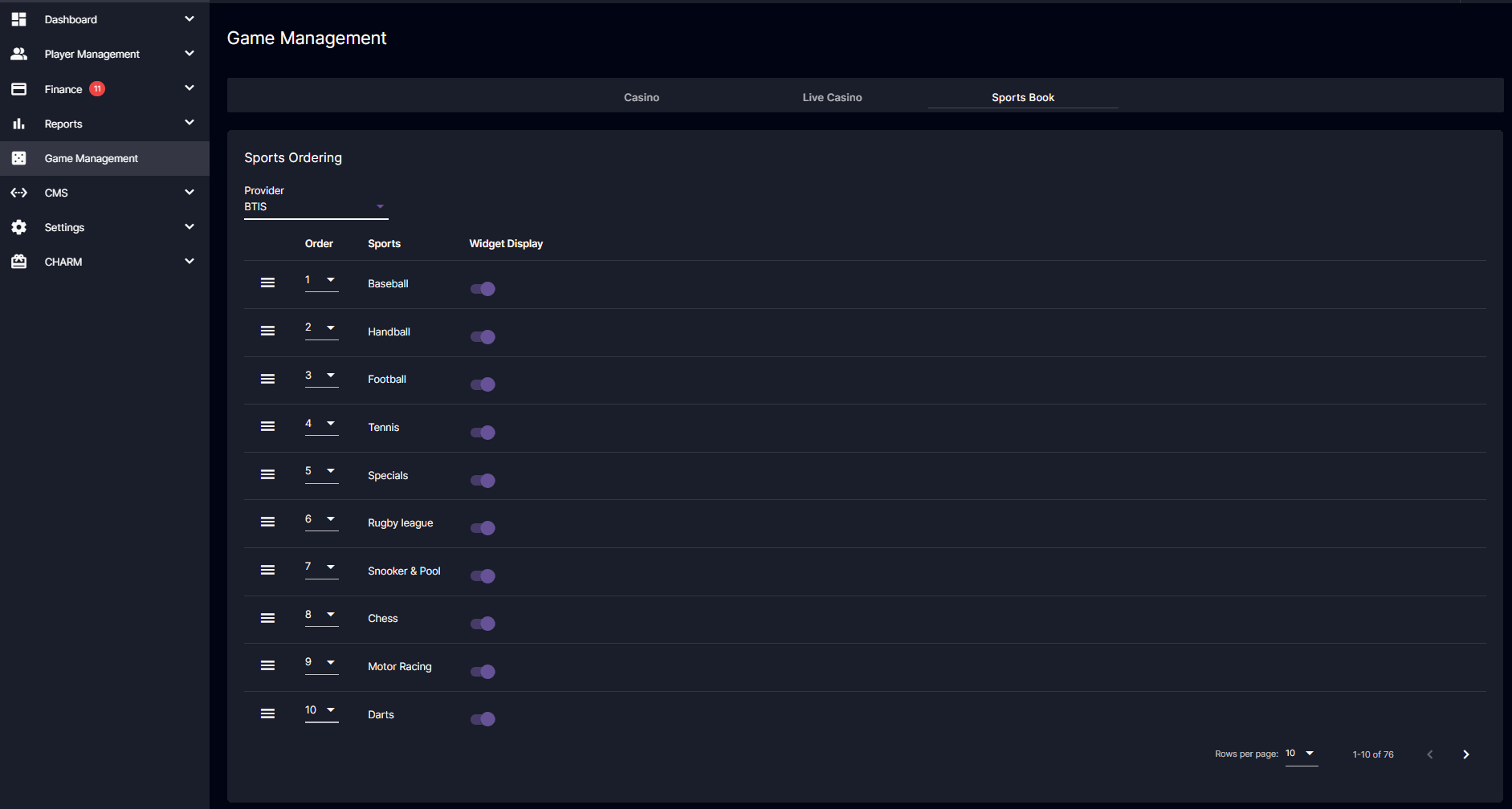
Sportsbook Game Management
Improvements
Financial Report: Player & Payment Report Totals
We have implemented the addition of total amount values in both the Player Report and the Payment Report. This enhancement is aimed at improving clarity and usability in our reporting processes.Fixes
- Removed sports bet info sorting and pagination
- Fixed DB Blocking for Evolution and Pragmatic
- (Brand Specific) Fixed page load and refresh latency
- (Brand Specific) Fixed profile page display
Version 4.39
Release Date: 2025-01-06Improvement
(For Multi-Currency Wallet) Withdrawal: Manual Bank Transfer
We’ve enhanced the Manual Bank Transfer option to make withdrawing fiat currencies more convenient for players. Here are the latest improvements: Back Office:- Removed actions that are not applicable when processing new withdrawal requests.
- Players can view detailed information about recent withdrawal requests for fiat currencies with existing requests.
- Players can stay informed about the status of their withdrawal requests through real-time notifications.
- Players can use the link in the “Paid Withdrawal Request” notification to quickly access the Withdrawal Transactions page.
- Players can view the transaction details for withdrawal requests with a “Pending” status.
(Brand Specific) Additional Languages
Player website language support for Thai.Player Analytics Graph
- Improved graphical display by showing hourly and daily precision
- Improved label readability display
Fixes
- Fixed evolution pending bets
- Fixed Sports Bet Info display
- Fixed bonus reload assignment
- Fixed calendar translation
- Fixed Totals translation display
- Fixed error code encountered from Pinnacle
- Fixed bonus refund behavior for rejected bets on Digitain
- Additional Totals fixed position
- Korean translation update
- Connection update for Softswiss
- Connection update for Relum
- Changed 10Coins error code response for expired deposit
- Route for custom javascript
- Patch for retry concurrency for Evolution
- Patch for retry concurrency for Pragmatic
- (Brand Specific) Fixed global settings loading
- (Brand Specific) Fixed player available balance metrics data display
- (Brand Specific) Fixed edit profile saving
Older Releases
Version 4.38
Release Date: 2024-12-16Improvements
Dashboard: Metrics Currency
View metrics cards based on the selected currency using the Currency Code dropdown filter for enabled currencies.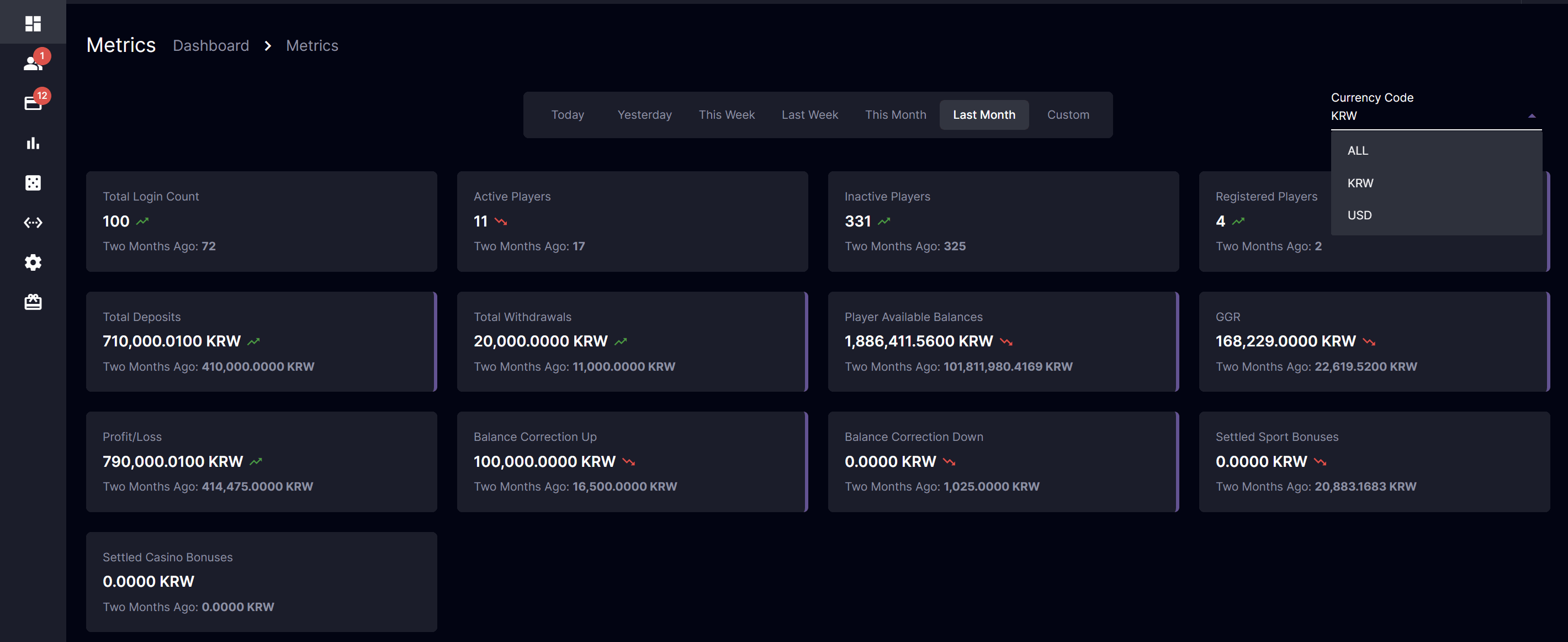
- All: Displays all transactions converted to the configured base currency
- Selected Currency Code:
- For Single Currency Wallet
- Displays transactions exclusively based on the selected currency.
- Displays player count based on players that use the selected currency.
- For Multi-Currency Wallet
- Displays transactions based on the selected currency, converted to the configured base currency.
- Displays player count based on all users.
- For Single Currency Wallet
(For Multi-Currency Wallet) Player Management: Finance Summary
Conveniently access a summary of each player’s financial information on Player Management. This update ensures the efficient management of each player’s financial data and improves usability for back-office operations.
Key Highlights
- A dedicated Finance Summary section is added under each player’s profile.
- This feature applies exclusively to Multicurrency Operators, ensuring accurate financial data across multiple currencies.
- All financial amounts in the summary are displayed based on the Operator’s Base Currency.
Finance Summary Data
- Available Balance: The sum of all available wallet balances of a player across all currencies.
- Requested Withdrawal: The player’s total amount of pending withdrawals across all currencies.
- Total Real Money Bet: The total value of all settled real-money wallet bets for a player across all currencies.
- Total Real Money Win: The total real-money winnings of a player across all currencies.
- Total Bonus Bet: The sum of all settled bonus bets of a player across all currencies.
- Total Bonus Win: The total bonus winnings for a player across all currencies.
- Total Bet: The combined sum of Total Real Money Bet and Total Bonus Bet across all currencies.
- Total Win: The combined total of all winnings (real money and bonus) across all currencies.
- Profit/Loss: Calculated as Total Bet - Total Win across all currencies. (Note: Bonus bets and wins are excluded.)
- Total Deposit: The total sum of all deposits made by a player across all currencies.
- Total Withdrawal: The total amount of paid withdrawals to a player across all currencies.
- Deposit Less Withdrawal: Calculated as Total Deposit - Total Withdrawal across all currencies.
- Manual Correction Up: The total value of all manual adjustments increasing a player’s balance across all currencies.
- Manual Correction Down: The total value of all manual adjustments decreasing a player’s balance across all currencies.
Player Management: Casino and Sports Report Totals
Effortlessly view a specific Player’s casino and sports bet totals through the Player Management: Casino and Sports Report.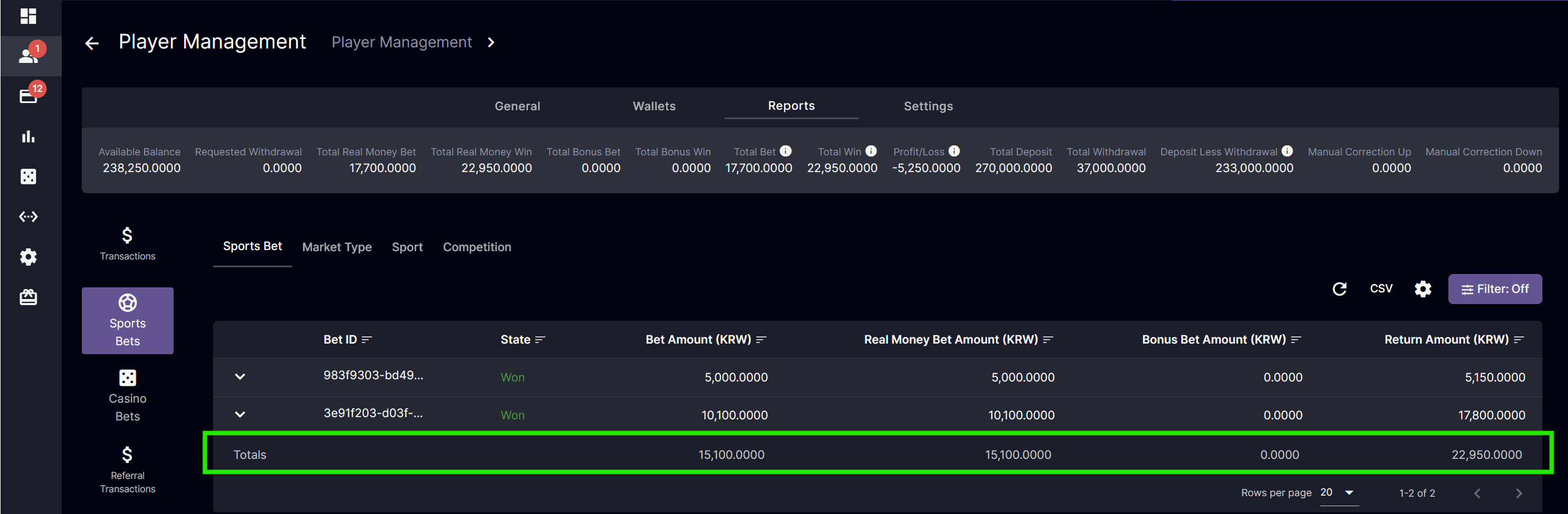
- Operator currency converted values
Columns have been added to display the amounts in the Operator’s Base Currency to calculate the amount totals.
Fixes
- Optimization for Evolution
- Fixed player website pop-up message showing global.messages
- (Brand Specific) Fixed withdrawal transaction network error
Version 4.37
Release Date: 2024-12-10Improvements
Bonus: Overwrite Active Bonus
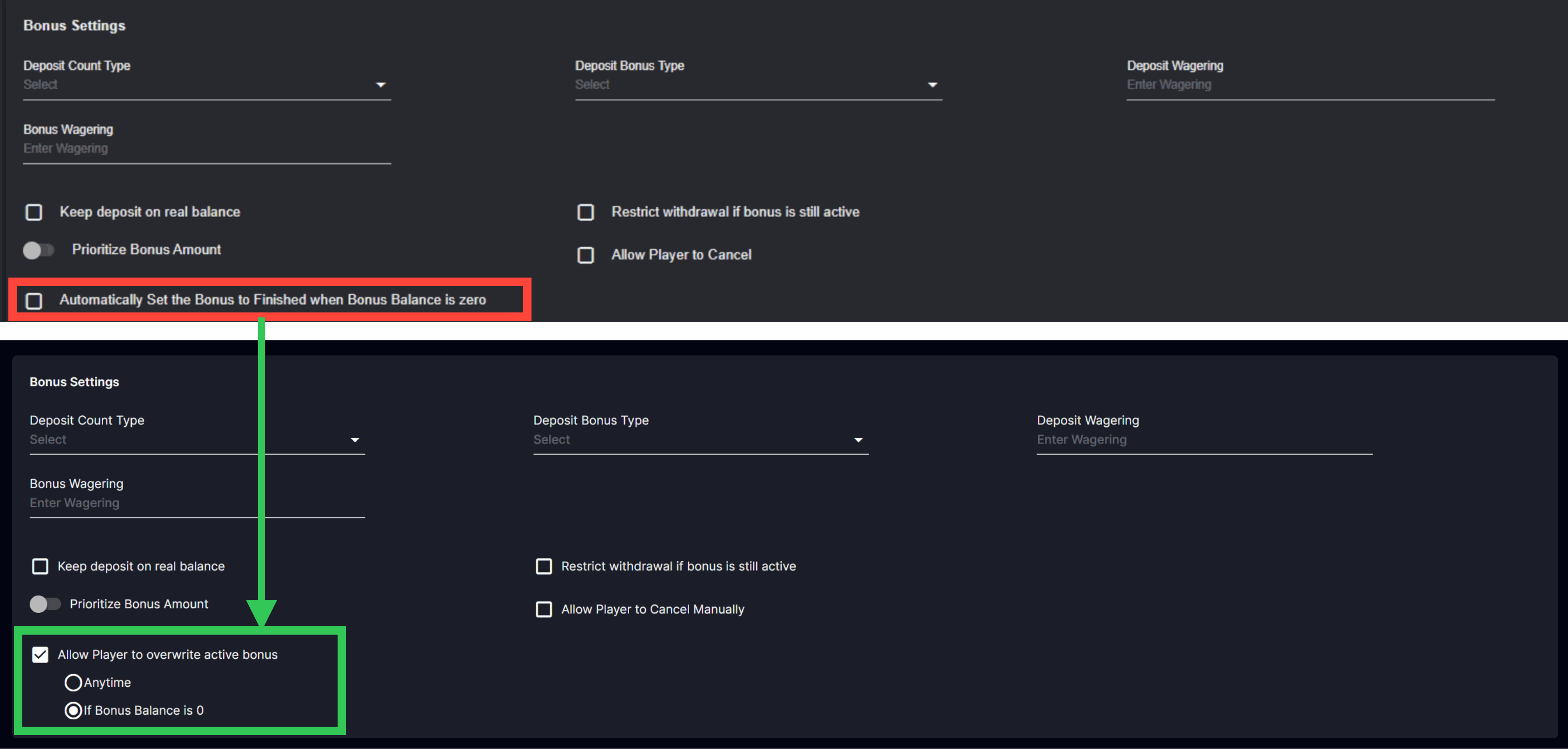
- Replace the “Automatically set the bonus to finished when the bonus balance is zero” to “Allow Player to overwrite active bonus” with options (1) “If Bonus Balance is 0” or (2) “Anytime”.
- When this is enabled:
- Players will be able to claim assigned bonuses even when there is an active bonus
- Overwritten active bonus are considered as canceled
- When this is disabled:
- An alert message will be displayed when the player tried to claim an assigned bonus informing that the bonus cannot be claimed at the moment.
- When this is enabled:
- Label changed from “Allow Player to Cancel” to “Allow Player to Cancel Manually”
(Brand Specific) Additional Languages
Player website language support for Vietnamese, Indonesian, and Japanese.Fixes
- Fixed Digitain split bet resettlement
- Fixed Player Management referral transaction filtering
- Fixed tournament ticker on page refresh
- Bonus balance real-time update
- Fixed referral calculation display for total computed commission
- Optimize referral report speed
Version 4.36
Release Date: 2024-12-04Improvements
Player Analytics Count Cards
- Count Cards Summary: It displays the distinct player count of those who made transactions during the selected period.
- The graph showing the total number of players with activity during the specified period ensures clarity between the distinct count and the overall activities of the players.
Dashboard Metric
- Active Players on Metrics: It aligns with the data presented in the Active Players section of the Player Analytics count cards.
Copy to Clipboard
- Add a functional copy icon for data fields under Deposit and Withdrawal request for efficient workflow
Freeze Row for Totals
- The totals row is now sticky to the bottom, so you can see your data summaries at a glance, without having to scroll.
Fixes
- Fixed tournament computation for Goal: Multiplier, Type: Highest configuration
- Fixed duplicate cashback campaign creation
- Fixed redirection page upon hitting the “Enter” key
- Fixed tooltip visibility for Send SMS icon
- Fixed Digitain Debit by Batch error code
- Removed disabled komp bonus from available bonuses
- Removed “If Bonus Wager is Completed” condition for “Allow player to Cancel Manually” for all bonus creation except for Deposit Bonus
- Disable the selection of the copy icon on highlight to remove ‘content_copy’ text being copied
- (Brand Specific) Fixed CSV download for Deposit Report
- (Brand Specific) Display currency selection at the top of the frame display instead of the middle
Version 4.35
Release Date: 2024-11-25Improvements
Loading time and performance
Players will experience significantly faster loading times and smoother performance across the entire platform through improved synchronous and asynchronous loading. Non-critical elements now load asynchronously, meaning they don’t block the loading of essential content, providing a smoother and faster initial user experience. These improvements collectively enhance the responsiveness and reliability of our platform, providing a more seamless and enjoyable user experience.Finance: Collapsible Account Name
Enhance back-office usability by introducing a collapse/expand feature for account names. This ensures that users can access detailed information when needed, while maintaining an efficient interface.Fixes
- Speed optimization
- Relum error code handling
- (Brand specific) Fixed mobile bonus display currency overflow
Version 4.34
Release Date: 2024-11-18New Payment Method
10Coins (Cryptocurrency Payment)
This applies only to brands that offer player betting in a single currency. The 10Coins payment method allows players to deposit fiat currency on the player portal using cryptocurrency. The deposit process will be fully automated, while the withdrawal process requires BO Users’ help in sending requests to 10Coins by approving a request.[Back Office] Finance: Deposit Requests
Upon receiving notification from 10Coins about a player’s deposit, we will promptly create the deposit request on our side. As the 10Coins process is fully automated, the process button remains disabled. Details of each request will be displayed in the Deposit Request Info pop-up upon clicking the “view” icon. Deposit Request Statuses
[Back Office] Finance: Withdrawal Requests
When a player requests a withdrawal for 10Coins, a new request will be created on our end. The process button for 10Coins is disabled on the main Withdrawal Requests page to exclude these requests from bulk withdrawal processing. Details of each request will be displayed in the Withdrawal Request Info pop-up upon clicking the “view” icon.
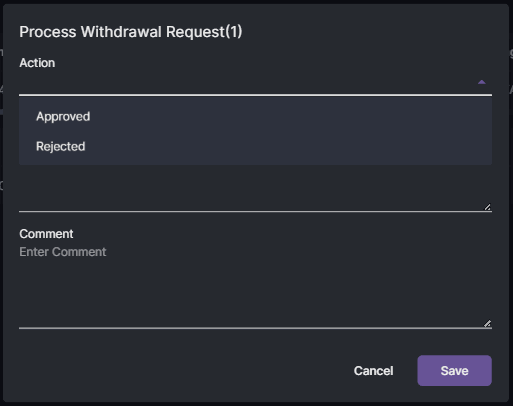
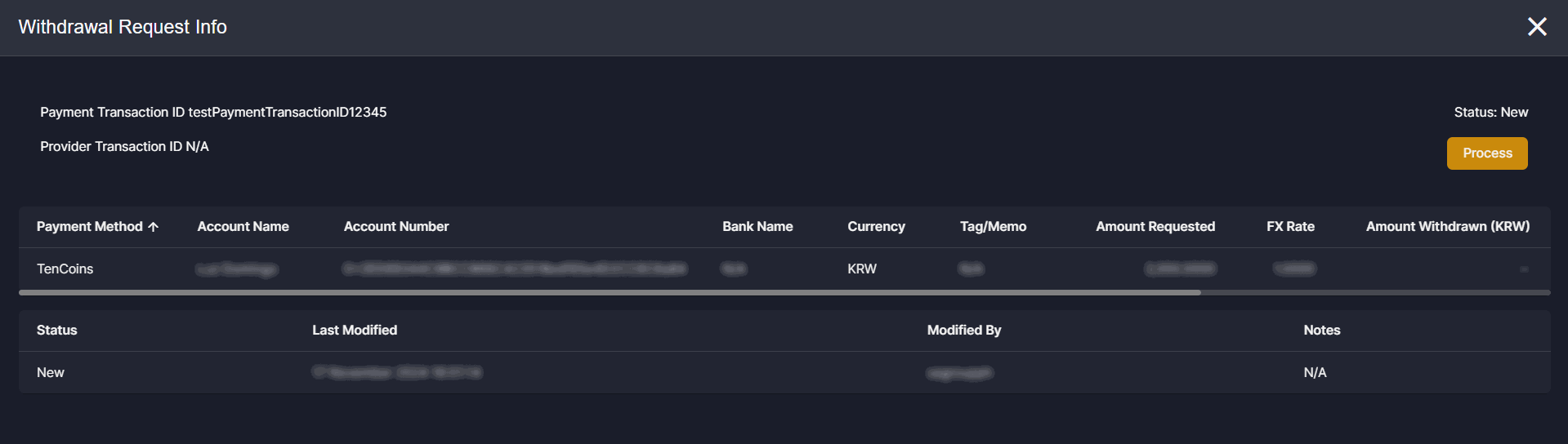 Clicking the “Process” button allows the BO User to either approve or reject a new withdrawal request. Approved withdrawal requests will then be sent to 10Coins for processing of the request.
 Withdrawal Request Statuses
[Back Office] Player Management: Additional Player’s Capability
The “Can use 10Coins” toggle enables BO Users to limit the 10Coins payment method to specific players. Additionally, BO Users can configure default capabilities for new users via Settings > Player Settings > Default Capabilities..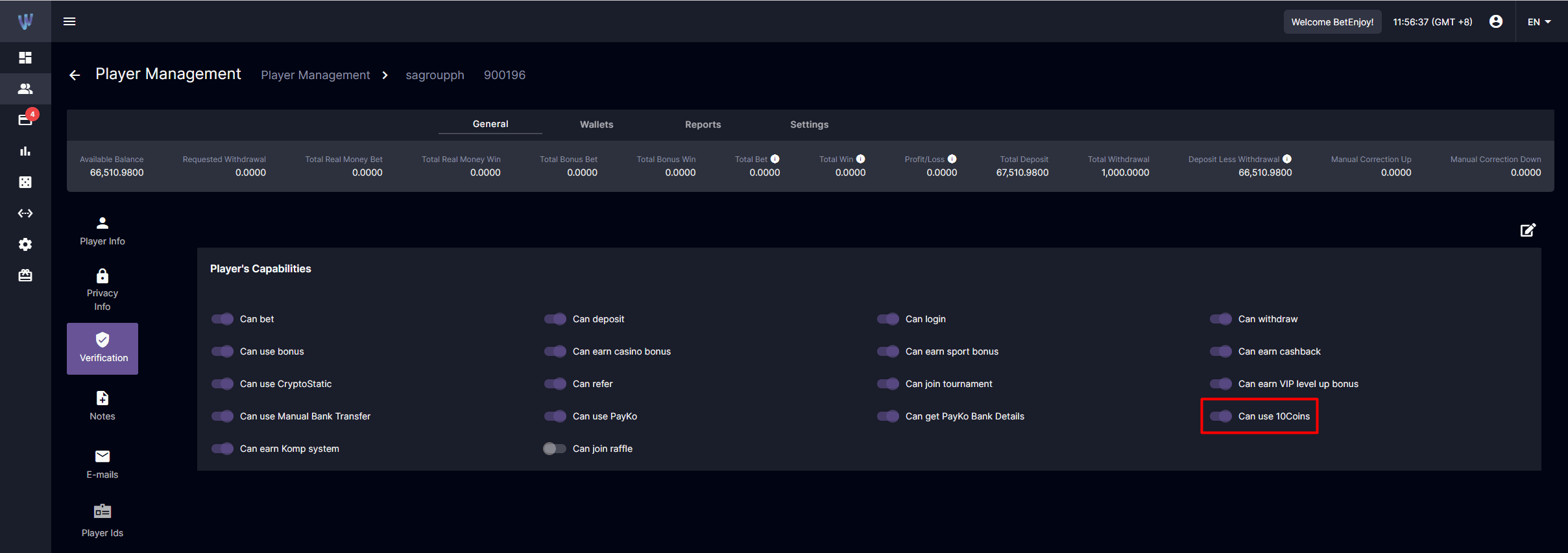
[Back Office] Payment Settings: Manual Payment Settings
The “10Coins” tab has been added to help BO Users manage the minimum and maximum amount limits for player currency and customize predefined amounts and instructions per currency.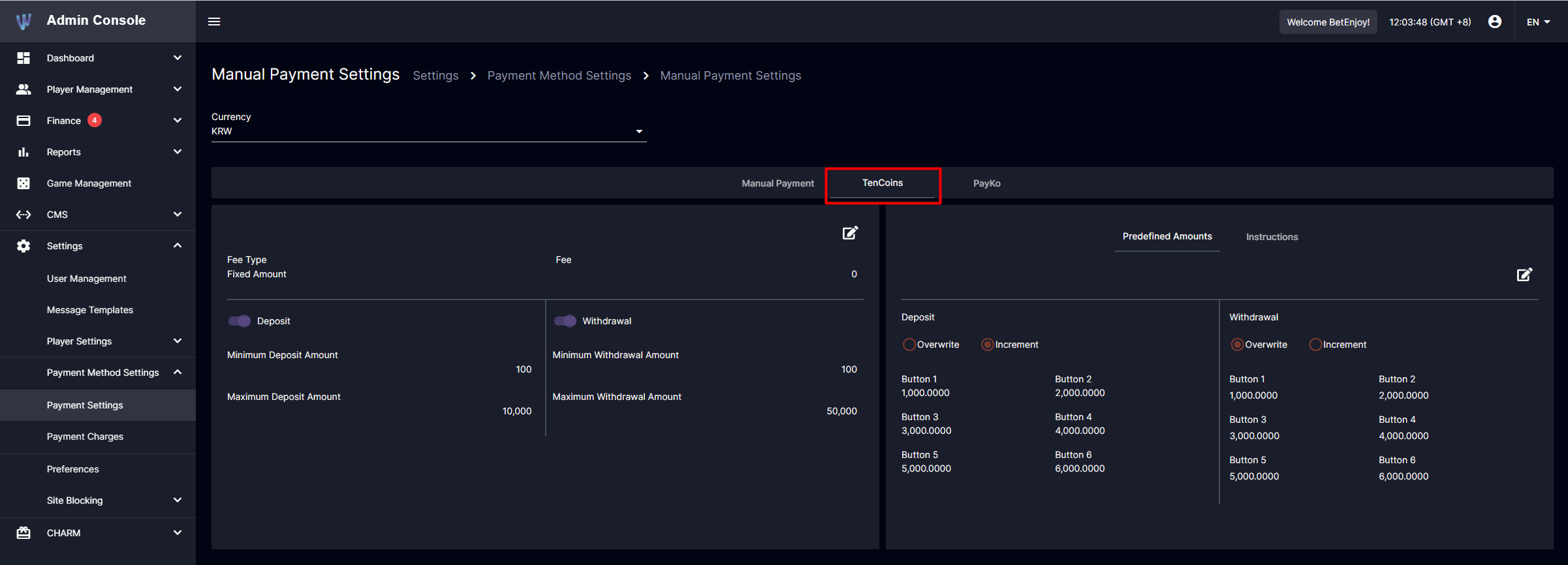 Instructions
Back Office Users need to provide clear instructions to help players understand how 10Coins works for Deposits and Withdrawals. Here are the key items to consider when setting up instructions for 10Coins:
Instructions
Back Office Users need to provide clear instructions to help players understand how 10Coins works for Deposits and Withdrawals. Here are the key items to consider when setting up instructions for 10Coins:
- Players must send the exact amount of cryptocurrency indicated.
- The amount sent should not be less than the minimum deposit required for that cryptocurrency.
- The crypto amount should be sent to the designated wallet address.
- The cryptocurrency conversion may change at any time. Therefore, the amount received might be different from the current view.
- For Withdrawal, players must make sure to enter the correct wallet address of the recipient.
[Player View] Deposit Request Screen
The Deposit Request Screen lets players view deposit instructions, enter their desired deposit amount, and select from 10Coins-supported cryptocurrencies to see the estimated amount that needs to be sent to their wallet.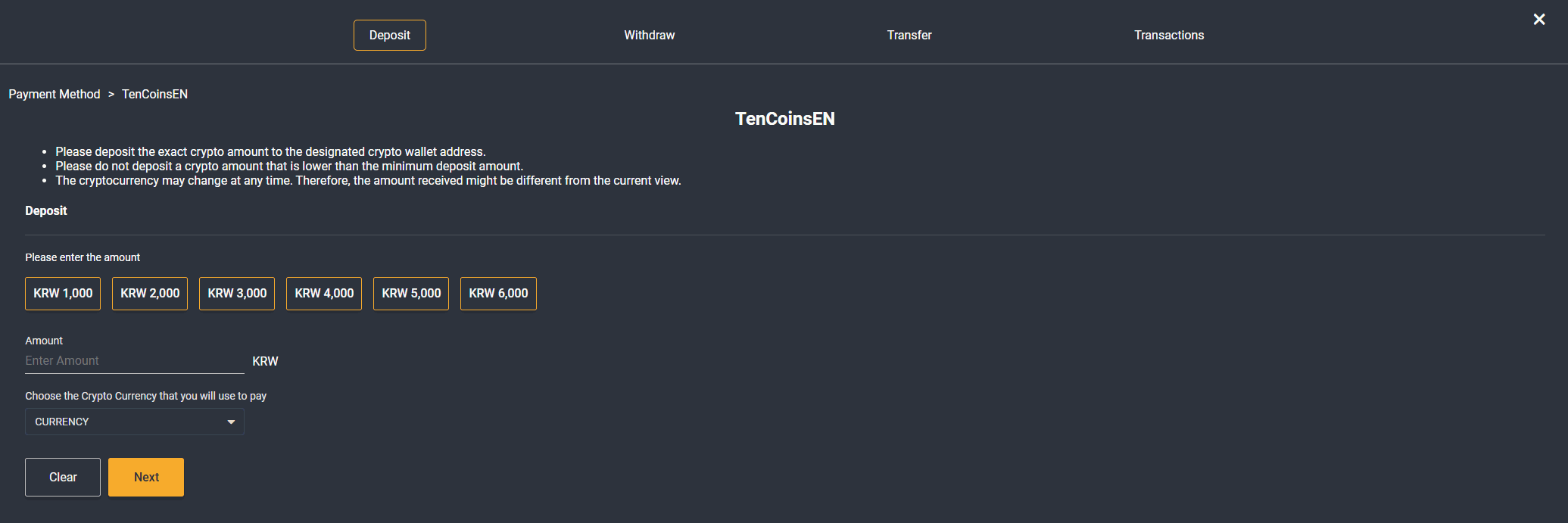
[Player View] QR Deposit Screen
The QR Deposit Screen lets players view the amount requested in player currency and in cryptocurrency, QR Code, and Deposit Wallet Address provided by 10Coins.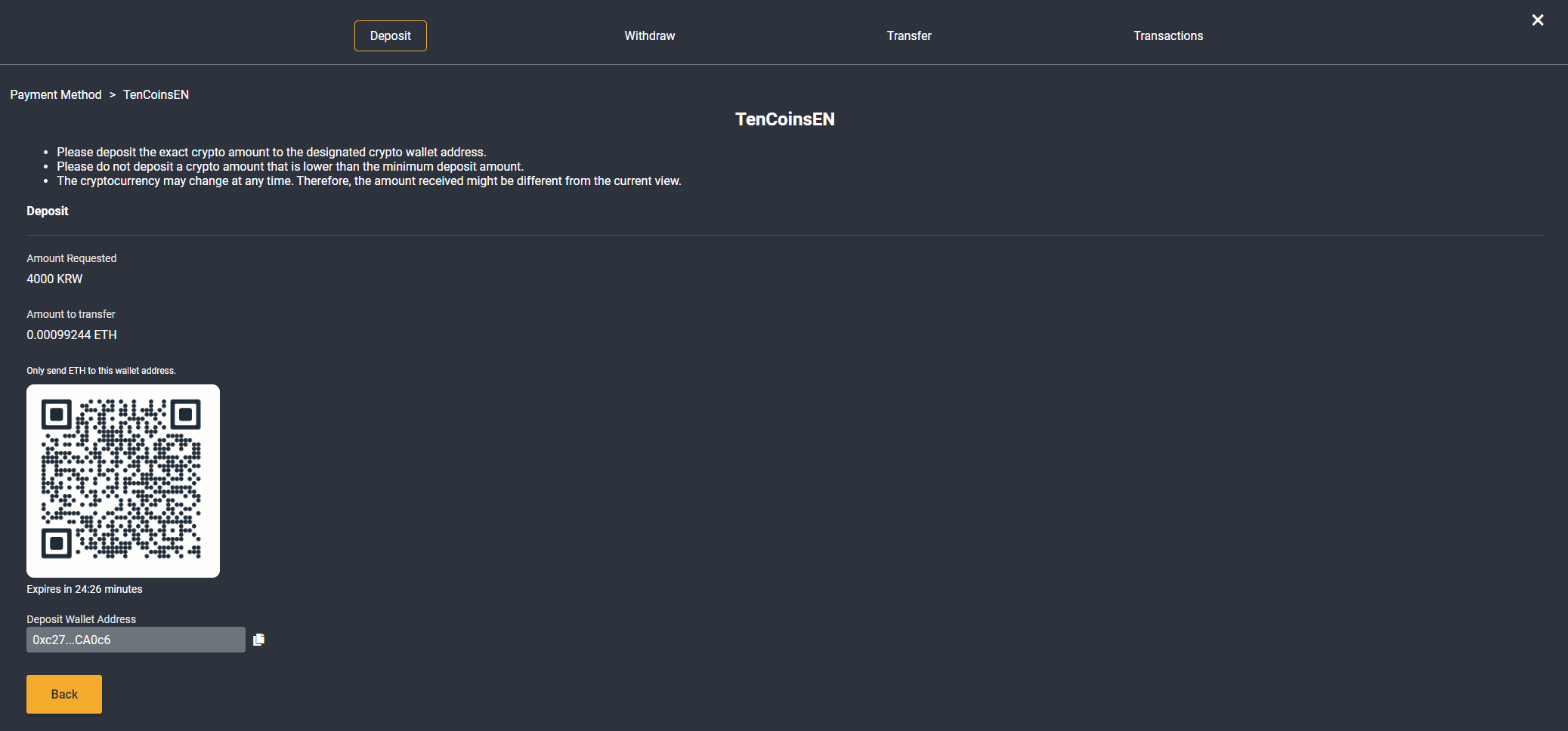
[Player View] Withdrawal Request Screen
The Withdraw Request Screen lets players view withdrawal instructions, enter their desired withdrawal amount, select from 10Coins-supported cryptocurrencies to see the estimated amount that a player can withdraw, and enter their cryptocurrency address and tag/memo.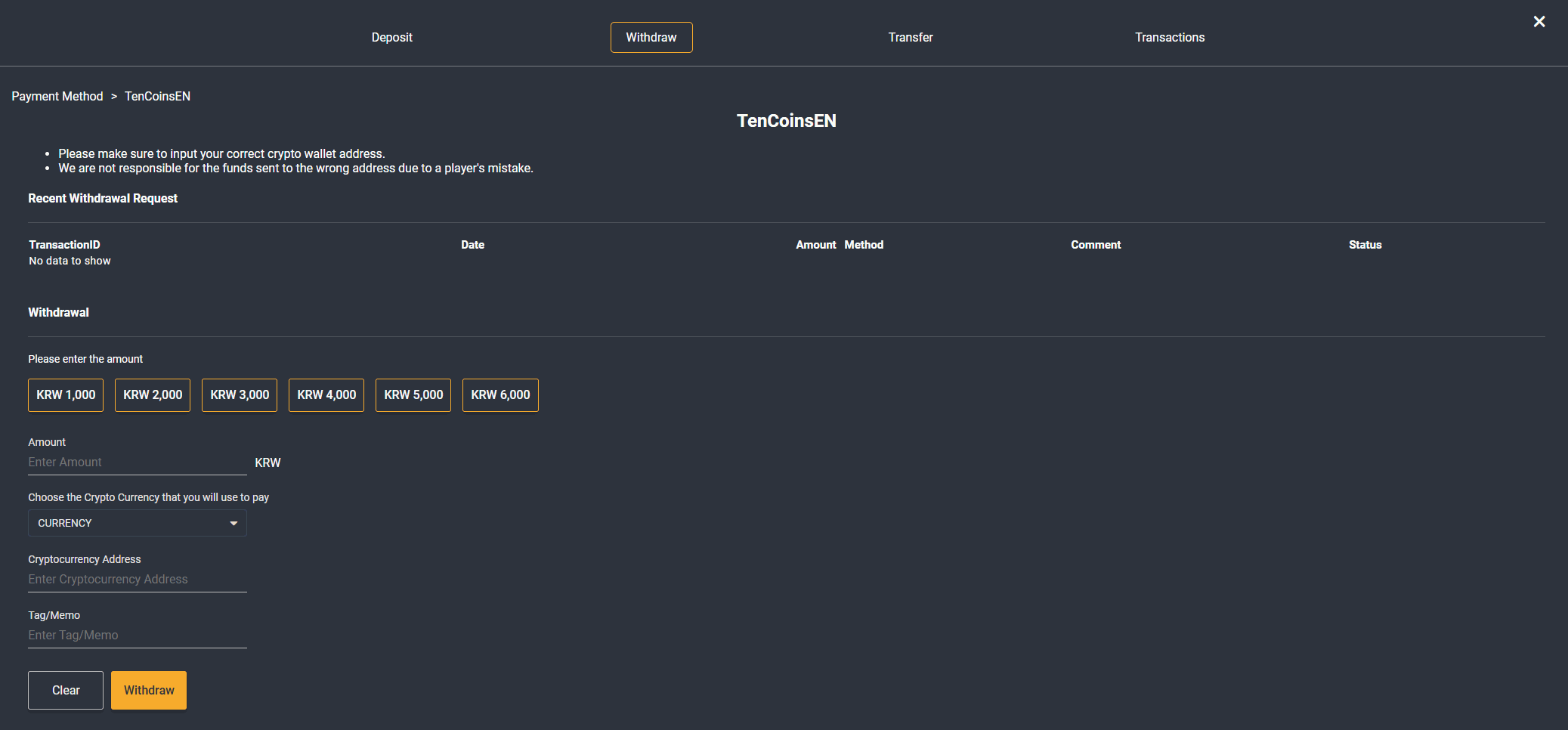
[Player View] Transactions: Crypto Transaction Details
Players can view successful payment transaction details for 10Coins by going to the Wallet > Transactions > Deposits or Withdrawals page and clicking on the “view” icon. This will be displayed once 10Coins provides us with this information. Deposit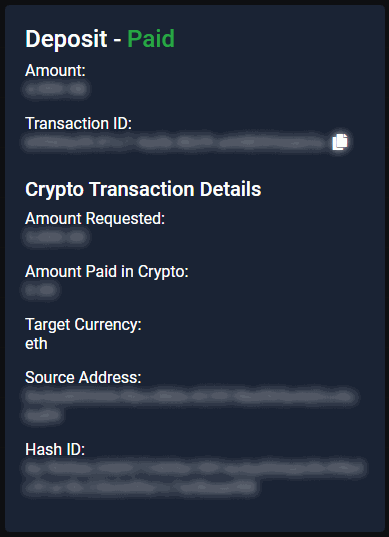
- Amount Requested refers to the amount requested by the player and displayed in player currency.
- Amount Paid in Crypto refers to the crypto amount sent by the player to the wallet address given by 10Coins.
- Target Currency refers to the cryptocurrency the player uses to pay the deposit amount.
- Source Address refers to the player’s wallet address.
- Hash ID refers to the unique crypto transaction ID provided by 10Coins
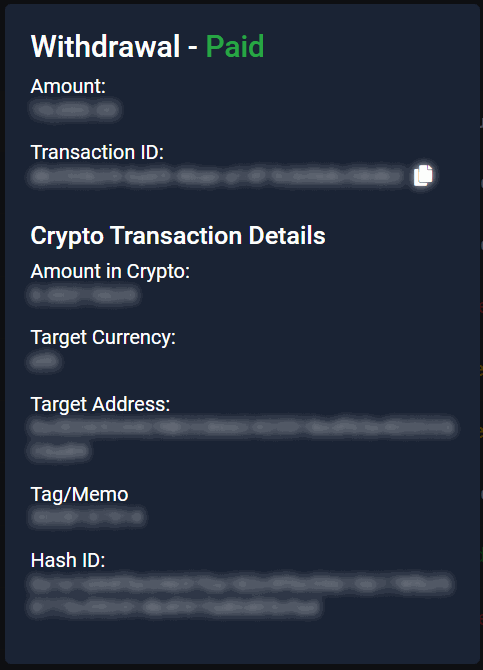
- Amount in Crypto refers to the requested withdrawal amount in cryptocurrency.
- Target Currency refers to the cryptocurrency used by the player for withdrawal
- Target Address refers to the player’s wallet address.
- Tag/Memo refers to unique identifier to differentiate transactions.
- Hash ID refers to the unique crypto transaction ID provided by 10Coins.
New Feature
Mobile & Desktop Download
We’re excited to introduce a new feature that allows players to download the gaming website directly to their device.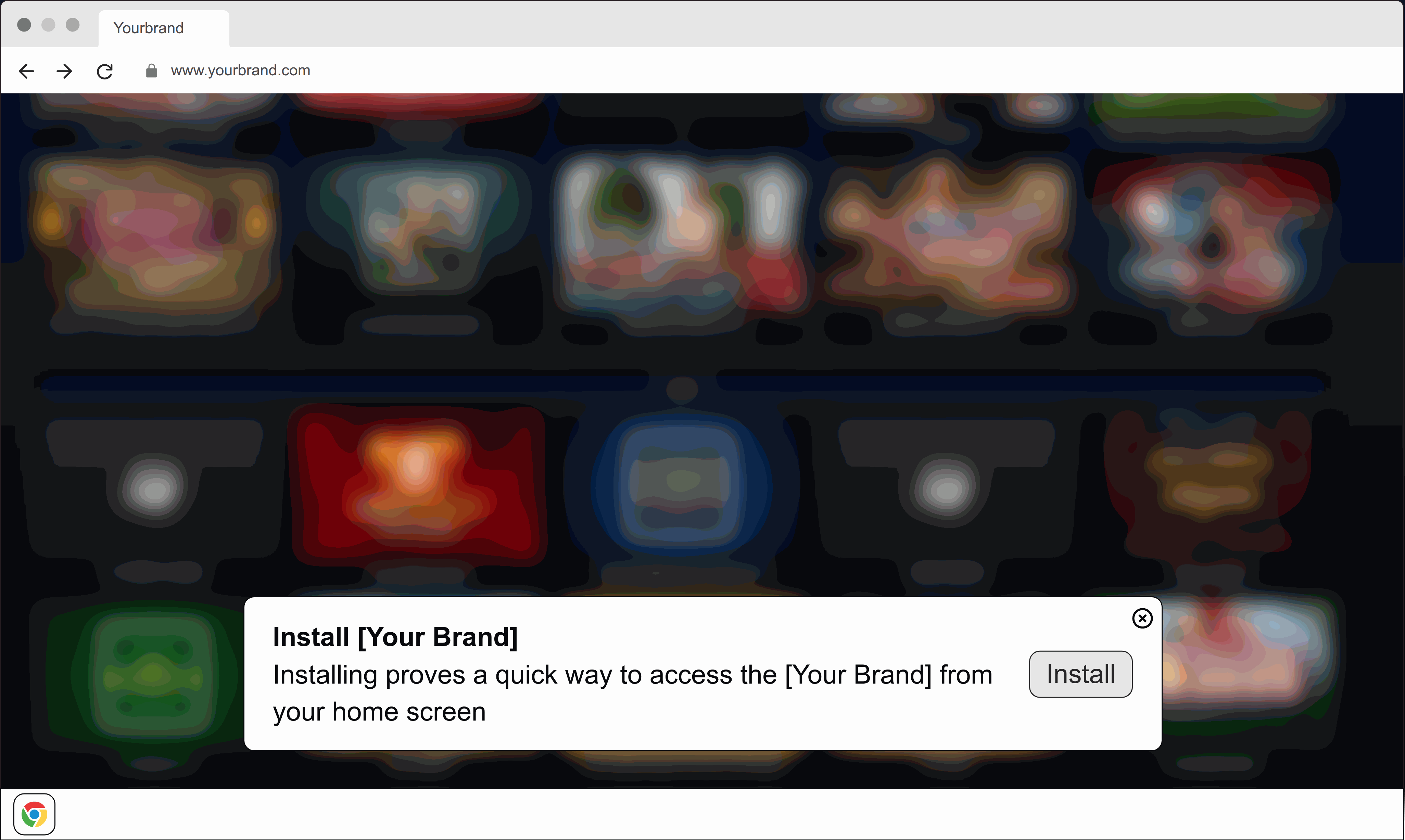
Sample website installation banner
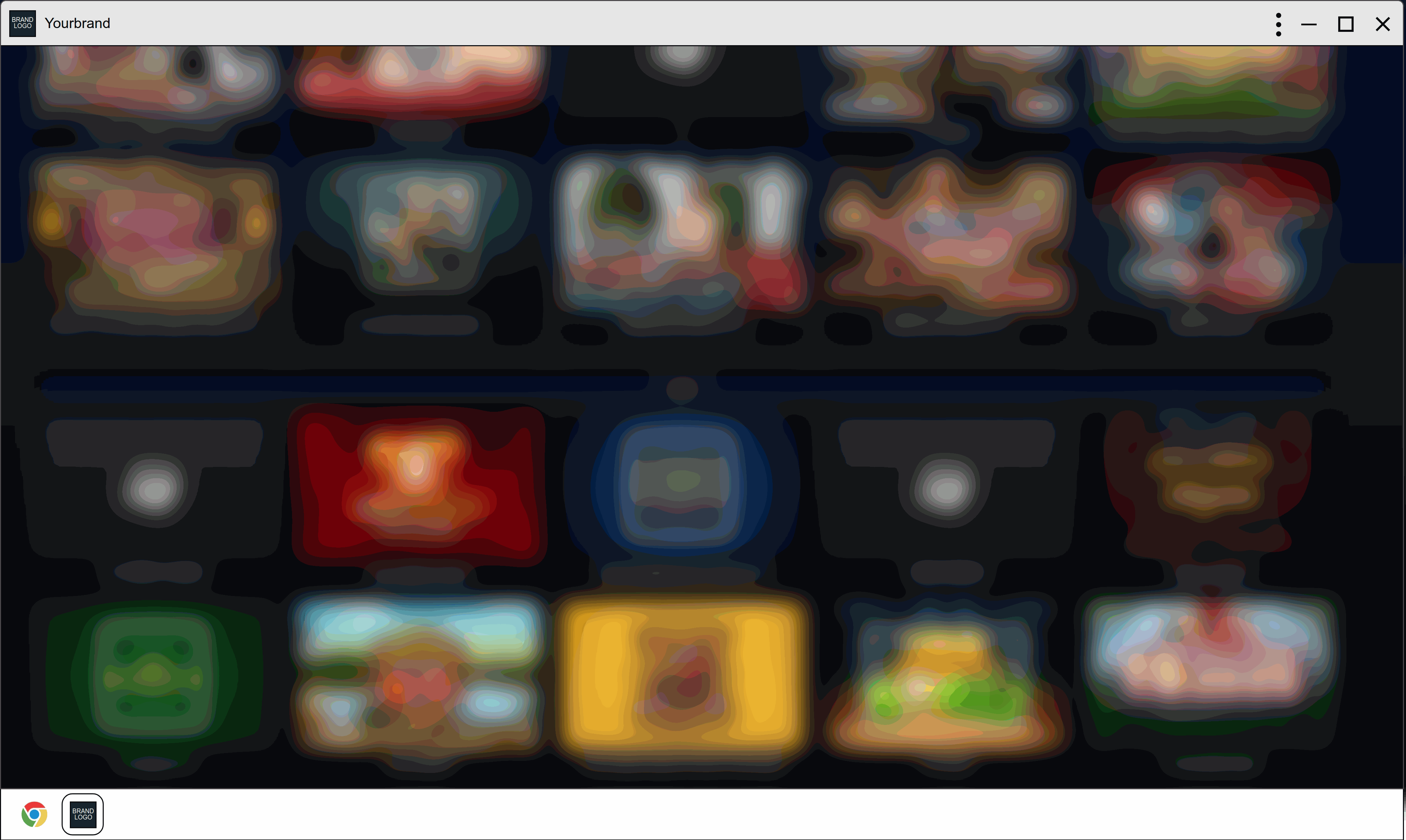
Installed in desktop

Installed in mobile
- Quick and Convenient Access: Add the gaming website to the home screen or desktop for instant access.
- Faster Loading Speeds: Enjoy quicker load times, making the gaming experience smoother.
- Seamless Integration: The website integrates effortlessly with the device’s features, providing a more streamlined and user-friendly experience.
Improvements
Tournament: Multiplier
Tournaments with Goal: Multiplier settings count tournament points based on settled bets with Won, Half Won and Half Lost status instead of previous implementation where points are based on the odds of settled bets, regardless of bet status.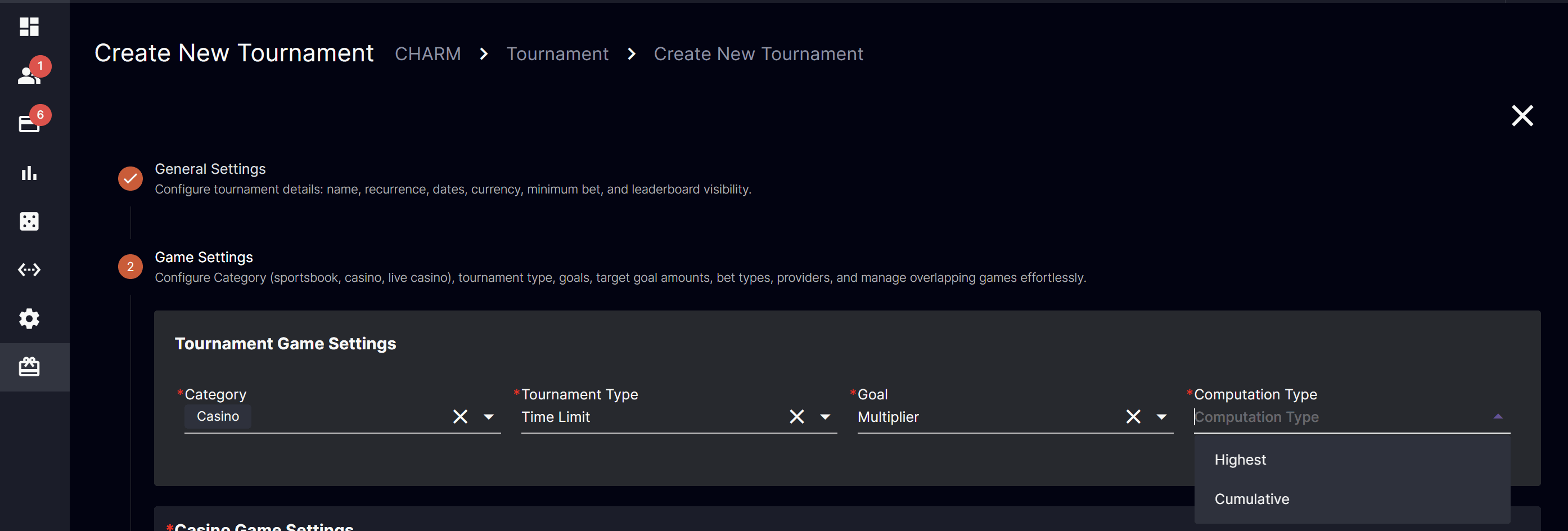
Computation: Highest
New option to get only the player’s highest multiplier for a single bet for the tournament period.Computation: Cumulative
Based on the player’s total multiplier for the tournament period.Fixes
- Remove inactive bonuses from player’s available bonuses
Version 4.33
Release Date: 2024-11-11Improvements
Dynamic Table View
Dynamically adjust the table container’s size to fit the screen height for all back office tables.SMS: Payment Segment Automatic Message
The “Active” toggle has been replaced with a “Website Message” checkbox to accommodate the new option of sending an automatic message through “SMS”.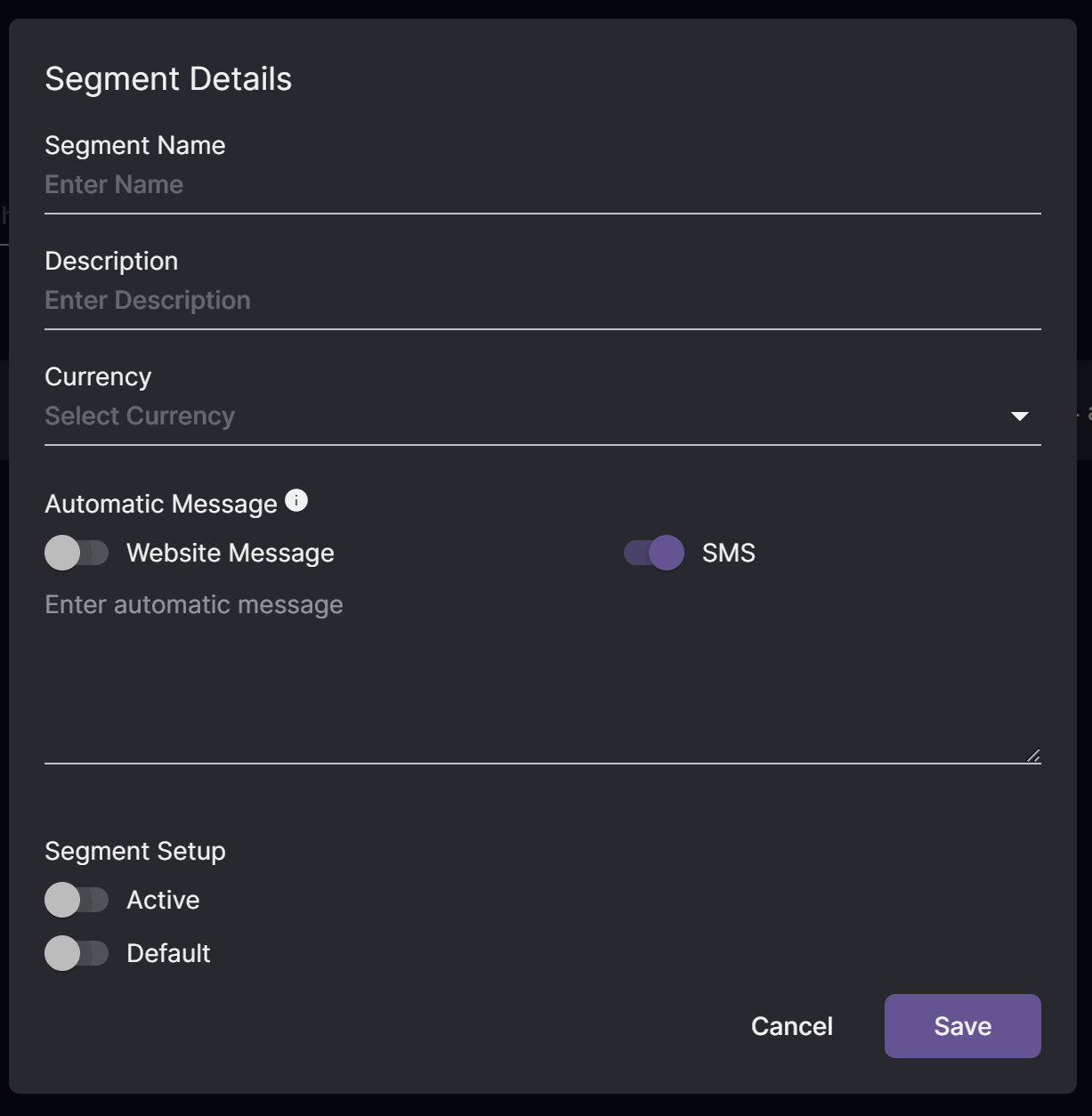
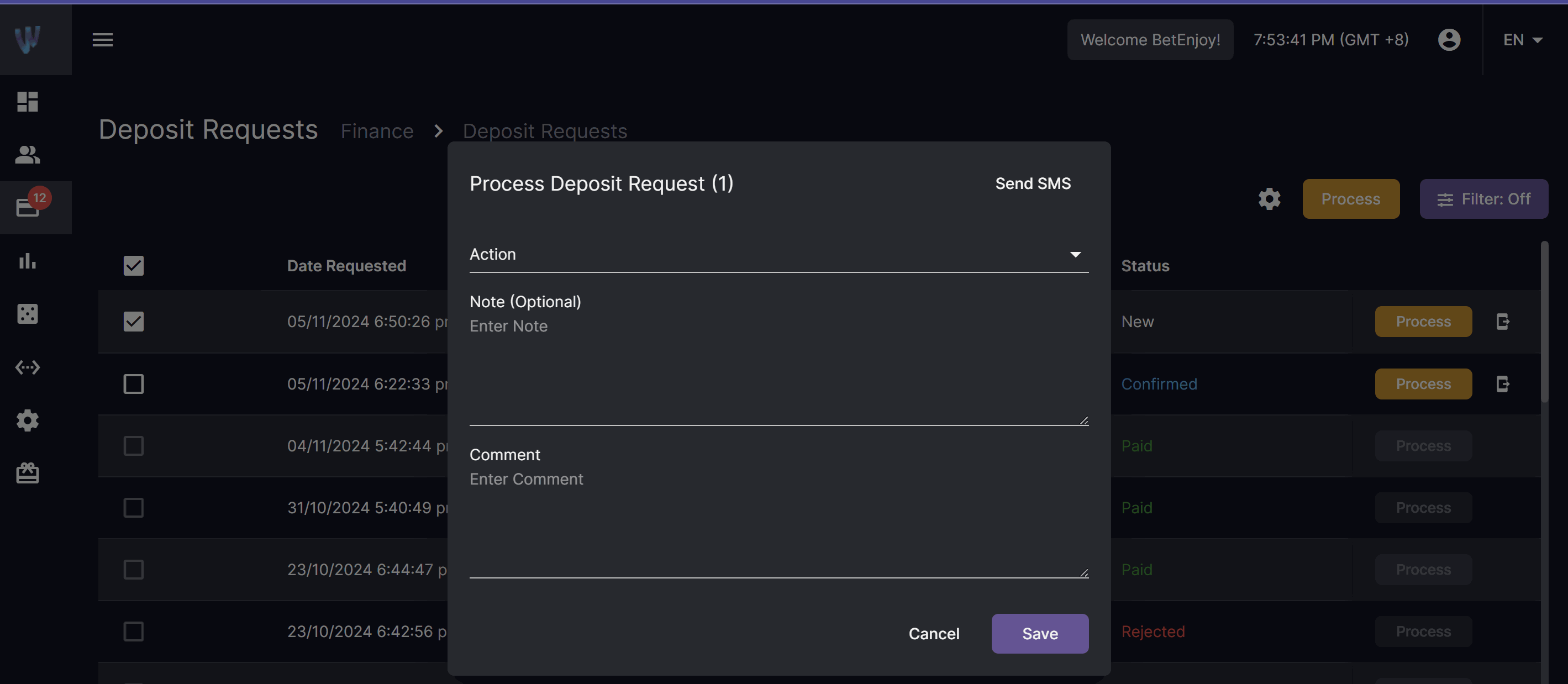
SMS: Deposit Request
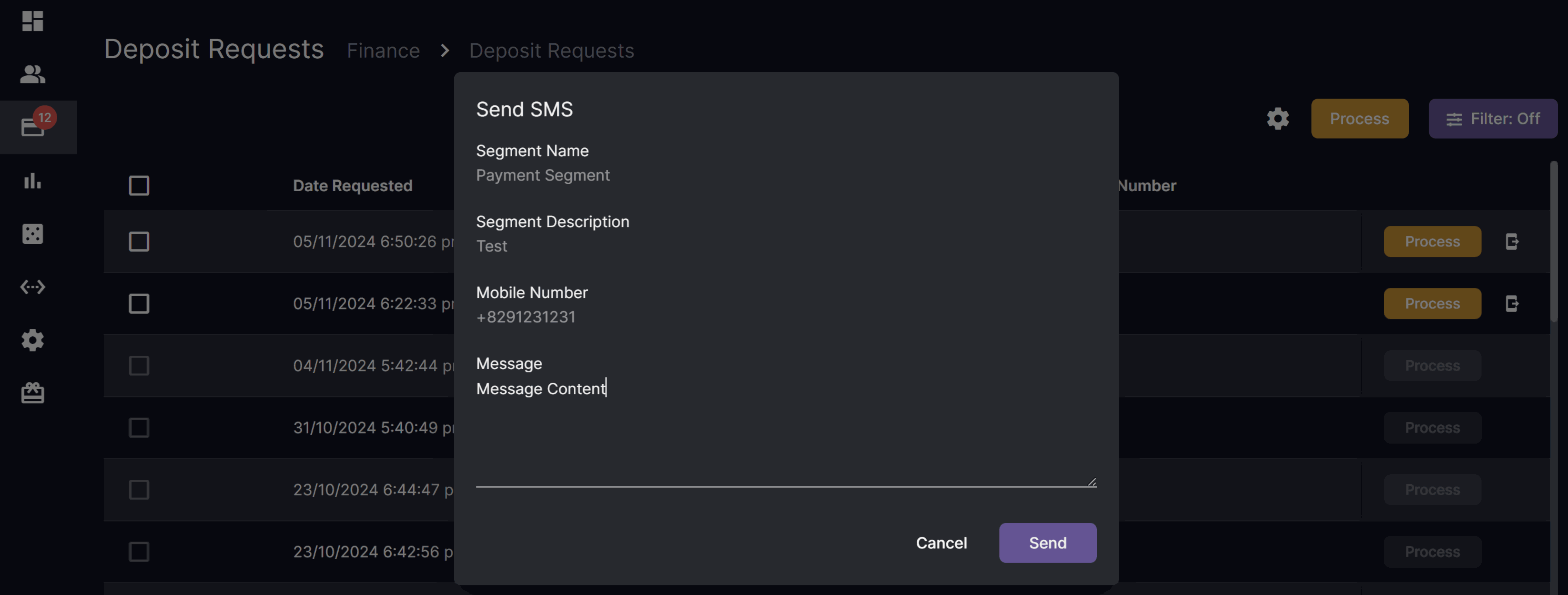
A new “Send SMS” icon has been added next to the “Process” button, allowing users to send SMS messages to individual players who have mobile numbers and transactions that can still be processed. The Send SMS function can also be accessed through the “Process Deposit Request” pop-up window.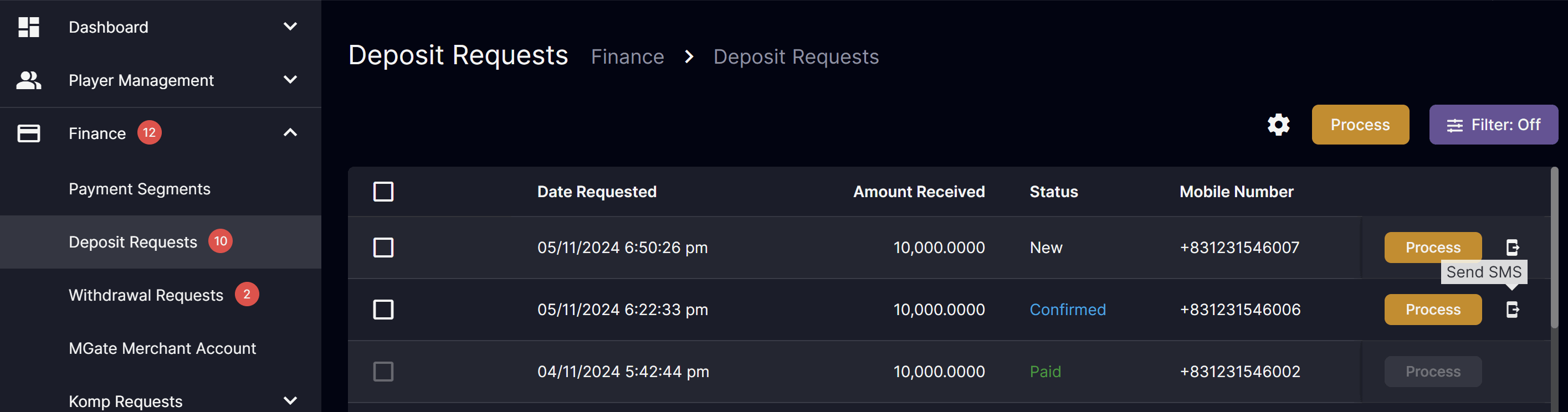
Sportsbook Bonus
Improvement on single sportsbook selection to only show read-only value of 1 for minimum selection countFixes
- (Brand Specific) Keep Live Chat button on top
- Fixed loading animation for Payko Verify/Cancel buttons
Version 4.32
Release Date: 2024-11-04New Feature
Messaging
Bulk sending of email/notification to players. Navigation: Settings > User Management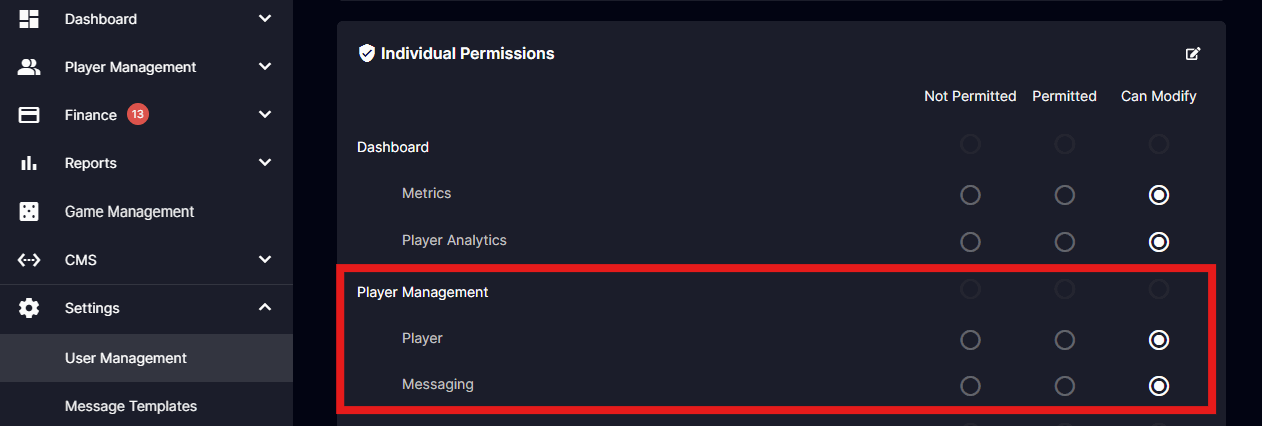
- Added permission settings for Player Management Messaging module access
- Notification Options: Utilize the option to enable or disable email notifications for specific players
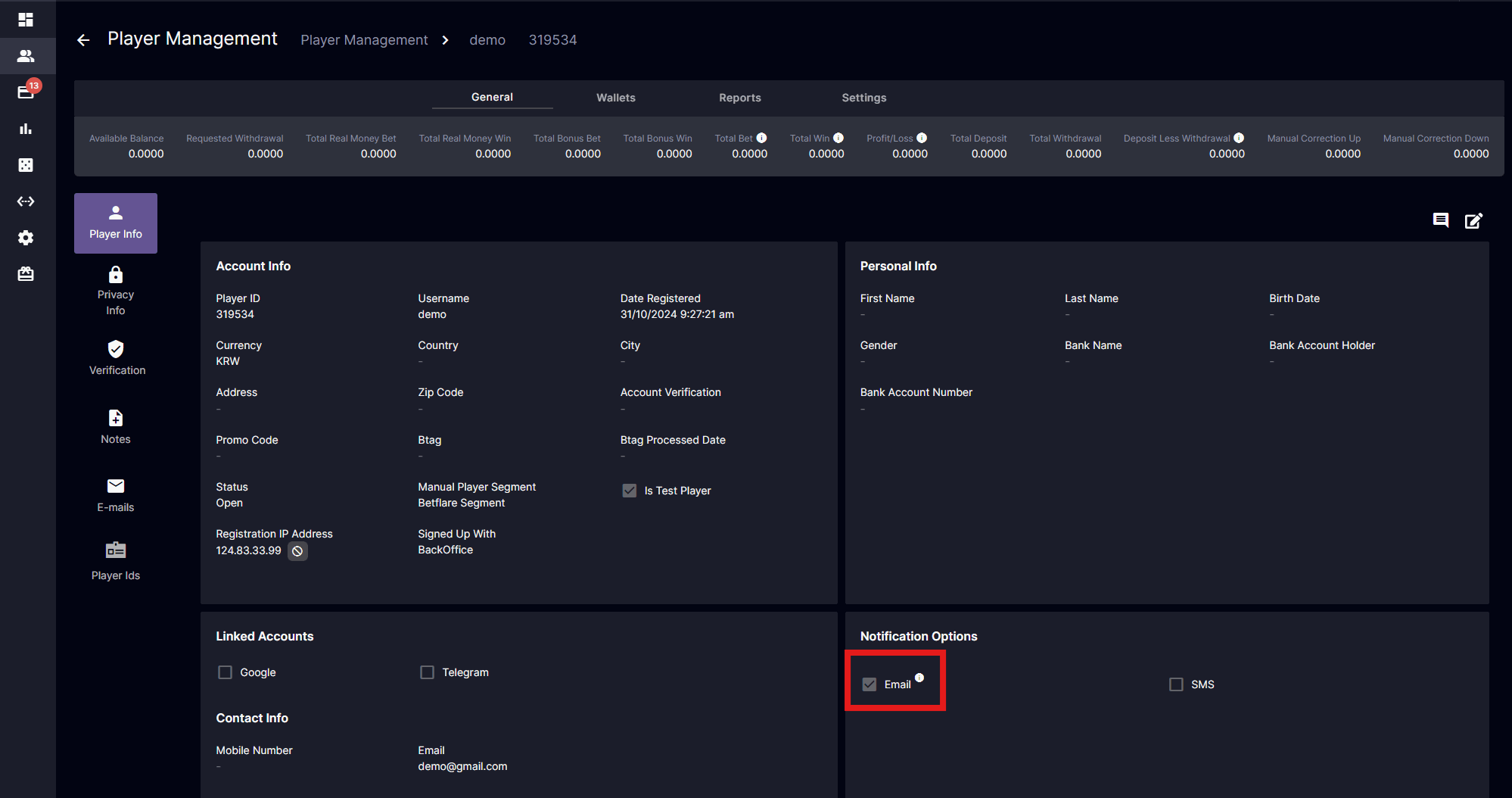
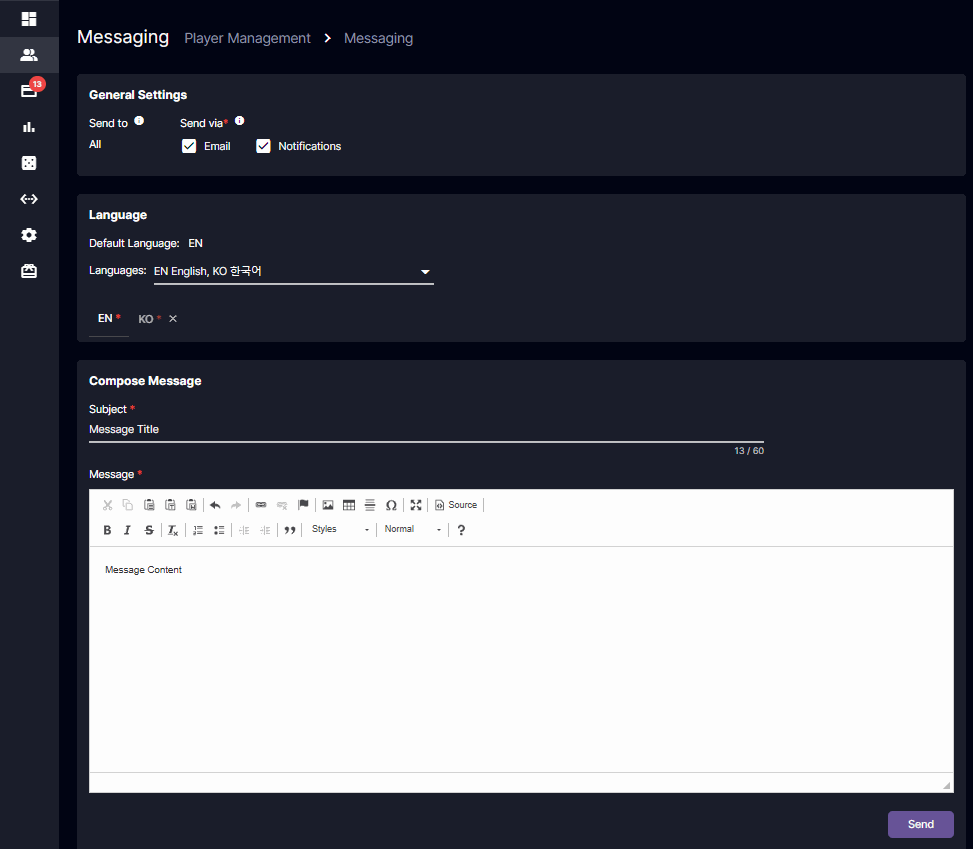
- Send to - Sent to all players with Open status and email notification set to check if sending via Email
- Send via - Sending options where players will receive the message
- Email - Player’s registered email or default language for newly registered non-logged-in accounts
- Notifications - Player website notification page
- Default Language - The operator’s default language. (See CMS > Site Settings > Languages)
- Languages - Option to include language translation for the message before sending
- Email - Message sent to the Player email will depend on the last language set by the player in the player website
- Notifications - Message displayed in the Player website will show the corresponding language set by the player
- Compose Message - Required field once languages are selected
(Brand Specific) Notifications
Player website notifications view for specific brands.- Enhanced the functionality to allow players to receive message notifications.
Improvements
Deposit & Withdrawal Request Table View
- Dynamically change the size of the table container to fit the height of the screen
Fixes
- Fixed tournament game listing
Version 4.31
Release Date: 2024-10-28Integration
Relum (Casino Aggregator)
Access to over 20,000 casino games from major content providers. The initial rollout will include Galaxsys as a new game provider.Improvement
Player Management: Transaction Reports
- Append the deposit transaction ID to the claimed bonus descriptions to facilitate tracking of corresponding deposit bonuses that the player has claimed.
Version 4.30
Release Date: 2024-10-24Improvement
Bonus: Sportsbook Game Settings
This feature improvement enhances the user experience by providing clear guidelines on how bonuses can be earned through Combo and System bets. By allowing operators to select between Per Selection and Total Odds options, the sportsbook can tailor its Bonus to encourage diverse betting strategies while maintaining compliance with bonus eligibility criteria.Minimum Odds
- Per Selection
- Select Minimum Odds - Each selection should meet the minimum odds configured
- Minimum Total Odds - The default value is set to 0; otherwise, the total odds must meet the minimum total odds configured.
- Total Odds
- Select Minimum Odds - The total odds should meet the minimum odds configured
Withdrawal Request: Mobile Number
- Added a new column for player’s mobile number
- Added a setting to toggle on/off the column view for player’s mobile number
Fixes
- Optimization patch
- Security patch
- Speed optimization
- Fixed total win to include bonus win
- Fix game unavailability after relaunch
- Added tooltip for calculation formula
- Partner Matrix (BillionClub) time zone alignment
- Translation Updates
Version 4.29
Release Date: 2024-10-14Integration
Telegram
- New user registration using Telegram account
- Password is not required for Telegram signup and login
- Players with cached website login sessions will automatically log in upon clicking the telegram button
- Link existing user’s account to Telegram account
- “Linked Accounts” information for Google and Telegram added in BO Player Management details
- It is possible to link a site form/back office registered account with a Google and a Telegram account
- New Google sign-ups should be liked with an existing site form/back office registered account to be linked with a Telegram account
Evolution: Spin Gifts
We are excited to introduce a new mechanism for our slots products, named “Spin Gifts” This means that randomly, your players will have the chance to receive rewards of free rounds as a “gift” from Evolution while enjoying our slot games. This mechanism will be enabled for all slot brands available on Evolution, including NetEnt, Red Tiger, Big Time Gaming, and NoLimit City. Additionally, future new games will also be enrolled in the Spin Gifts mechanism.Player Management Filter
- Date selection for back office player management filter changed from single date picker to a date range picker
- Applicable to:
- Date Registered
- Last Login Date
- Last Betting Date
- First Deposit Date
- Last Deposit Date
Fixes
- Optimization patch
- Security patch
- Fixed page loader after player log out
- Fixed Manual Bonus cannot be seen/select in the Bonus List
- Removed sound notification upon redeeming Komp Bonus in BO
- Fixed Number format affecting Odds display
- Fixed settled Digitain bets showing as open
- (Brand specific) Left navigation translation improvements
Version 4.28
Release Date: 2024-10-01Integration
Partner Matrix (BillionClub)
- Revamped Bonus/Deduction calculation
- Charge Bonus/Deduction during bonus settlement based on bonus assigned for:
- Deposit Bonus
- Manual Bonus
- Cashback Bonus
- Komp Bonus
- Charge Bonus/Deduction when Komp Real Wallet request marked as Paid
- Charge Bonus/Deduction when an amount is given for:
- VIP Level-Up Bonus
- VIP Rakeback
- VIP Cash Rebate
Fixes
- Security patch
- Translation patch
- Fixed Currency and Bonus type filter in the Casino Bet Report
- Fixed loading animation for Metics monthly period
- Fixed Transactions button on initial login
- Fixed withdrawal restriction settings affecting same username
- Fixed intermittent login error
- (Brand Specific) Fixed assignment of bonus for specific currency
- (Brand Specific) Enable USD as currency in the Payment Segment
- (Brand Specific) Removed “Answered” option for “Confirmed” manual bank transfer deposit request
Version 4.27
Release Date: 2024-09-16Improvements
Deposit Request: Manual Bank Transfer
Multi-Currency Brand Specific
- Show Deposit Instructions on the website based on configured payment settings
- Show Predefined Amount as buttons on the website based on configured payment settings
- Show recent deposit request details for currencies with existing deposit requests
- View Recent Deposit Request details in the Transactions page
- Enable the confirm button functionality for answered requests
All Brands
- Display currencies in a dropdown list instead of individual tabs
- Display payment methods as individual tabs for clear distinction of corresponding configuration settings
Fixes
- Security patches
- Faster BO Metrics loading time
- Fixed BTi, Pinnacle, and Digitain windows to show logged-in player details
- Fixed metrics inactive player count
- Removed search history suggestion
- (Specific Operator) Fixed Language label in the Global Settings page
- (Specific Operator) Fixed landing page view for new players
- Partner Matrix Bets, Win & GGR calculation to include bonuses
Version 4.26
Release Dates: 2024-09-10Integration
Digitain Sports
Multi-Currency Brand Specific
- Enable currency selection when placing a bet in Digitain Sports
- Added a floating balance view that converts the player’s real and bonus wallet currency to the selected Digitain Sports bet currency
- Added link to Digitain Bet History in the Player Transaction page
Single Currency Brand Specific
- Added link to Digitain Bet History in Player Account Window if Digitain Sports is enabled
Fixes
- Display Bank Name in BO Withdrawal
- Fixed Digitain batch rollback
- VIP Komp & Activity Optimization
- Fixed custom category sorting
- (Specific Provider) Fixed completing bonus when there are still pending bets
Version 4.25
Release Dates: 2024-08-27 & 2024-09-02Improvements
Partner Matrix (BillionClub)
- Support multi-brand affiliate management
- Support currency conversion based on Player Currency to Operator Currency to Partner Matrix Currency
- Support Bonus/Deduction based on cost incurred during bonus betting for:
- Deposit Bonus
- Manual Bonus
- Cashback Bonus
- Komp Bonus
Deposit Request Notification
- Enable sound notification for Deposit Request “Status: Answered” for players with Payment Segment
Fixes
- Faster website game lobby loading time
- Faster BO player management reports loading time
- Faster BO player management bonuses loading time
- Removed movable columns for Player Tier Report and Level Up Bonus Report
- Removed progress bar when max VIP level is reached
- Restrict bonus cancellation for settled bonus by showing an error message
- Show Deposit Amount (For Deposit Bonus) for assigned bonuses on the website
- Show Bonus Value for assigned bonuses on the website
- Show the Credit Resettlement in player transactions after the Debit Resettlement
- Align website and back office transaction time with last modified date and time
- Enable player capabilities toggle update action for re-opened player account
- Enable reject action for closed player account finance requests
- Fixed BO transactions history date sorting
- Fixed Btag processed date to show accurate timing
- Fixed Player Management KPI filter glitch
- Fixed broken tournament game page after reloading
- Fixed default text tier label for non-VIP players
- Fixed Transactions pagination affecting other pages
- Fixed BTIS cancelation of reserved bet error
- Fixed Digitain cashback bonus
- Fixed Pinnacle rollback error
- (Brand specific) Removed Komp as a bonus type
- (Brand specific) Fixed tournament widget display for games not selected for tournament event
- (Brand specific) Fixed Transactions redirect broken link
- (Brand specific) Fixed Tournament game list display
- (Brand specific) Display the bet amount on the leaderboard
- (Brand specific) Tournaments category display refinement
- (Brand specific) Hide scheduled recurring tournaments on the website
Version 4.24.0
Release Date: 2024-08-12New Feature
Dashboard Player Analytics
Backoffice- Track player trends
- Filter periodically and compare with the previous period
- Charts for easy visualization
- Graphical data comparison per category
- Summarized view for quick statistical data
Improvements
Dashboard Metrics
Backoffice- Active Players - Align count to include login and deposit/withdrawal activities
- Custom Date - Removed start date restriction and limit date range to 31 days
Komp System Real Wallet Request Notification
Backoffice- Notification badge for new requests
- Sound notification for new requests
- Finance badge to show total new requests for new Deposits, Withdrawals, and Komp Requests
Version 4.23.0
Release Date: 2024-07-15Improvements
Payko: Expire Verified Accounts
Backoffice- Add a column Action and a clickable Expire icon for every Verified Accounts bank record
- This action will transfer the Verified Accounts record to the Failed and Expired Verifications tab.
- This action will also reject new withdrawal requests for the corresponding PayKo bank account tagged as expired
Fixes
- Restrict duplicate bonus name creation
- Fixed sports bonus showing in casino game balance
- Display Digitain bonus winnings as ‘win’ instead of ‘open’
- Fixed manual bonus assignment bonus list dropdown search
- Fixed komp system slug
- Fixed first deposit date displaying in csv file
- Fixed Source ID as clickable source info for Komp points transaction record
- Fixed VIP activity availability filtering
- Fixed HTML text editor error message
- Fixed PayKo verification code text display visibility
- Fixed Komp system display for mobile
- Fixed lost bets for pragmatic causing bonus settlement issue
- Fixed duplicate game display in favorites and recent
Version 4.22.0
Release Date: 2024-07-08Improvements
Payment Segment Automatic Message
Backoffice- Add an Active toggle under Automatic Message (Default to Off)
Important Note: Please toggle this to “On” to enable automatic messages for players. If set to “Off”, players won’t see the automatic message.
Version 4.21.0
Release Date: 2024-07-08New Feature
New Player Notification
Backoffice- Add a sound notification when a new player has registered through the Player Website.
- Add a new player badge count for New Players.
- Add a column and filter for “New Player” to indicate whether the back office user has checked the player’s details.
Note: The eye icon for viewing details will also appear yellow to indicate that the player is new. The “New Player” will be updated to “No” once the back office user views the players’ details.
Watchers.io
- Community chat integration ready
- Custom design and configuration per brand
- Coordinate with the Partner Success Team to get started
Improvements
Withdrawal Request Payment Segment
Backoffice- Add “Payment Segment” as a column and filter in the withdrawal requests module
Version 4.20.0
Release Date: June 10, 2024New Feature
Player Capabilities
Backoffice- Can Earn Sports Bonus: To enable/disable a player from being assigned a sports bonus to all bonus types.
- Can Earn Casino Bonus: To enable/disable a player from being assigned a casino bonus to all bonus types.
Email Verification
Backoffice- Registration Settings: Added new settings toggle for Email Fields
- Verify Email Address - Option to send an email verification link to new players
- Allow Unverified to Login - Option to require new players to verify email to login
- Email verified badge: Show a check icon in the Player Info of email
- Verify Email Address: A pop-up message for unchecked “Allow unverified to Login” registration settings
Improvements
Backoffice- New Look and Feel: Improved UI design
Version 4.19.0
Release Date: June 6, 2024New Provider
Jili
- Integration improvements
Version 4.18.0
Release Date: June 6, 2024New Provider
Jili
- 163 New Fast Games and Slot Games
Version 4.17.2
Release Date: April 15, 2024Feature Improvement:
Bonus
Allow the player to cancel the claimed bonus and automatically finish the bonus once the bonus balance is 0. Player Website- Add a ‘Cancel’ button for the claimed bonus if settings are toggled on in the backoffice for the specific bonus
- Add the ‘Allow Player to Cancel’ checkbox under Bonus Settings for all bonus creation and editing form
- Add ‘If Bonus Wagering is completed’, ‘If Bonus Balance is 0’, and ‘Anytime’ radio button options under the ‘Allow Player to Cancel’ checkbox
- Add the ‘Automatic Set the Bonus to Finished when Bonus Balance is 0’ checkbox under Bonus Settings for all bonus creation and editing form
Version 4.17.1
Release Date: April 11, 2024Feature Improvement:
PayKo
Using identity verification for the bank registration process & sending of deposit details to player. Player Website- Update the Deposit page info text for English and Korean
- Remove the ‘Deposit To Bank’ and ‘Deposit To Bank Account Number’ columns under the Verified Accounts table
- Add the ‘Send Details To’ column to the Verified Bank Accounts table
- Add the ‘Send Deposit Bank Details To’ popup for receiving verification messages via SMS
- Add Phone Number in the ‘Register New Bank Account’ popup
- Add validation rules to the ‘Register New Bank Account’ input
- Add BootPay identity verification
- Add ‘Retry’ button to re-register failed and expired bank accounts
- Removed ‘Deposit to Bank’ and ‘Deposit To Bank Account Number’ columns in the PayKo Verified Accounts under Player Management
Fixes:
- Fixed Bonus Bets placed that get stuck as “Pending” wherein the status should be “Lost” for Evolution, Pragmatic, World Entertainment & Softswiss
Version 4.15.0
Release Date: May 6, 2024New Feature
Tournaments
Player Website- Tournament Listings: Displays all Active, Scheduled, and Ended tournaments.
- Leaderboards: Displays player rankings with their corresponding prize.
- View Tournament Pop-up: Displays specific tournament details.
- Real-Time Countdown: Displays the remaining time for players to participate in a tournament.
- Participation: Players can join a tournament by betting on any games configured for active tournaments. Tournament-enabled casino games will have the tournament details and leaderboards attached to the display.
- Creation of Tournament: Plan and manage tournaments with flexible settings.
- Tournament Reports: Tournament results and player ranks for ended tournaments.
- Leaderboards: Exclusively for active tournaments, showcasing all participating players and their corresponding ranks.
- Administrative Controls: Expanded administrative controls and permissions management
- Rules: Integrated the rules and validation for creating a tournament and proper validations for tournaments feature.
Fixes:
- Digitain Over/Under points included in Backoffice bet details
- Using bonus for betting on games fixed
- Description added to Komp bonuses
- Language display for Komp bonuses fixed
Version 4.10.2
Release Date: May 20, 2024Feature Improvement:
PayKo
Backoffice- Added ‘Can Use PayKo’ toggle switch on Player Management > General > Verification to manage who is allowed to use PayKo
- Added ‘Can get PayKo bank details’ toggle switch on Player Management > General > Verification to manage whether a player is allowed to get PayKo bank details via direct message or not.
- Added ‘Send details via SMS’ column on Player Management > Wallets > PayKo to allow BO User to send the Assigned Bank Account details to the player.
- Added an option to delete unverified or failed bank accounts on Player Management > Wallets > PayKo > Unverified Accounts/Failed Verifications
- Added an option to mask confidential Bank Account details on the Verified Bank Accounts table such as Bank Account Number and Bank Account Name.
- Added an option to cancel the verification by adding the “Cancel’ button on the Unverified Bank Accounts table.
- Added a prompt informing the player that he has to contact our live chat to get the Assigned Bank Account details sent via direct message.
Default Capabilities
Backoffice- Added ‘Default Capabilities’ page under Player Settings to allow BO User to set default capabilities for all new players.
Fixes:
- Fixed the delay in receiving the bonus after a successful deposit.
Version 4.4.5
Release Date: 2024-07-08Feature Improvement
VIP & Komp System
- Enable exp accumulation for BT1, Pinnacle, Betgames, Spadegaming and Flowgaming
Backoffice
Bonus Report
- Add “Finished” option for State filter
- Add csv button to download report
Fixes
- Deposit request message prompt update (Operator-specific)
- Fixed missing icons, text display, and category images display (Operator-specific)
- Show error message for existing username during registration
- Show error message for existing email during registration
- Show error message for existing mobile number during registration
- Fixed deposit bonus claim invalidation for consumed deposit
- Fixed chrome built-in translation misalignment for the login button
- Fixed game-exiting issue when clicking wallet
- Fixed referral program next period settings change to only affect next period
- Fixed WE pending game issue
- Fixed Sports Bet Report and Sports Report alignment of totals
- Fixed withdrawal request with active bonus message prompt
- Fixed PayKo withdrawal request cancellation for paid transaction
- Fixed Komp redeem button translation
- Fixed Player Capabilities for can earn sports bonus cashback behavior
- Fixed Player Capabilities for can earn casino bonus cashback behavior
- Fixed email verification link issue
- Fixed error prompt for withdrawal request with insufficient balance
- Fixed duplicate filter options for Player Management Bonus Wallets
- Fixed assigned bonus pop-up display language
- Fixed VIP tier report accumulated exp tally
- Fixed provider games pagination issue on refresh
- Fixed player management komp wallet duplicate records
- Fixed dashboard and reports GGR tally
- Fixed casino bonus settlement FX rate
- Fixed filter by payment method in payment reports
- Fixed wrong data reflecting for manual adjustment when there is a comma input
- Fixed “In Play” label showing when not in game lobby
- Fixed VIP Tier Details dropdown scrolling
- Fixed VIP Activity Settings Info display